Containers — GKE and Artifact Registry
Overview
Containers package your app with its runtime so it runs the same in CI, on your laptop, and in the cloud. On Google Cloud you store images in Artifact Registry, then run them on Google Kubernetes Engine (GKE) — or on Cloud Run when you do not need a full Kubernetes control plane (Module 8).
This module focuses on the operator path interviews expect: create a Docker repository, build/push an image, deploy a tiny workload to GKE Autopilot, prove the pod is healthy, and delete the cluster so it does not drain your Free Trial.
This is Tutorial 1 in Module 7: Containers of the REBASH Academy Google Cloud for Cloud & DevOps Engineers series.
Cost hygiene
GKE Autopilot bills for running pods and cluster overhead. Delete the cluster in Cleanup the same day. If you cannot create a cluster, complete the Artifact Registry path plus the documented alternate — do not leave a half-created cluster overnight.
Prerequisites
- Databases on Google Cloud
- Docker fundamentals (image = filesystem + metadata)
- Kubernetes recommended (
kubectl, Pod, Deployment, Service) - Billing linked; Kubernetes Engine API allowed in your project
Learning Objectives
By the end of this tutorial, you will be able to:
- Explain Artifact Registry vs a random Docker Hub tag for production
- Create a Docker repository and push an image (Cloud Build or Docker)
- Contrast GKE Standard vs Autopilot in plain English
- Deploy a workload to Autopilot or complete the alternate proof path
- Decide when Cloud Run is enough instead of GKE
Architecture
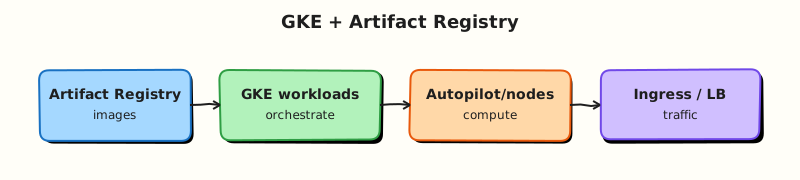
Developers build images → Artifact Registry stores them → GKE schedules Pods on nodes (Autopilot manages nodes for you) → Services expose workloads. Cloud Run is the simpler serverless container lane for many HTTP APIs.
Theory
What it is
Artifact Registry is Google Cloud’s managed repository for container images and other artefacts. GKE is managed Kubernetes: Google runs the control plane; you run workloads (and in Standard mode, node pools).
Why it matters
Production teams rarely pull unpinned latest from the public internet for deploy. They push to a private registry, scan images, and deploy with Kubernetes manifests or Helm. Interviews ask Autopilot vs Standard and “why not only Cloud Run?”.
How it works
- Enable Artifact Registry + Kubernetes Engine APIs.
- Create a
dockerrepository in your region. - Build and push
REGION-docker.pkg.dev/PROJECT/REPO/IMAGE:TAG. - Create a GKE cluster (
create-autofor Autopilot). kubectl applyDeployment + Service.- Prove Ready pods; delete cluster when done.
Autopilot vs Standard
| Mode | You manage | Pick when |
|---|---|---|
| Autopilot | Workloads mostly; Google manages nodes | Most new teams; less node ops |
| Standard | Node pools, machine types, upgrades more directly | Special networking, GPUs, tight node control |
When Cloud Run instead of GKE
Choose Cloud Run (Module 8) for request-driven HTTP/container services with minimal Kubernetes API surface. Choose GKE when you need broad Kubernetes ecosystem features, complex service meshes, DaemonSets, or multi-workload platforms.
Common pitfalls
- Forgetting
gcloud container clusters get-credentials - Pushing to
gcr.iolegacy host by habit (Artifact Registry is current) - Leaving Autopilot clusters for “just one more day”
- Using
:latestwith no digest in production - Confusing registry IAM with Kubernetes RBAC
Hands-on Lab
Objective
Create an Artifact Registry Docker repository, build/push a tiny nginx-based image with Cloud Build, deploy it to GKE Autopilot (preferred) or complete the alternate path, prove the pod, then delete the cluster and repository resources you no longer need.
Prerequisites
| Tool | Notes |
|---|---|
gcloud + kubectl | kubectl version --client |
| APIs | artifactregistry, container, cloudbuild |
Lab environment
mkdir -p ~/rebash-gcp/module-07 && cd ~/rebash-gcp/module-07
export PROJECT_ID="${PROJECT_ID:-$(gcloud config get-value project)}"
export REGION="${REGION:-europe-west2}"
export REPO="rebash-m07"
export IMAGE="hello"
export TAG="v1"
export CLUSTER="rebash-m07-auto"
export IMAGE_URI="${REGION}-docker.pkg.dev/${PROJECT_ID}/${REPO}/${IMAGE}:${TAG}"
gcloud config set project "$PROJECT_ID"
gcloud config set compute/region "$REGION"
gcloud services enable \
  artifactregistry.googleapis.com \
  container.googleapis.com \
  cloudbuild.googleapis.com \
  --project="$PROJECT_ID"
Real-world scenario
Platform asks you to prove the minimum golden path: private image in Artifact Registry, one Deployment on Autopilot, evidence the pod is Ready, and zero cluster left behind after the spike.
Step-by-step tasks
Task 1 – Artifact Registry repository
cd ~/rebash-gcp/module-07
gcloud artifacts repositories create "$REPO" \
  --repository-format=docker \
  --location="$REGION" \
  --description="REBASH Module 7" \
  --format=json | tee repo.json
gcloud artifacts repositories describe "$REPO" --location="$REGION" \
  --format=json | tee repo-describe.json
Task 2 – Build and push with Cloud Build
Create Dockerfile in your editor:
FROM nginx:1.27-alpine
RUN printf '%s\n' 'rebash-m07 ok' > /usr/share/nginx/html/index.html
cd ~/rebash-gcp/module-07
gcloud builds submit --tag="$IMAGE_URI" .
gcloud artifacts docker images list "${REGION}-docker.pkg.dev/${PROJECT_ID}/${REPO}/${IMAGE}" \
  --format="table(package,version,createTime)" | tee images.txt
grep -q "$TAG\|sha256\|${IMAGE}" images.txt
echo "$IMAGE_URI" | tee image-uri.txt
Expected output
Cloud Build succeeds; images.txt lists your image.
Task 3 – Autopilot cluster + deploy (preferred)
cd ~/rebash-gcp/module-07
gcloud container clusters create-auto "$CLUSTER" \
  --region="$REGION" \
  --release-channel=regular
gcloud container clusters get-credentials "$CLUSTER" --region="$REGION"
kubectl get nodes -o wide | tee nodes.txt
Create deploy.yaml in your editor (replace the image line if needed — or use envsubst pattern carefully). Prefer writing the full URI you saved:
apiVersion: apps/v1
kind: Deployment
metadata:
  name: rebash-m07
spec:
  replicas: 1
  selector:
    matchLabels:
      app: rebash-m07
  template:
    metadata:
      labels:
        app: rebash-m07
    spec:
      containers:
        - name: web
          image: IMAGE_URI_PLACEHOLDER
          ports:
            - containerPort: 80
          readinessProbe:
            httpGet:
              path: /
              port: 80
---
apiVersion: v1
kind: Service
metadata:
  name: rebash-m07
spec:
  selector:
    app: rebash-m07
  ports:
    - port: 80
      targetPort: 80
  type: ClusterIP
cd ~/rebash-gcp/module-07
IMAGE_URI=$(cat image-uri.txt)
# Write deploy.ready.yaml from the template (sed; no shell heredoc for the manifest)
sed "s|IMAGE_URI_PLACEHOLDER|${IMAGE_URI}|g" deploy.yaml > deploy.ready.yaml
kubectl apply -f deploy.ready.yaml | tee apply.txt
kubectl rollout status deployment/rebash-m07 --timeout=180s
kubectl get pods -l app=rebash-m07 -o wide | tee pods.txt
grep -q Running pods.txt
kubectl port-forward svc/rebash-m07 8080:80 >/tmp/rebash-m07-pf.log 2>&1 &
PF_PID=$!
sleep 3
curl -fsS http://127.0.0.1:8080/ | tee curl-ok.txt
kill "$PF_PID" 2>/dev/null || true
grep -q "rebash-m07 ok" curl-ok.txt
echo "gke+ar proof OK" | tee evidence.txt
Why port-forward?
It proves the Service/Pod data plane without waiting on an external LoadBalancer IP (faster and cheaper for this lab).
Task 3b – Alternate if Autopilot is blocked
Complete Tasks 1–2, keep deploy.yaml with a real IMAGE_URI, then:
cd ~/rebash-gcp/module-07
kubectl apply --dry-run=client -f deploy.yaml | tee dry-run.txt
grep -q Deployment dry-run.txt
printf '%s\n' "alternate: AR push + kubectl client dry-run; cluster deferred" | tee evidence.txt
test -s images.txt
Write cluster-blocker.txt with the error message and whether it was quota, org policy, or billing.
Validation steps
- Repository and image exist in Artifact Registry
- Preferred: Pod Running +
curl-ok.txtor alternate dry-run evidence - You can explain Autopilot vs Standard
Common errors and fixes
| Error you see | Plain meaning | What to do |
|---|---|---|
DENIED push/pull | Missing Artifact Registry IAM | Ensure Cloud Build SA can write; your user can read |
| Autopilot create denied | Org policy / quota | Task 3b; ask mentor |
| ImagePullBackOff | Wrong URI or IAM on nodes | Check IMAGE_URI; Autopilot uses node SA permissions |
| Rollout timeout | Readiness failing | kubectl describe pod; fix probe/image |
Challenge exercise
Write run-vs-gke.txt (eight lines): three reasons to pick GKE and three to pick Cloud Run for an internal HTTP API.
Learning outcomes
- You pushed a private image with Cloud Build
- You deployed to Autopilot or documented a clean alternate
- You can narrate registry → cluster → workload
Cleanup
cd ~/rebash-gcp/module-07
export PROJECT_ID="${PROJECT_ID:-$(gcloud config get-value project)}"
export REGION="${REGION:-europe-west2}"
export CLUSTER="rebash-m07-auto"
export REPO="rebash-m07"
kubectl delete -f deploy.ready.yaml --ignore-not-found 2>/dev/null || true
kubectl delete -f deploy.yaml --ignore-not-found 2>/dev/null || true
gcloud container clusters delete "$CLUSTER" --region="$REGION" --quiet 2>/dev/null || true
# Optional: delete images/repo after you finish Module 8 if you want to reuse the image
# gcloud artifacts repositories delete "$REPO" --location="$REGION" --quiet
rm -f repo.json repo-describe.json images.txt apply.txt nodes.txt pods.txt \
  curl-ok.txt evidence.txt dry-run.txt challenge.txt deploy.ready.yaml
Validation
- Lab folder
~/rebash-gcp/module-07used - Cluster deleted (or never created on alternate path)
- Image URI recorded for Module 8 optional reuse
Code Walkthrough
- Artifact Registry first — private images before orchestrators.
- Cloud Build submit — no local Docker daemon required.
- Autopilot — less node babysitting for the first GKE lab.
- port-forward proof — faster than external LB for a training spike.
- Cluster delete — the most important command in the module.
Security Considerations
- Restrict who can push/pull repositories.
- Prefer digest pins in production deploys.
- Use Workload Identity for Pod→GCP API access (not JSON keys in Pods).
- Keep the Kubernetes API endpoint restricted in production (authorised networks / private clusters).
Common Mistakes
Docker Hub latest is fine for production
Tags move; networks fail; supply chain risk rises. Use your registry and pinned digests.
Autopilot means zero cost when idle
Control plane / Autopilot overhead and leftover workloads still cost. Delete labs.
GKE and Cloud Run are the same
Both run containers; the ops model differs. Know when Kubernetes API surface is worth it.
Best Practices
- One repo per product or team with clear IAM
- Build in CI; promote images by digest
- Autopilot by default unless you need Standard features
- Resource requests/limits on every container
- NetworkPolicies and namespaces as you mature
Troubleshooting
| Symptom | Likely cause | Fix |
|---|---|---|
kubectl wrong cluster | Kubeconfig context | kubectl config get-contexts |
| Build fails on Dockerfile | Base pull / syntax | Check Cloud Build logs |
| Cluster delete stuck | Finalisers / quota ops | Describe operations; wait; support if orphaned |
Summary
Artifact Registry stores container images; GKE runs them on Kubernetes. Autopilot reduces node operations for first deployments. Cloud Run remains the simpler HTTP path — next module. Always delete training clusters.
Interview Questions
1. What is Artifact Registry?
Reveal answer
Google Cloud’s managed artefact repository service. For containers it stores Docker images in regional repositories with IAM controls, scanning integrations, and CI/CD friendly URLs under *.pkg.dev.
2. Autopilot vs Standard GKE?
Reveal answer
Autopilot manages node infrastructure for you; you focus on Pods. Standard gives you control of node pools and machine configuration at the cost of more operations work.
3. Why not pull everything from Docker Hub in production?
Reveal answer
Availability, rate limits, tag mutability, and supply-chain trust. Teams mirror or build into a private registry they control.
4. When choose Cloud Run over GKE?
Reveal answer
When you have request-driven container services and do not need the full Kubernetes API (custom controllers, DaemonSets, complex cluster networking). Cloud Run reduces platform overhead.
5. What does ImagePullBackOff usually mean?
Reveal answer
The node cannot pull the image — wrong URI/tag, registry auth/IAM failure, or network policy blocking the registry.
6. What is Workload Identity in one sentence?
Reveal answer
A way for Kubernetes service accounts to impersonate Google service accounts so Pods call Google APIs without downloaded JSON keys.
7. How do you prove a Deployment worked without an external load balancer?
Reveal answer
Check kubectl rollout status / Ready pods, then kubectl port-forward to the Service and curl locally — same technique as this lab.
8. What is the first cleanup step after a GKE lab?
Reveal answer
Delete the workloads if needed, then delete the cluster, and verify with gcloud container clusters list. Orphan clusters are a common bill shock.
Related Tutorials
- Previous: Databases on Google Cloud
- Next: Serverless on Google Cloud
- Kubernetes course
- Parallel: AWS containers