Prompt Engineering for Ops
Overview
On-call engineers do not need poetic answers — they need structured, reproducible summaries: severity, likely component, next checks, and nothing that leaks credentials into a vendor log. Prompt engineering for ops is the discipline of designing instructions, examples, and output shapes so models behave like a junior SRE who follows your runbook format.
Bad prompts dump raw logs (including Authorization: Bearer … lines) into a cloud API. Good prompts redact first, ask for JSON, and include few-shot examples that mirror your incident taxonomy.
This tutorial teaches structured prompts for logs and tickets, few-shot labelling, JSON-only responses, and secret hygiene — then you build a log-summariser CLI under ~/rebash-ai/module-03 that proves secrets never appear in the prompt sent to the model.
This is Tutorial 3 in Module 3: Prompt Engineering of the REBASH Academy AI for DevOps Engineers series — practical AI for Cloud and DevOps work.
Prerequisites
- LLM and API Fundamentals (chat client and mock backend)
- Python 3.10+
- Familiarity with JSON and basic regex
Learning Objectives
By the end of this tutorial, you will be able to:
- Design system prompts with role, constraints, and output schema for ops tools
- Apply few-shot examples to stabilise incident labels and summary format
- Require JSON output and validate it before downstream automation
- Redact API keys, passwords, and Bearer tokens before building prompts
- Build a log-summariser CLI that logs prompt hashes, not raw secrets
Architecture
Log lines pass through a redaction stage, then a template assembles system + few-shot + user content. The mock (or live) client returns JSON; your CLI validates schema before printing.
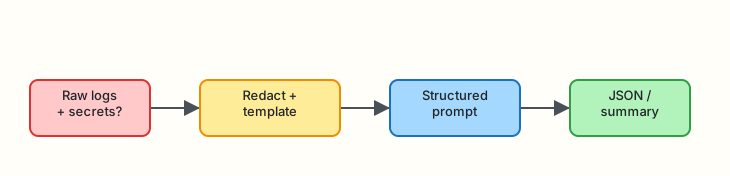
Theory
What it is
Prompt engineering is designing the input text and structure that steers an LLM toward useful, safe outputs. For ops, that usually means:
- A fixed system message (role, tone, forbidden behaviours)
- Optional few-shot user/assistant pairs (examples of good summaries)
- A user message with redacted log or ticket text
- An output contract (JSON keys, max length, allowed enums)
| Term | Plain meaning |
|---|---|
| System prompt | Standing instructions the model should follow every turn |
| Few-shot | Example Q&A pairs in the prompt to show desired format |
| Zero-shot | No examples — only instructions |
| Output schema | Required JSON fields your parser expects |
| Secret hygiene | Strip credentials before the prompt leaves your network |
Why it matters
Ops text is messy and sensitive. A single pasted export AWS_SECRET_ACCESS_KEY= line in a prompt can end up in vendor logs, support tickets, or training pipelines depending on contract terms.
Structured JSON lets you:
- Wire summaries into PagerDuty or Jira without regex fragility
- Fail closed when the model omits a required field
- Version prompts like code and test them (Module 4)
How it works
- Ingest raw log slice or ticket body
- Redact known secret patterns (API keys, passwords, Bearer tokens)
- Build messages — system + few-shot + user with redacted text
- Call model (mock-first) with low temperature for stability
- Parse JSON — reject non-JSON or schema violations
- Emit summary for human review — never auto-execute from model text
Key concepts and comparisons
| Technique | When to use | Risk if skipped |
|---|---|---|
| System constraints | Always | Model drifts to prose essays |
| Few-shot | Label taxonomy, JSON shape | Inconsistent field names |
| JSON mode / schema | Automation downstream | Brittle regex on free text |
| Low temperature (0–0.3) | Triage and classification | Creative but wrong commands |
| Redaction | Any untrusted log input | Credential leak |
Example system constraints for ops:
- “Return only valid JSON matching the schema.”
- “Do not invent hostnames not present in the log.”
- “Severity must be one of: critical, high, medium, low.”
- “If unsure, set
confidencebelow 0.5 and listopen_questions.”
Few-shot example (abbreviated):
{"role":"user","content":"ERROR payment timeout upstream=ledger"}
{"role":"assistant","content":"{\"severity\":\"high\",\"component\":\"payments\",\"summary\":\"Payment timeout contacting ledger\",\"checks\":[\"ledger health\",\"network path\"]}"}
Common pitfalls
- Pasting secrets “just this once” — redaction must be automatic
- Asking for paragraphs when your pipeline needs JSON
- Few-shot examples that contradict the schema (typo in keys)
- High temperature on classification tasks
- Trusting model JSON without
json.loadsand schema checks
Hands-on Lab
Objective
Build a log-summariser CLI under ~/rebash-ai/module-03 that redacts secrets, assembles a few-shot prompt template, calls the mock LLM, and returns validated JSON — with audit evidence that redacted patterns never appear in the prompt file.
Prerequisites
- Python 3.10+
- Copy or reuse mock client patterns from Module 2 (this lab includes a self-contained mock)
Lab environment
Workspace: ~/rebash-ai/module-03
mkdir -p ~/rebash-ai/module-03/prompts && cd ~/rebash-ai/module-03
python3 --version | tee python-version.txt
Expected output
Python 3.10+ recorded in python-version.txt.
Real-world scenario
An incident channel bot pasted production logs into a vendor chat. Security found a live Bearer token in the vendor’s request log. Your task: ship a summariser that always redacts secrets locally, writes a prompt audit file with hashes only, and outputs JSON your on-call tool can display — without sending credentials upstream.
Step-by-step tasks
Task 1 – Secret redaction module
Create redact.py:
"""Redact secrets from ops logs before prompt construction."""
from __future__ import annotations

import re
from dataclasses import dataclass

BEARER_RE = re.compile(r"Bearer\s+[A-Za-z0-9\-._~+/]+=*", re.IGNORECASE)
API_KEY_RE = re.compile(
    r"(?i)(api[_-]?key|apikey|token|secret)\s*[:=]\s*['\"]?([A-Za-z0-9\-_]{8,})"
)
PASSWORD_RE = re.compile(
    r"(?i)(password|passwd|pwd)\s*[:=]\s*['\"]?([^\s'\"]{4,})"
)
AWS_KEY_RE = re.compile(r"AKIA[0-9A-Z]{16}")


@dataclass
class RedactionResult:
    text: str
    redacted_count: int
    patterns_hit: list[str]


def redact(text: str) -> RedactionResult:
    patterns_hit: list[str] = []
    count = 0

    def _sub(pattern: re.Pattern[str], label: str, repl: str, src: str) -> str:
        nonlocal count
        new, n = pattern.subn(repl, src)
        if n:
            count += n
            patterns_hit.append(label)
        return new

    out = text
    out = _sub(BEARER_RE, "bearer", "Bearer [REDACTED]", out)
    out = _sub(API_KEY_RE, "api_key", r"\1=[REDACTED]", out)
    out = _sub(PASSWORD_RE, "password", r"\1=[REDACTED]", out)
    out = _sub(AWS_KEY_RE, "aws_key", "AKIA[REDACTED]", out)
    return RedactionResult(text=out, redacted_count=count, patterns_hit=patterns_hit)
Create sample.log:
2026-08-04T10:01:00Z ERROR payments-api upstream timeout host=ledger-01
Authorization: Bearer eyJhbGciOiJIUzI1NiIsInR5cCI6IkpXVCJ9.leak
api_key=sk-live-abc123xyz789notreal
password=SuperSecret123!
2026-08-04T10:01:02Z WARN retry attempt=3 latency_ms=980
cd ~/rebash-ai/module-03
python3 - <<'PY'
from pathlib import Path
from redact import redact
raw = Path("sample.log").read_text()
result = redact(raw)
Path("sample.redacted.log").write_text(result.text)
print(f"redacted_count={result.redacted_count} patterns={result.patterns_hit}")
assert "Bearer eyJ" not in result.text
assert "sk-live" not in result.text
assert "SuperSecret" not in result.text
PY
Expected output
redacted_count is at least 3. sample.redacted.log contains [REDACTED] placeholders and no raw secrets.
Task 2 – Prompt template and mock JSON summariser
Create prompts/system.txt:
You are an SRE incident triage assistant.
Return ONLY valid JSON with keys: severity, component, summary, checks (array of strings), confidence (0-1 float).
Severity must be one of: critical, high, medium, low.
Do not invent hostnames not present in the log.
Never include secrets or credentials in output.
Create prompts/few_shot.json:
[
  {
    "role": "user",
    "content": "ERROR db connection refused service=orders-db"
  },
  {
    "role": "assistant",
    "content": "{\"severity\":\"high\",\"component\":\"orders-db\",\"summary\":\"Database connection refused\",\"checks\":[\"check orders-db pod status\",\"verify network policy\"],\"confidence\":0.85}"
  },
  {
    "role": "user",
    "content": "INFO health check ok service=edge-proxy"
  },
  {
    "role": "assistant",
    "content": "{\"severity\":\"low\",\"component\":\"edge-proxy\",\"summary\":\"Health check passing\",\"checks\":[\"no action unless correlated alert\"],\"confidence\":0.9}"
  }
]
Create mock_summariser.py:
"""Mock LLM that returns schema-shaped JSON from redacted logs."""
from __future__ import annotations

import json
import re
from typing import Any


def _infer_from_log(log_text: str) -> dict[str, Any]:
    lower = log_text.lower()
    if "error" in lower or "timeout" in lower:
        severity = "high"
    elif "warn" in lower:
        severity = "medium"
    else:
        severity = "low"

    host_match = re.search(r"host=([A-Za-z0-9\-]+)", log_text)
    svc_match = re.search(r"service=([A-Za-z0-9\-]+)", log_text)
    component = (host_match or svc_match).group(1) if (host_match or svc_match) else "unknown"

    summary = "Incident signals detected in redacted log slice."
    if "timeout" in lower:
        summary = "Upstream timeout detected; investigate dependency latency."
    if "connection refused" in lower:
        summary = "Connection refused; verify target service and network path."

    checks = ["correlate with metrics", "inspect recent deploys", "validate dependency health"]
    return {
        "severity": severity,
        "component": component,
        "summary": summary,
        "checks": checks,
        "confidence": 0.75,
    }


def complete(messages: list[dict[str, str]]) -> dict[str, Any]:
    user_text = "\n".join(m["content"] for m in messages if m["role"] == "user")
    payload = _infer_from_log(user_text)
    content = json.dumps(payload)
    return {
        "choices": [{"message": {"role": "assistant", "content": content}}],
        "usage": {"prompt_tokens": len(user_text.split()), "completion_tokens": len(content.split()), "total_tokens": 0},
    }
Create summarise_cli.py:
"""Log summariser — redact, prompt, mock complete, validate JSON."""
from __future__ import annotations

import argparse
import hashlib
import json
import sys
from pathlib import Path
from typing import Any

from mock_summariser import complete
from redact import redact

REQUIRED_KEYS = {"severity", "component", "summary", "checks", "confidence"}
ALLOWED_SEVERITY = {"critical", "high", "medium", "low"}


def load_few_shot(path: Path) -> list[dict[str, str]]:
    data = json.loads(path.read_text(encoding="utf-8"))
    if not isinstance(data, list):
        raise ValueError("few_shot must be a list")
    return data


def build_messages(system: str, few_shot: list[dict[str, str]], log_text: str) -> list[dict[str, str]]:
    messages: list[dict[str, str]] = [{"role": "system", "content": system}]
    messages.extend(few_shot)
    messages.append({"role": "user", "content": log_text})
    return messages


def validate_summary(obj: dict[str, Any]) -> None:
    missing = REQUIRED_KEYS - set(obj)
    if missing:
        raise ValueError(f"missing keys: {sorted(missing)}")
    if obj["severity"] not in ALLOWED_SEVERITY:
        raise ValueError(f"invalid severity: {obj['severity']}")
    if not isinstance(obj["checks"], list):
        raise ValueError("checks must be a list")


def audit_prompt(messages: list[dict[str, str]], out: Path) -> None:
    serialised = json.dumps(messages, sort_keys=True)
    digest = hashlib.sha256(serialised.encode()).hexdigest()
    out.write_text(
        json.dumps({"prompt_sha256": digest, "message_count": len(messages)}, indent=2) + "\n",
        encoding="utf-8",
    )


def main() -> int:
    parser = argparse.ArgumentParser(description="Redacting log summariser")
    parser.add_argument("--log", type=Path, default=Path("sample.log"))
    parser.add_argument("--system", type=Path, default=Path("prompts/system.txt"))
    parser.add_argument("--few-shot", type=Path, default=Path("prompts/few_shot.json"))
    parser.add_argument("--out", type=Path, default=Path("summary.json"))
    parser.add_argument("--audit", type=Path, default=Path("prompt-audit.json"))
    args = parser.parse_args()

    raw = args.log.read_text(encoding="utf-8")
    redacted = redact(raw)
    if redacted.redacted_count == 0 and ("Bearer" in raw or "api_key" in raw):
        print("WARN: expected secrets in sample but none redacted", file=sys.stderr)

    system = args.system.read_text(encoding="utf-8").strip()
    few_shot = load_few_shot(args.few_shot)
    messages = build_messages(system, few_shot, redacted.text)

    # Prove secrets not in serialised prompt
    blob = json.dumps(messages)
    for forbidden in ("eyJhbGci", "sk-live", "SuperSecret"):
        if forbidden in blob:
            print(f"FAIL: secret fragment '{forbidden}' in prompt", file=sys.stderr)
            return 2

    audit_prompt(messages, args.audit)
    result = complete(messages)
    content = result["choices"][0]["message"]["content"]
    summary = json.loads(content)
    validate_summary(summary)

    args.out.write_text(json.dumps(summary, indent=2) + "\n", encoding="utf-8")
    print(f"severity={summary['severity']} component={summary['component']} redactions={redacted.redacted_count}")
    print(f"wrote {args.out} audit={args.audit}")
    return 0


if __name__ == "__main__":
    raise SystemExit(main())
cd ~/rebash-ai/module-03
python3 summarise_cli.py --log sample.log --out summary.json
test -f summary.json
test -f prompt-audit.json
python3 -m json.tool summary.json | tee summary-pretty.json
grep -q '"severity"' summary.json
grep -q 'prompt_sha256' prompt-audit.json
Expected output
CLI prints severity/component and redaction count. summary.json is valid JSON with required keys. prompt-audit.json contains prompt_sha256 only — no raw log body.
Task 3 – Break and fix: bypass redaction fails closed
Create sample-no-redact.log:
Create broken_summarise.py:
"""Intentionally bad path — skips redaction (do not ship)."""
from __future__ import annotations

import json
from pathlib import Path

from summarise_cli import build_messages, load_few_shot, validate_summary
from mock_summariser import complete

raw = Path("sample-no-redact.log").read_text()
system = Path("prompts/system.txt").read_text().strip()
few_shot = load_few_shot(Path("prompts/few_shot.json"))
messages = build_messages(system, few_shot, raw)  # BUG: no redact()
blob = json.dumps(messages)
if "eyJshouldneverappear" in blob:
    raise SystemExit("detected_secret_in_prompt=FAIL")
print("unexpected pass")
cd ~/rebash-ai/module-03
python3 broken_summarise.py 2>break.err || true
grep -q 'detected_secret_in_prompt=FAIL' break.err
python3 summarise_cli.py --log sample-no-redact.log --out summary-fixed.json
grep -q 'REDACTED' summary-fixed.json || python3 -c "import json;print(json.load(open('summary-fixed.json')))"
Expected output
Broken script exits with detected_secret_in_prompt=FAIL. Fixed CLI path completes and never places raw token in prompt audit.
Validation steps
-
sample.redacted.logremoves Bearer, api_key, and password values -
summary.jsonvalidates against required schema -
prompt-audit.jsonstores hash only — no raw secrets - Broken no-redact path fails detection
- You can explain why few-shot stabilises JSON field names
Common errors and fixes
| Error | Cause | Fix |
|---|---|---|
JSONDecodeError on summary | Model returned prose | Strengthen system “JSON only”; add validator |
missing keys | Schema drift | Align few-shot keys with REQUIRED_KEYS |
| Secrets still in prompt | Skipped redact() | Call redact before build_messages |
| Wrong severity enum | Typo in few-shot | Copy exact allowed values in system prompt |
Challenge exercise
Add a --schema-file option pointing to a JSON Schema or a simple key list file. Reject summaries where confidence is below 0.5 unless open_questions array is present (add this field to schema and few-shot).
Learning outcomes
- You redact credentials before any model call
- You assemble reusable prompt templates with few-shot examples
- You validate JSON before trusting automation
Cleanup
echo "Artefacts under ~/rebash-ai/module-03 — remove manually if desired"
# rm -rf ~/rebash-ai/module-03
Validation
- Lab path completed successfully
- Can explain system vs few-shot vs user messages
- Can list three secret patterns to redact in ops logs
- Can describe what happens if JSON parsing fails in production
Code Walkthrough
- Redact first — treat every log as hostile input.
- Template prompts from files under version control.
- Few-shot encodes your incident taxonomy — not ad hoc chat.
- Parse and validate JSON before any webhook fires.
- Audit with hashes — prove hygiene without storing secrets.
Security Considerations
- Redact Bearer tokens, API keys, passwords, and cloud access keys by default
- Never log full prompts containing ticket bodies in production
- Keep prompt templates in git — review changes like code
- Reject summaries that include shell commands for auto-exec
- Separate read-only triage from mutation tools (Module 1 gate)
Common Mistakes
Relying on the model to ignore secrets
Fix: Deterministic redaction regex + tests; models cannot unsee pasted keys.
Free-text output into Jira automation
Fix: Require JSON schema; fail closed on parse errors.
Few-shot examples with fake hostnames
Fix: Use realistic but fictional names; never production customer data.
Best Practices
- Version prompts (
prompts/directory) and test with golden files (Module 4) - Keep temperature low (≤0.3) for classification and summarisation
- Cap log slice size before prompt construction
- Include
confidenceandopen_questionsfor uncertain triage - Document redaction patterns in security review packets
Troubleshooting
| Symptom | Likely cause | Fix |
|---|---|---|
| Empty checks array | Weak few-shot | Add example with populated checks |
| Hallucinated component | Log lacked service/host | Instruct “use unknown if absent” |
| Redaction count zero | Pattern mismatch | Extend regex for your log format |
| Valid JSON but wrong labels | Temperature too high | Lower temperature; add few-shot |
Summary
Ops prompt engineering is constraint design: redact secrets, show the model your JSON shape, validate output, and audit without leaking credentials. Your summariser under ~/rebash-ai/module-03 is ready for golden-file evaluation next.
Next: Evaluation and Reliability.
Interview Questions
1. Why redact logs before sending them to an LLM API?
Reveal answer
Logs often contain Bearer tokens, API keys, and passwords. Vendor request logs, support access, and retention policies can expose what you sent. Redaction is deterministic defence; asking the model to ignore secrets is not reliable.
2. What is few-shot prompting in an ops summariser?
Reveal answer
Including example user log snippets and ideal assistant JSON responses in the prompt so the model copies field names, severity enums, and tone — reducing format drift between incidents.
3. Why require JSON instead of free-text summaries for automation?
Reveal answer
JSON parses reliably, validates against schema, and fails closed. Free text needs fragile regex, invites hallucinated bullets, and blocks safe downstream wiring.
4. What belongs in a system prompt for incident triage?
Reveal answer
Role, output schema, allowed severity values, instructions not to invent facts, JSON-only response requirement, and guidance for low-confidence cases.
5. How do you prove secrets did not reach the model in an interview?
Reveal answer
Show redaction unit tests, prompt audit hashes, and grep/assertions that forbidden substrings are absent from serialised messages — plus break/fix demo where skipping redact fails CI.
6. When would you raise temperature above 0.3?
Reveal answer
Rarely for ops triage. Slightly higher temperature might be acceptable for drafting human-readable postmortem prose — not for labels, severity, or automated routing.
7. What should happen when JSON parsing fails in production?
Reveal answer
Fail closed: surface error to operator, log redacted prompt hash and raw model text length, do not trigger webhooks or auto-remediation, and alert if failure rate spikes (possible prompt regression).
8. How do few-shot examples interact with prompt regression?
Reveal answer
Changing examples changes behaviour. Treat few-shot edits like code changes — run golden evals (Module 4) before merge so label accuracy does not silently drop.
Related Tutorials
- Prior: LLM and API Fundamentals
- Next: Evaluation and Reliability
- Course: AI for DevOps Overview