LLM and API Fundamentals
Overview
Every ops assistant you build will eventually call a model through an HTTP API — whether that is a vendor endpoint, an internal gateway, or a local Ollama server on a jump host. Before you wire prompts and tools, you need a clear mental model of tokens, chat completions, model choice, and latency/cost trade-offs.
Most production incidents involving LLM integrations are not “the model is dumb” — they are “we hit the wrong endpoint”, “context blew the budget”, or “timeouts stacked under load”. Interviewers expect you to explain how you would test an integration without burning API credits on every CI run.
This tutorial covers how chat completion APIs work, how OpenAI-compatible clients fit platform engineering, and how to ship a mock-first CLI chat tool that optionally talks to live APIs when credentials exist — never requiring them.
This is Tutorial 2 in Module 2: LLM & APIs of the REBASH Academy AI for DevOps Engineers series — practical AI for Cloud and DevOps work.
Prerequisites
- AI for DevOps Foundations (policy gate and human-in-the-loop model)
- Python 3.10+ and comfort with JSON
- Optional:
OPENAI_API_KEYfor a live OpenAI-compatible endpoint - Optional: Ollama on
OLLAMA_HOST(defaulthttp://127.0.0.1:11434) — not required
Learning Objectives
By the end of this tutorial, you will be able to:
- Explain tokens, chat roles, and completion responses in plain language
- Compare mock, local (Ollama), and live OpenAI-compatible backends for CI and on-call use
- Estimate latency and cost drivers for ops assistants
- Build a CLI chat client under
~/rebash-ai/module-02that works offline with a mock - Diagnose common API failures (auth, model name, timeout) from CLI evidence
Architecture
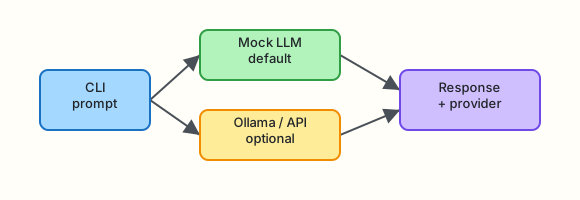
Your application sends a messages array to a completion endpoint. A client library (or thin HTTP wrapper) returns assistant text plus usage metadata. The same interface can target mock, Ollama, or a cloud API.
Theory
What it is
A Large Language Model (LLM) predicts the next token (roughly a word fragment) given prior tokens. A chat completion API accepts a list of messages — typically system, user, and assistant roles — and returns the model’s next assistant message.
| Term | Plain meaning |
|---|---|
| Token | Smallest billing/context unit; ~4 characters of English on average |
| Prompt | Input text (all messages sent to the model) |
| Completion | Model output text |
| Context window | Maximum tokens the model can read in one request |
| Model ID | Vendor string such as gpt-4o-mini or llama3.2 |
Interview one-liner: You pay for tokens in and tokens out; latency grows with prompt size and model size.
Why it matters
Ops assistants read logs, tickets, and runbooks — often tens of thousands of tokens if you are careless. Platform teams need:
- Predictable cost (token meters, per-team budgets)
- Predictable latency (p95 under on-call pressure)
- Testability without live API keys in CI
A mock client lets pipelines prove wiring; Ollama gives engineers a local sandbox; live APIs stay optional behind environment variables.
How it works
Typical chat completion flow:
- Build messages — system instructions + user question (+ optional history)
- POST to
/v1/chat/completions(OpenAI-compatible shape) or vendor equivalent - Receive JSON —
choices[0].message.content,usage.prompt_tokens,usage.completion_tokens - Handle errors — 401 auth, 404 model, 429 rate limit, 504 timeout
- Log safely — redact secrets before logging prompts (Module 3)
Key concepts and comparisons
| Backend | Best for | CI-friendly | Cost |
|---|---|---|---|
| Mock | Unit tests, offline labs, deterministic demos | Yes | Free |
| Ollama (local) | Engineer laptop, air-gapped eval | Yes (if installed) | Free (GPU optional) |
| OpenAI-compatible cloud | Production assistants, best quality | Only with secrets | Per token |
| Latency driver | Effect | Mitigation |
|---|---|---|
| Large prompt | More input tokens to process | Summarise logs first; trim history |
| Large model | Slower inference | Use smaller model for triage |
| Cold start (serverless) | First request slow | Warm-up job or dedicated endpoint |
| Network RTT | Adds tens–hundreds of ms | Regional endpoint; retry with backoff |
| Cost driver | Effect | Mitigation |
|---|---|---|
| Input tokens | Every log line in prompt costs money | Chunk + retrieve (Module 5) |
| Output tokens | Long answers cost more | Ask for JSON / bullet limits |
| Tool loops | Multiple round trips | Cap iterations; cache reads |
OpenAI-compatible means the request/response JSON matches the de facto /v1/chat/completions schema. Many gateways (Azure OpenAI, local proxies, LiteLLM) expose the same shape — your client code stays portable.
Common pitfalls
- Sending full log files in one prompt → context overflow or huge bills
- Hard-coding vendor SDKs everywhere → cannot swap mock/Ollama in CI
- Ignoring
usagefields → no FinOps visibility - Treating streaming as required for batch ops tools → simpler sync calls often suffice
- Logging raw prompts that contain API keys or Bearer tokens
Hands-on Lab
Objective
Build a mock-first CLI chat client under ~/rebash-ai/module-02 that completes chat requests offline, records token usage, and optionally uses Ollama or an OpenAI-compatible API when configured — never requiring live credentials.
Prerequisites
- Python 3.10+
- Optional:
export OPENAI_API_KEY=...andexport OPENAI_BASE_URL=...if your org uses a gateway - Optional: Ollama running (
curl -s http://127.0.0.1:11434/api/tags)
Lab environment
Workspace: ~/rebash-ai/module-02
mkdir -p ~/rebash-ai/module-02 && cd ~/rebash-ai/module-02
python3 --version | tee python-version.txt
Expected output
python-version.txt shows Python 3.10 or newer.
Real-world scenario
Platform engineering wants a standard “ops copilot” CLI for on-call. Security refuses to put production API keys in CI. You deliver a client that runs 100% offline in pipelines (mock), lets engineers use Ollama on laptops, and supports the corporate OpenAI-compatible gateway when OPENAI_API_KEY is present.
Step-by-step tasks
Task 1 – Mock completion client and shared adapter
Create mock_client.py:
"""Deterministic mock chat completions for CI and offline labs."""
from __future__ import annotations

import hashlib
import json
from typing import Any


def _estimate_tokens(text: str) -> int:
    # Rough heuristic for labs — not for billing
    return max(1, len(text.split()))


def chat_completion(
    messages: list[dict[str, str]],
    model: str = "mock-ops-v1",
    temperature: float = 0.2,
) -> dict[str, Any]:
    user_bits = [m["content"] for m in messages if m.get("role") == "user"]
    user_text = " ".join(user_bits).strip() or "(empty)"
    digest = hashlib.sha256(user_text.encode()).hexdigest()[:8]

    if "latency" in user_text.lower():
        reply = (
            "Check p95 latency on the ingress and upstream dependency. "
            "Compare error rate and saturation before restarting pods."
        )
    elif "oom" in user_text.lower() or "memory" in user_text.lower():
        reply = "Inspect container memory limits and recent deploys. Check for leaks before scaling."
    else:
        reply = f"Mock assistant ({model}, temp={temperature}): acknowledged — ref {digest}."

    prompt_tokens = sum(_estimate_tokens(m.get("content", "")) for m in messages)
    completion_tokens = _estimate_tokens(reply)

    return {
        "id": f"chatcmpl-mock-{digest}",
        "object": "chat.completion",
        "model": model,
        "choices": [
            {
                "index": 0,
                "message": {"role": "assistant", "content": reply},
                "finish_reason": "stop",
            }
        ],
        "usage": {
            "prompt_tokens": prompt_tokens,
            "completion_tokens": completion_tokens,
            "total_tokens": prompt_tokens + completion_tokens,
        },
    }


def chat_completion_json(messages: list[dict[str, str]], **kwargs: Any) -> str:
    return json.dumps(chat_completion(messages, **kwargs), indent=2)
Create llm_client.py:
"""Select mock, Ollama, or OpenAI-compatible backend from environment."""
from __future__ import annotations

import json
import os
import urllib.error
import urllib.request
from typing import Any

from mock_client import chat_completion as mock_chat_completion


def _post_json(url: str, payload: dict[str, Any], headers: dict[str, str]) -> dict[str, Any]:
    data = json.dumps(payload).encode()
    req = urllib.request.Request(url, data=data, headers=headers, method="POST")
    with urllib.request.urlopen(req, timeout=60) as resp:
        return json.loads(resp.read().decode())


def _openai_chat(messages: list[dict[str, str]], model: str, temperature: float) -> dict[str, Any]:
    api_key = os.environ.get("OPENAI_API_KEY", "").strip()
    if not api_key:
        raise RuntimeError("OPENAI_API_KEY not set")

    base = os.environ.get("OPENAI_BASE_URL", "https://api.openai.com/v1").rstrip("/")
    url = f"{base}/chat/completions"
    headers = {
        "Authorization": f"Bearer {api_key}",
        "Content-Type": "application/json",
    }
    payload = {"model": model, "messages": messages, "temperature": temperature}
    return _post_json(url, payload, headers)


def _ollama_chat(messages: list[dict[str, str]], model: str, temperature: float) -> dict[str, Any]:
    host = os.environ.get("OLLAMA_HOST", "http://127.0.0.1:11434").rstrip("/")
    url = f"{host}/api/chat"
    payload = {"model": model, "messages": messages, "stream": False, "options": {"temperature": temperature}}
    raw = _post_json(url, payload, {"Content-Type": "application/json"})
    content = raw.get("message", {}).get("content", "")
    prompt_tokens = len(json.dumps(messages)) // 4
    completion_tokens = len(content) // 4
    return {
        "id": "ollama-local",
        "object": "chat.completion",
        "model": model,
        "choices": [{"index": 0, "message": {"role": "assistant", "content": content}, "finish_reason": "stop"}],
        "usage": {
            "prompt_tokens": prompt_tokens,
            "completion_tokens": completion_tokens,
            "total_tokens": prompt_tokens + completion_tokens,
        },
    }


def resolve_backend(explicit: str | None = None) -> str:
    if explicit and explicit != "auto":
        return explicit
    if os.environ.get("OPENAI_API_KEY", "").strip():
        return "openai"
    if os.environ.get("OLLAMA_HOST") or _ollama_reachable():
        return "ollama"
    return "mock"


def _ollama_reachable() -> bool:
    host = os.environ.get("OLLAMA_HOST", "http://127.0.0.1:11434").rstrip("/")
    try:
        urllib.request.urlopen(f"{host}/api/tags", timeout=2)
        return True
    except (urllib.error.URLError, TimeoutError):
        return False


def chat_completion(
    messages: list[dict[str, str]],
    model: str = "mock-ops-v1",
    temperature: float = 0.2,
    backend: str | None = None,
) -> dict[str, Any]:
    chosen = resolve_backend(backend)
    if chosen == "openai":
        live_model = os.environ.get("OPENAI_MODEL", model)
        return _openai_chat(messages, live_model, temperature)
    if chosen == "ollama":
        ollama_model = os.environ.get("OLLAMA_MODEL", "llama3.2")
        return _ollama_chat(messages, ollama_model, temperature)
    return mock_chat_completion(messages, model=model, temperature=temperature)
Create chat_cli.py:
"""CLI chat — mock-first; optional OpenAI-compatible or Ollama."""
from __future__ import annotations

import argparse
import json
import sys
from pathlib import Path

from llm_client import chat_completion, resolve_backend


def main() -> int:
    parser = argparse.ArgumentParser(description="Ops copilot chat CLI")
    parser.add_argument("--message", "-m", required=True, help="User message")
    parser.add_argument("--system", default="You are a concise SRE assistant.", help="System prompt")
    parser.add_argument("--model", default="mock-ops-v1", help="Model id (mock name or live model)")
    parser.add_argument("--backend", choices=["auto", "mock", "openai", "ollama"], default="auto")
    parser.add_argument("--out", type=Path, default=Path("last-response.json"))
    args = parser.parse_args()

    messages = [
        {"role": "system", "content": args.system},
        {"role": "user", "content": args.message},
    ]

    backend = resolve_backend(args.backend)
    try:
        result = chat_completion(messages, model=args.model, backend=args.backend)
    except Exception as exc:  # noqa: BLE001 — surface to CLI for labs
        print(f"ERROR backend={backend} detail={exc}", file=sys.stderr)
        return 1

    args.out.write_text(json.dumps(result, indent=2) + "\n", encoding="utf-8")
    content = result["choices"][0]["message"]["content"]
    usage = result.get("usage", {})
    print(f"backend={backend} model={result.get('model')} tokens={usage.get('total_tokens')}")
    print(content)
    return 0


if __name__ == "__main__":
    raise SystemExit(main())
cd ~/rebash-ai/module-02
python3 chat_cli.py --backend mock -m "We see elevated latency on payments-api"
test -f last-response.json
grep -q 'Mock assistant' last-response.json
grep -q 'prompt_tokens' last-response.json
Expected output
stdout includes backend=mock, a token count, and SRE-style guidance mentioning latency. last-response.json contains usage and assistant content.
Task 2 – Prove optional live backends (skip if unavailable)
cd ~/rebash-ai/module-02
if [ -n "${OPENAI_API_KEY:-}" ]; then
  python3 chat_cli.py --backend openai -m "Summarise one check for high CPU" --out live-openai.json
  test -f live-openai.json && echo "openai_backend=OK"
else
  echo "openai_backend=SKIPPED (no OPENAI_API_KEY)"
fi
if curl -sf "${OLLAMA_HOST:-http://127.0.0.1:11434}/api/tags" >/dev/null 2>&1; then
  python3 chat_cli.py --backend ollama -m "One line: what is a pod restart?" --out live-ollama.json
  test -f live-ollama.json && echo "ollama_backend=OK"
else
  echo "ollama_backend=SKIPPED (Ollama not reachable)"
fi
Expected output
Mock always works. Live lines print OK or SKIPPED — neither failure blocks the lab.
Task 3 – Break and fix: unknown backend and error handling
Create broken_env_test.sh:
#!/usr/bin/env bash
set -euo pipefail
cd ~/rebash-ai/module-02
# Force openai without a key — must fail cleanly
unset OPENAI_API_KEY
if python3 chat_cli.py --backend openai -m "test" 2>err.txt; then
  echo "FAIL: should have errored"
  exit 1
fi
grep -q 'OPENAI_API_KEY not set' err.txt
echo "auth_error_handled=OK"
cd ~/rebash-ai/module-02
chmod +x broken_env_test.sh
./broken_env_test.sh
python3 chat_cli.py --backend mock -m "OOMKill on checkout-worker" | tee recovery.txt
grep -q 'memory' recovery.txt
Expected output
auth_error_handled=OK then mock recovery output mentioning memory or limits.
Task 4 – Interview evidence: token and latency note
cd ~/rebash-ai/module-02
python3 chat_cli.py --backend mock -m "latency spike after deploy" --out evidence.json
python3 - <<'PY'
import json
from pathlib import Path
data = json.loads(Path("evidence.json").read_text())
u = data["usage"]
print(f"prompt_tokens={u['prompt_tokens']} completion_tokens={u['completion_tokens']}")
assert u["total_tokens"] == u["prompt_tokens"] + u["completion_tokens"]
PY
| tee token-evidence.txt
Expected output
token-evidence.txt shows token breakdown; assertion passes.
Validation steps
- Mock backend returns JSON with
choices,usage, and assistant text -
--backend openaiwithoutOPENAI_API_KEYexits non-zero with a clear error - Optional Ollama/OpenAI paths skip cleanly when unavailable
- You can explain tokens, context window, and why mocks belong in CI
Common errors and fixes
| Error | Cause | Fix |
|---|---|---|
OPENAI_API_KEY not set | Live backend forced without secret | Use --backend mock in CI |
URLError to Ollama | Daemon not running | Start Ollama or skip with mock |
| HTTP 404 on model | Wrong model name | Set OPENAI_MODEL / OLLAMA_MODEL |
| Empty assistant content | Malformed messages array | Ensure roles are system/user/assistant |
Challenge exercise
Add a --messages-file flag to chat_cli.py that loads a JSON array of messages (multi-turn chat). Prove a two-turn conversation where the user first asks about latency and then asks for “three bullet checks” — mock should return distinct content.
Learning outcomes
- You built a portable chat adapter (mock / Ollama / OpenAI-compatible)
- You recorded usage metadata for FinOps conversations
- You practised fail-safe behaviour when credentials are missing
Cleanup
echo "Artefacts remain under ~/rebash-ai/module-02 unless removed"
# rm -rf ~/rebash-ai/module-02
Validation
- Lab path completed successfully
- Can explain chat roles and token billing in own words
- Can name when to use mock vs Ollama vs cloud
- Can describe one production failure mode (timeout, rate limit, context overflow)
Code Walkthrough
- Inspect environment before choosing a backend — never assume live keys in CI.
- Normalise on OpenAI-compatible JSON so adapters stay swappable.
- Record
usageon every call for cost dashboards. - Surface errors to stderr with backend name — on-call needs actionable text.
- Keep secrets out of repo; optional live paths via environment only.
Security Considerations
- Never commit API keys; use short-lived tokens and secret managers in production
- Redact Bearer tokens and cloud credentials from logged prompts
- Pin base URLs; prevent SSRF via misconfigured
OPENAI_BASE_URL - Rate-limit internal gateways to contain runaway automation
- Audit which teams can enable live backends in CI
Common Mistakes
Using production keys in CI because mock feels fake
Fix: Mock proves wiring; scheduled smoke tests hit live with rotated keys.
Sending entire log files as one prompt
Fix: Chunk, summarise, or retrieve relevant lines (Modules 3 and 5).
Ignoring latency under load
Fix: Set client timeouts, retries with jitter, and circuit breakers on the gateway.
Best Practices
- Default to mock/offline in unit tests and pull-request checks
- Log model ID, token usage, and latency — not full prompts with secrets
- Wrap vendor SDKs behind your own thin adapter interface
- Document
OPENAI_BASE_URLfor enterprise gateways - Cap output length for triage tools (JSON schema in Module 3)
Troubleshooting
| Symptom | Likely cause | Fix |
|---|---|---|
| 401 Unauthorized | Invalid or expired API key | Rotate key; check gateway headers |
| 429 Too Many Requests | Rate limit | Backoff; smaller model; queue requests |
| Timeout | Large prompt or cold start | Trim context; increase timeout; warm endpoint |
| Garbled JSON | Non-compatible proxy | Validate response schema in tests |
| Mock always selected | auto prefers mock when no env | Pass --backend openai explicitly when intended |
Summary
Chat completion APIs are the wire protocol for ops assistants. Tokens drive cost and latency; adapters let you develop offline and deploy with the same interface. Your CLI under ~/rebash-ai/module-02 is the foundation for prompt templates and evaluation in the next modules.
Next: Prompt Engineering for Ops.
Interview Questions
1. What is a token in LLM billing terms?
Reveal answer
A token is the unit vendors use to meter input and output — roughly a word fragment. You pay for prompt tokens plus completion tokens; long logs in the prompt directly increase cost and latency.
2. What three roles appear in a typical chat completion request?
Reveal answer
system (instructions), user (the human or upstream tool), and assistant (prior model replies in multi-turn history). The API returns a new assistant message.
3. Why ship a mock LLM client in CI?
Reveal answer
Deterministic tests without secrets, no network flakiness, no per-build API spend, and proof that your wiring (messages, parsing, error handling) works before live integration.
4. When would you choose Ollama over a cloud API?
Reveal answer
Local development, air-gapped environments, prototyping prompts, or cost-sensitive batch jobs where slightly lower quality is acceptable — always with governance if outputs touch production decisions.
5. What does OpenAI-compatible mean for platform teams?
Reveal answer
The HTTP JSON shape matches /v1/chat/completions, so one client can target OpenAI, Azure OpenAI, LiteLLM, or an internal gateway by changing base URL and credentials.
6. Name two latency drivers and one mitigation each.
Reveal answer
Large prompts → trim/summarise context. Large models → use a smaller model for triage. Network RTT → regional endpoint. Cold starts → dedicated capacity or warm-up.
7. How should a CLI behave if OPENAI_API_KEY is missing but the operator passed --backend openai?
Reveal answer
Fail fast with a clear error on stderr and non-zero exit — never silently fall back to mock in production mode, or operators may think they tested live behaviour.
8. What metadata should you log from every completion call?
Reveal answer
Backend, model ID, token usage, latency, request ID if available — and redacted prompt hashes rather than raw secrets. Enough for FinOps and incident replay.
Related Tutorials
- Prior: AI for DevOps Foundations
- Next: Prompt Engineering for Ops
- Course: AI for DevOps Overview