Model Context Protocol (MCP) for DevOps
Overview
Hard-coding every tool into each assistant does not scale. Model Context Protocol (MCP) is a way for hosts to discover tools from servers and call them with a shared shape — list tools, call tool, get structured results. For DevOps, MCP servers can expose read-only metrics, ticket search, or runbook lookup behind a policy boundary.
Plain problem: Five bots each reinvent kubectl wrappers. An MCP-style server advertises get_cpu_percent once; many clients reuse it — still under host allowlists.
This lab builds a minimal MCP-style JSON client/server (stdlib only) that lists fake metric tools and calls them. It is a teaching model of the protocol ideas, not a full network MCP SDK.
This is Tutorial 9 in Module 9: MCP of the REBASH Academy AI for DevOps Engineers series — practical AI for Cloud and DevOps work.
Prerequisites
- Tool Calling and Function APIs
- Python 3.10+
Learning Objectives
By the end of this tutorial, you will be able to:
- Explain MCP client vs server roles for ops tooling
- List tools advertised by a server
- Call a read-only fake metrics tool through the client
- Keep host policy outside the server (deny mutations)
- Contrast MCP discovery with hard-coded tool maps in interview
Architecture
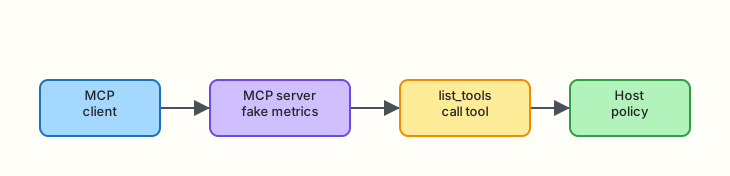
Client discovers tools from a server; the host still applies policy.
Theory
What it is
MCP standardises how AI applications connect to tool/data servers. Mentally:
| Role | Job |
|---|---|
| MCP server | Advertises tools/resources; executes tool handlers |
| MCP client | Discovers tools; forwards calls from the host/agent |
| Host app | Policy, UX, credentials, auditing |
You do not need the full SDK to learn the loop: list_tools → call_tool.
Why it matters
Platform teams want one metrics/runbook server reused by Slack bots, IDE copilots, and CI assistants — with consistent schemas and central policy.
How it works
- Client asks server for tool catalogue.
- Host filters catalogue through an allowlist.
- Model or workflow selects a tool.
- Client sends
call_toolwith arguments. - Server returns JSON content; host audits.
Key concepts and comparisons
| Approach | Pros | Cons |
|---|---|---|
| Hard-coded tools in one repo | Simple | Duplication across bots |
| MCP-style servers | Reuse, clearer boundary | Extra moving part |
| Raw shell plugin | Flexible | Unsafe by default |
Common pitfalls
- Treating MCP as automatic trust — servers can still be dangerous
- Putting cloud admin credentials inside every server
- Skipping host-side allowlists because “the server is internal”
- Confusing resources (data) with tools (actions)
Hands-on Lab
Objective
Run a fake metrics MCP-style server and client under ~/rebash-ai/module-09. List tools, call get_cpu_percent, and prove a mutating tool is filtered by host policy.
Prerequisites
- Python 3.10+
Lab environment
mkdir -p ~/rebash-ai/module-09 && cd ~/rebash-ai/module-09
python3 --version | tee python-version.txt
Expected output
Python 3.10+ recorded.
Real-world scenario
Observability wants assistants to read CPU from a staging metrics sidecar. Security refuses direct Prometheus credentials in the LLM process. You expose a tiny MCP-style server with read-only tools and keep deny rules in the client host.
Step-by-step tasks
Task 1 – MCP-style server
Create mcp_server.py:
"""Minimal MCP-style JSON tool server (in-process teaching model)."""
from __future__ import annotations

from typing import Any

TOOLS: list[dict[str, Any]] = [
    {
        "name": "get_cpu_percent",
        "description": "Return fake CPU percent for a service",
        "input_schema": {
            "type": "object",
            "properties": {"service": {"type": "string"}},
            "required": ["service"],
        },
    },
    {
        "name": "get_error_rate",
        "description": "Return fake error rate for a service",
        "input_schema": {
            "type": "object",
            "properties": {"service": {"type": "string"}},
            "required": ["service"],
        },
    },
    {
        "name": "restart_service",
        "description": "Mutating tool — must be blocked by host policy",
        "input_schema": {
            "type": "object",
            "properties": {"service": {"type": "string"}},
            "required": ["service"],
        },
    },
]

FAKE_CPU = {"payments-api": 87.5, "checkout": 22.0}
FAKE_ERRORS = {"payments-api": 0.12, "checkout": 0.01}


class McpServer:
    def list_tools(self) -> list[dict[str, Any]]:
        return TOOLS

    def call_tool(self, name: str, arguments: dict[str, Any]) -> dict[str, Any]:
        service = str(arguments.get("service", ""))
        if name == "get_cpu_percent":
            return {
                "ok": True,
                "tool": name,
                "service": service,
                "cpu_percent": FAKE_CPU.get(service, 5.0),
            }
        if name == "get_error_rate":
            return {
                "ok": True,
                "tool": name,
                "service": service,
                "error_rate": FAKE_ERRORS.get(service, 0.0),
            }
        if name == "restart_service":
            # Server *could* implement this — host must still deny.
            return {"ok": True, "tool": name, "restarted": service}
        return {"ok": False, "error": f"unknown tool {name}"}
Task 2 – Client with host policy
Create mcp_client.py:
"""MCP-style client with host allowlist policy."""
from __future__ import annotations

from typing import Any

from mcp_server import McpServer

ALLOWLIST = {"get_cpu_percent", "get_error_rate"}


class McpClient:
    def __init__(self, server: McpServer | None = None) -> None:
        self.server = server or McpServer()

    def list_tools(self) -> list[dict[str, Any]]:
        tools = self.server.list_tools()
        return [t for t in tools if t["name"] in ALLOWLIST]

    def call_tool(self, name: str, arguments: dict[str, Any]) -> dict[str, Any]:
        if name not in ALLOWLIST:
            return {
                "ok": False,
                "error": "DENIED_BY_HOST",
                "tool": name,
                "reason": "tool not in host allowlist",
            }
        return self.server.call_tool(name, arguments)
Create mcp_cli.py:
"""CLI for MCP-style list/call."""
from __future__ import annotations

import argparse
import json
from pathlib import Path

from mcp_client import McpClient


def main() -> int:
    parser = argparse.ArgumentParser()
    sub = parser.add_subparsers(dest="cmd", required=True)

    sub.add_parser("list-tools")

    call = sub.add_parser("call")
    call.add_argument("--tool", required=True)
    call.add_argument("--service", required=True)
    call.add_argument("--out", type=Path, default=Path("mcp-call.json"))

    args = parser.parse_args()
    client = McpClient()

    if args.cmd == "list-tools":
        tools = client.list_tools()
        names = [t["name"] for t in tools]
        print(json.dumps({"tools": names}, indent=2))
        Path("mcp-tools.json").write_text(
            json.dumps({"tools": tools}, indent=2) + "\n", encoding="utf-8"
        )
        return 0

    result = client.call_tool(args.tool, {"service": args.service})
    args.out.write_text(json.dumps(result, indent=2) + "\n", encoding="utf-8")
    print(json.dumps(result, indent=2))
    return 0 if result.get("ok") else 1


if __name__ == "__main__":
    raise SystemExit(main())
cd ~/rebash-ai/module-09
python3 mcp_cli.py list-tools
python3 - <<'PY'
import json
from pathlib import Path
names = json.loads(Path("mcp-tools.json").read_text())
tool_names = [t["name"] for t in names["tools"]]
assert "get_cpu_percent" in tool_names
assert "get_error_rate" in tool_names
assert "restart_service" not in tool_names
print("list_tools_filtered=OK")
PY
python3 mcp_cli.py call --tool get_cpu_percent --service payments-api --out cpu.json
python3 - <<'PY'
import json
from pathlib import Path
r = json.loads(Path("cpu.json").read_text())
assert r["ok"] is True and r["cpu_percent"] == 87.5
print("call_cpu_ok")
PY
Expected output
list_tools_filtered=OK — restart_service hidden. call_cpu_ok with cpu_percent 87.5.
Task 3 – Break: host denies restart
cd ~/rebash-ai/module-09
python3 mcp_cli.py call --tool restart_service --service payments-api --out restart.json; echo rc=$?
python3 - <<'PY'
import json
from pathlib import Path
r = json.loads(Path("restart.json").read_text())
assert r["ok"] is False and r["error"] == "DENIED_BY_HOST"
print("restart_denied_ok")
PY
Expected output
restart_denied_ok — even though the server implements restart, the host blocks it.
Validation steps
-
list-toolsomits mutating tools -
get_cpu_percentreturns fake metrics -
restart_serviceis DENIED_BY_HOST - You can explain client vs server vs host policy
Common errors and fixes
| Error | Cause | Fix |
|---|---|---|
| Restart appears in list | Filtering bug | Filter in McpClient.list_tools |
| Unknown service CPU 5.0 | Missing fixture key | Expected default for unknown services |
Challenge exercise
Add get_memory_percent to the server and allowlist; prove list + call. Keep restart denied.
Learning outcomes
- You separated discovery from policy
- You practised MCP-style list/call without a vendor SDK
- You proved host deny beats server capability
Cleanup
Validation
- Lab asserts passed
- Can define MCP roles without marketing language
- Know host policy still applies to “internal” servers
- Can relate MCP to Module 8 allowlists
Code Walkthrough
- Server advertises capability.
- Client discovers then filters.
- Host deny wins over server implement.
- Structured results only — no shell pipes.
- Audit call name + args + outcome (extend in prod).
Security Considerations
- Authenticate clients to MCP servers
- Scope credentials inside each server narrowly
- Never expose mutate tools to general assistants
- Validate arguments (service name allowlists)
- Log tool calls for forensics
Common Mistakes
Assuming MCP equals safe
Fix: MCP is transport/discovery. Safety is allowlists, auth, and least privilege.
Putting admin kubeconfig inside a shared MCP server
Fix: Read-only tokens, short TTL, per-tool credentials.
Best Practices
- Start with read-only metric/runbook servers
- Version tool schemas
- Document blast radius per tool
- Filter at the host even if the server is “trusted”
- Prefer one server per domain (metrics vs tickets)
Troubleshooting
| Symptom | Likely cause | Fix |
|---|---|---|
| Empty tool list | Allowlist mismatch | Align names with server |
| DENIED on CPU tool | Typo in allowlist | Check ALLOWLIST set |
Summary
MCP-style servers make ops tools reusable; hosts still enforce who may call what. Next you loop propose → act → observe into a stoppable agent.
Next: Agents for Ops Workflows.
Interview Questions
1. What problem does MCP aim to solve?
Reveal answer
Standardising how AI hosts discover and call external tools/data sources so every bot does not hard-code its own integrations.
2. What is the difference between an MCP server and the host application?
Reveal answer
The server exposes tools/resources. The host owns UX, model orchestration, credentials policy, and auditing.
3. Why filter list_tools through an allowlist?
Reveal answer
So assistants never even see mutating tools they must not call — reducing prompt-injection and accidental selection risk.
4. Can a server implement a dangerous tool that the client still blocks?
Reveal answer
Yes. Defence in depth: host deny should win even if the server offers restart_service.
5. How is MCP different from hard-coded Module 8 tools?
Reveal answer
MCP emphasises discovery and reusable servers; Module 8 hard-codes dispatch. Both still need allowlists.
6. What should you put in a tool’s input schema?
Reveal answer
Required properties, types, and descriptions clear enough for a model — and strict enough for host validation.
7. Name a DevOps-shaped MCP server you might build first.
Reveal answer
Read-only metrics, runbook search, or ticket fetch — not cluster mutate.
Related Tutorials
- Previous: Tool Calling and Function APIs
- Next: Agents for Ops Workflows
- Course: AI for DevOps Overview