Troubleshooting GitLab CI
Overview
Diagnose failed jobs, runner problems, auth errors, cache misses, and slow pipelines with a fixed order: lint → config → runner → credentials → cache → performance.
Most “CI is broken” tickets are YAML rules, missing tags, expired tokens, or poisoned caches — not mysterious GitLab bugs. Separate definition failures from execution failures before changing production variables.
This is a core tutorial in Module 17 · Troubleshooting of the REBASH Academy GitLab CI/CD for Cloud & DevOps Engineers series — written for Cloud, DevOps, Platform, and SRE engineers.
Prerequisites
- Pipeline Monitoring and Observability
- Runner and variables modules completed (or equivalent)
Learning Objectives
By the end of this tutorial, you will be able to:
- Classify config vs runner vs auth vs cache failures
- Use lint, job logs, and
CI_*context systematically - Recover from stuck/pending jobs and executor errors
- Apply a performance triage for slow pipelines
Architecture
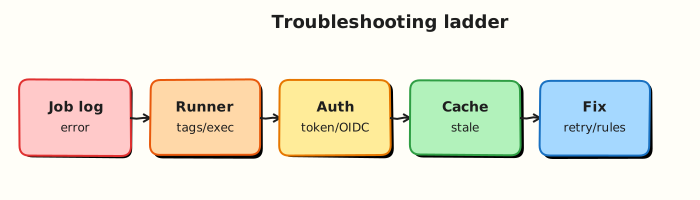
This topic’s control points and relationships are shown below.
Theory
What it is
Troubleshooting GitLab CI is locating which layer failed: YAML/workflow, runner availability, executor runtime, secrets/OIDC, artefacts/cache, or external systems (registry, cloud APIs). A failed job log is necessary but not sufficient — pending jobs never produce a script log.
| Symptom | First checks |
|---|---|
| Pipeline not created | workflow:rules, .gitlab-ci.yml syntax, CI enabled |
| Job pending forever | Runner online, tags, protected branches, concurrency |
| Script exit ≠ 0 | Last error in log, image, deps |
| 401 / forbidden | Token, OIDC, protected var, registry login |
| Flaky / slow | Cache keys, image pulls, serial stages |
Why it matters
Mean time to recovery for delivery depends on CI as much as production apps. Platform on-call needs a playbook juniors can follow under pressure. The same checks belong in shift-left tooling: glab ci lint and local runners catch definition errors before they burn SaaS minutes.
How it works
Use this order every time:
- Lint / parse —
glab ci lintor YAML load; confirm the job exists for this ref (rules). - Scope — Is the job pending or failed? Pending → runners/tags/protection. Failed → log.
- Log — Read from the bottom; note image,
before_script, and the failing command. - Auth — Masked variables present on protected branches? OIDC audience/role correct?
CI_JOB_TOKENpermissions for cross-project? - Cache / artefacts — Wrong
cache:key→ cold builds; missingdependencies/needs→ missing files. - Runner —
gitlab-runner status, executor errors, disk full, Docker privilege, Kubernetes pod events. - Performance — largest jobs by duration; parallelise; slim images; avoid unnecessary
needschains.
Reproduce with a minimal job when possible. Prefer fixing root cause over retry: 2 as a product strategy.
Key concepts and comparisons
| Failure class | Looks like | Not fixed by |
|---|---|---|
| Definition | Job absent / wrong rules | Restarting runners |
| Capacity | Pending, “no runners” | Editing script only |
| Runtime | Red job, script error | Adding more runners alone |
| Auth | 401/403 mid-job | Clearing cache |
| Cache | Intermittent missing modules | Random retry |
Common pitfalls
- Blaming GitLab.com when the job never matched a runner tag.
- Clearing all caches as step one — hides the bad key design.
- Putting secrets in logs “just to debug” on shared runners.
- Using
allow_failure: trueto silence a broken gate permanently.
Hands-on Lab
Objective
Start from intentionally broken GitLab CI YAML, prove the failure with local validation, fix the configuration, and confirm the pipeline parses cleanly.
Prerequisites
- Python 3 with PyYAML (
pip install pyyaml) - Optional: GitLab project to observe runner-side failures
Lab environment
Workspace: ~/rebash-gitlab/module-17
File-first lab. Broken YAML fails locally before wasting runner minutes.
Real-world scenario
On-call receives “pipeline stuck” alerts. The first step is validating YAML and job dependencies locally — not restarting runners. You reproduce a broken config, capture the error, apply the fix, and re-validate.
Step-by-step tasks
Task 1 – Broken pipeline (before)
Create .gitlab-ci.yml.broken:
stages:
  - lint
  - test

lint:
  stage: lint
  image: python:3.12-alpine
  script:
    - python -m py_compile src/app.py

test:
  stage: test
  image: python:3.12-alpine
  needs: [lintt]
  script:
    - python src/app.py
Create src/app.py:
Validate and capture the failure:
cd ~/rebash-gitlab/module-17
set -euo pipefail
python3 -m py_compile src/app.py
if python3 -c "import yaml; yaml.safe_load(open('.gitlab-ci.yml.broken'))" 2>/dev/null; then
  echo 'YAML parsed — checking needs typo'
  grep 'needs: \[lintt\]' .gitlab-ci.yml.broken | tee before-needs.txt
else
  echo 'YAML parse failed' | tee before-parse.txt
fi
grep -q 'lintt' .gitlab-ci.yml.broken
echo 'broken config confirmed' | tee before-status.txt
Expected output
broken config confirmed; typo lintt visible in needs.
Task 2 – Fixed pipeline (after)
Create .gitlab-ci.yml:
stages:
  - lint
  - test

lint:
  stage: lint
  image: python:3.12-alpine
  script:
    - python -m py_compile src/app.py

test:
  stage: test
  image: python:3.12-alpine
  needs: [lint]
  script:
    - python src/app.py
  artifacts:
    when: always
    paths:
      - out.txt
    expire_in: 1 day
Validate the fix:
cd ~/rebash-gitlab/module-17
set -euo pipefail
python3 -c "
import yaml
d = yaml.safe_load(open('.gitlab-ci.yml'))
assert d['test']['needs'] == ['lint']
print('fixed gitlab-ci OK', list(d))
"
grep -q 'python:3.12-alpine' .gitlab-ci.yml
! grep -q 'lintt' .gitlab-ci.yml
Expected output
fixed gitlab-ci OK with job keys; no lintt typo.
Task 3 – Simulate job scripts locally
cd ~/rebash-gitlab/module-17
set -euo pipefail
python3 -m py_compile src/app.py
python3 src/app.py | tee out.txt
test "$(cat out.txt)" = 'ok'
echo 'local script simulation passed' | tee after-scripts.txt
Expected output
local script simulation passed
Task 4 – Before/after validation report
Create validate-fix.sh:
#!/usr/bin/env bash
set -euo pipefail
grep -q 'lintt' .gitlab-ci.yml.broken
python3 -c "import yaml; d=yaml.safe_load(open('.gitlab-ci.yml')); assert d['test']['needs']==['lint']"
python3 src/app.py | tee out.txt
test "$(cat out.txt)" = 'ok'
echo 'module-17 troubleshooting lab passed'
Run it:
cd ~/rebash-gitlab/module-17
set -euo pipefail
chmod +x validate-fix.sh
./validate-fix.sh | tee validation.txt
Expected output
module-17 troubleshooting lab passed
Validation steps
- Broken file documents the
needstypo (lintt) - Fixed
.gitlab-ci.ymlparses;needs: [lint]is correct - Local script path matches job intent (
okin out.txt) - Pinned image
python:3.12-alpineon both jobs - Before/after validator script passes
Common errors and fixes
| Error | Cause | Fix |
|---|---|---|
needs: job not found | Typo in job name | Match needs to actual job key exactly |
| Job stuck pending | Runner tag mismatch | Align job tags with runner registration |
| YAML parse error | Tabs or bad indent | Use 2-space indent; validate with PyYAML |
| Cache miss every run | Wrong cache key | Include lockfile hash in cache key |
| Secret in logs | Debug echo of variables | Mask variables; never print CI secrets |
Challenge exercise
Add a third broken variant .gitlab-ci.yml.runner-mismatch where jobs require tag gpu but no runner provides it. Document the GitLab UI path to diagnose pending jobs.
Learning outcomes
- Reproduced a realistic CI configuration failure locally
- Fixed dependency typo and re-validated YAML structure
- Simulated job scripts before pushing to runners
- Built a before/after evidence trail for handover
Cleanup
Validation
- Lab commands run under
~/rebash-gitlab/module-17/ - You can explain each Theory section in your own words
- You used modern tooling where it applies to this topic
- You can describe one production failure mode for this topic
Code Walkthrough
Production practice for Troubleshooting GitLab CI always combines:
- Inspect before you change (status, plan, logs, dry-run)
- Prefer reversible, documented changes (Git, IaC, drop-ins, version pins)
- Capture evidence (command output, pipeline logs) for handovers
- Prefer current tools and APIs over legacy shortcuts
- Least privilege — escalate credentials only when required
Keep runbooks short enough to follow under pressure. Automate checks; keep humans for judgement.
Security Considerations
- Treat credentials and tokens for gitlab as privileged — never commit them
- Prefer short-lived auth (OIDC, roles, SSO) over long-lived keys
- Validate blast radius before apply/deploy/delete operations
- Restrict who can approve production changes
- Collect audit logs; limit who can read sensitive traces
Common Mistakes
Blaming GitLab.com when the job never matched a runner tag.
Validate assumptions against the Theory section and official docs before changing production.
Clearing all caches as step one — hides the bad key design.
Lab shortcuts (open security groups, admin roles, skip approvals) must not ship unchanged.
Changing production without a rollback path
Always know how to revert (previous artefact, prior release, state rollback, DNS failback).
Best Practices
- Encode Troubleshooting GitLab CI changes as code and review them in pull requests
- Pin versions (images, modules, actions, provider plugins)
- Separate environments with clear promotion gates
- Alert on symptoms with runbooks attached
- Destroy lab resources; tag everything with owner and expiry where possible
Troubleshooting
| Symptom | Likely cause | Fix |
|---|---|---|
| Auth / permission denied | Wrong identity, policy, or scope | Check caller identity, roles, and least-privilege policies |
| Timeout / no route | Network, DNS, security group, or endpoint | Trace path, DNS, and allow-lists before retrying |
| Drift / unexpected plan | Manual change or wrong state/workspace | Reconcile desired vs actual; avoid click-ops on managed resources |
| Pipeline/job red | Flaky step, cache, or missing secret | Read failing step logs; bisect recent workflow/config changes |
| Cost spike | Idle load balancer, NAT, oversized compute | Inventory billable resources; stop/delete labs promptly |
Summary
Troubleshooting GitLab CI is essential for Cloud and DevOps engineers working with gitlab. Practise the lab until the inspection and change path is muscle memory, then continue the track.
Interview Questions
- Give a systematic order for debugging a red pipeline.
- How do image entrypoints break scripts that work locally?
- When is CI_DEBUG_TRACE appropriate — and when dangerous?
- What runner vs project configuration mismatches look like?
- How do you reproduce a CI failure on a laptop safely?
Sample answer — question 2
Read the first failing script line, confirm image/tag, then check rules/needs and variable availability.
Sample answer — question 4
Debug tracing can print secrets; use it only in isolated projects and rotate any credentials that may have been exposed.