Kubernetes Deploys and GitLab Agent
Overview
Describe how the GitLab Agent connects CI to a cluster, sketch a Helm or kubectl deploy job, and contrast push deploys with GitOps pull controllers — including canary, blue-green, and rollback.
Pipelines that push manifests with kubectl or Helm need a secure path into the cluster. The GitLab Agent for Kubernetes (agentk) establishes a reverse tunnel so runners never hold long-lived kubeconfigs in CI variables. Progressive delivery (canary, blue-green) and rollbacks sit on top of Deployments or Helm releases. GitOps (Flux/Argo CD) inverts the model: the cluster pulls desired state from Git (conceptual flow in gitlab-gitops.svg).
This is a core tutorial in Module 9 · Kubernetes Deployments of the REBASH Academy GitLab CI/CD for Cloud & DevOps Engineers series — written for Cloud, DevOps, Platform, and SRE engineers.
Prerequisites
Learning Objectives
By the end of this tutorial, you will be able to:
- Explain the GitLab Agent trust boundary vs stored kubeconfig
- Sketch a deploy job using
kubectlor Helm - Compare canary and blue-green
- Outline rollback (Helm revision / prior image digest)
- State when push CI ends and GitOps begins
Architecture
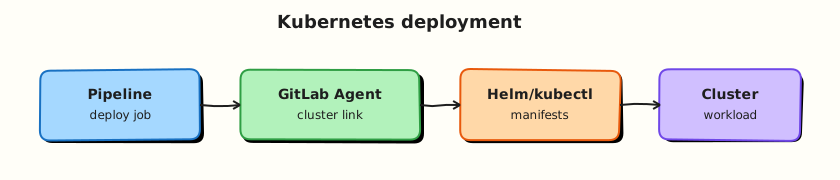
This topic’s control points and relationships are shown below.
Theory
What it is
Kubernetes deployment from GitLab means a job updates cluster state after images are built and scanned. The GitLab Agent is a lightweight process in the cluster that authenticates to GitLab and receives CI/ci_access connections — CI jobs request Kubernetes API access through the agent rather than embedding admin kubeconfigs.
| Mode | Who applies changes | Fit |
|---|---|---|
Push CI (kubectl / Helm) | Pipeline job | Simple apps, demos, controlled envs |
| GitOps pull | Controller (Argo CD / Flux) | Multi-cluster, strong drift control |
| Hybrid | CI updates Git; controller syncs | Common enterprise pattern |
Why it matters
Static kubeconfigs in CI are high-value secrets and hard to rotate. Agents shrink blast radius and support environment-scoped access. Progressive delivery reduces blast radius of bad releases; rollbacks need a practised path (previous Helm revision or prior digest). Confusing push CI with GitOps causes double-writes and drift fights.
How it works
- Install
agentkin the cluster; register it to a GitLab project/group. - Grant
ci_access(or GitOps access) for selected projects. - CI job uses the agent context to run
kubectl set image/helm upgrade --installwith the SHA-tagged image from Module 8. - Canary: shift a fraction of traffic (Ingress weight / Flagger / service mesh). Blue-green: two full stacks; switch Service or Ingress when healthy.
- Rollback:
helm rollback, or redeploy the last known-good digest; GitOps reverts the Git commit and lets the controller sync.
Keep production behind protected environments and manual or approval gates.
Key concepts and comparisons
| Pattern | Idea | Rollback |
|---|---|---|
| Rolling update | Default Deployment surge | Roll back ReplicaSet / Helm |
| Canary | Partial traffic to new version | Shift weight back |
| Blue-green | Two environments, cut over | Point traffic at blue again |
| GitOps | Desired state in Git | Revert commit |
Common pitfalls
- Cluster-admin credentials in unprotected CI variables.
- Deploying
latestinstead of the SHA built in the same pipeline. - Running canary without metrics or automatic abort.
- Both CI and Argo CD applying the same Deployment (duelling controllers).
- Skipping
helm history/ revision notes so rollback targets are unclear.
Hands-on Lab
Objective
Create Kubernetes manifests under manifests/, author a deploy job stub for the GitLab Agent or kubeconfig placeholder, and validate all YAML offline.
Prerequisites
- Python 3 with PyYAML (
pip install pyyaml) - Optional: kind or minikube cluster for live
kubectl apply - Optional: GitLab Agent connected to a cluster
Lab environment
Workspace: ~/rebash-gitlab/module-09 with manifests in manifests/
File-first lab. YAML validates without a cluster; apply steps are optional.
Real-world scenario
Your platform team deploys microservices with the GitLab Agent for Kubernetes instead of long-lived kubeconfig secrets in CI variables. You add Deployment and Service manifests plus a deploy job stub that references the agent context — validated locally before any cluster access.
Step-by-step tasks
Task 1 – Create Kubernetes manifests
Create manifests/deployment.yaml:
apiVersion: apps/v1
kind: Deployment
metadata:
  name: rebash-gitlab-lab
  labels:
    app: rebash-gitlab-lab
spec:
  replicas: 1
  selector:
    matchLabels:
      app: rebash-gitlab-lab
  template:
    metadata:
      labels:
        app: rebash-gitlab-lab
    spec:
      containers:
        - name: app
          image: python:3.12-alpine
          command: ["python", "-c", "print('k8s deploy ok')"]
Create manifests/service.yaml:
apiVersion: v1
kind: Service
metadata:
  name: rebash-gitlab-lab
spec:
  selector:
    app: rebash-gitlab-lab
  ports:
    - port: 80
      targetPort: 8080
  type: ClusterIP
Validate manifests:
cd ~/rebash-gitlab/module-09
python3 -c "
import yaml, pathlib
for f in ['manifests/deployment.yaml', 'manifests/service.yaml']:
    d = yaml.safe_load(pathlib.Path(f).read_text())
    print('OK', f, d['kind'])
"
Expected output
Two lines: OK manifests/deployment.yaml Deployment and OK manifests/service.yaml Service.
Task 2 – Create deploy pipeline stub
Create .gitlab-ci.yml:
stages:
  - validate
  - deploy

variables:
  KUBE_NAMESPACE: rebash-gitlab-lab
  MANIFEST_DIR: manifests

validate_manifests:
  stage: validate
  image: python:3.12-alpine
  script:
    - python -c "import yaml, pathlib; [yaml.safe_load(p.read_text()) for p in pathlib.Path('manifests').glob('*.yaml')]"
    - echo "Manifests valid"

deploy_staging:
  stage: deploy
  image:
    name: bitnami/kubectl:1.30.2
    entrypoint: [""]
  environment:
    name: staging
    kubernetes:
      namespace: rebash-gitlab-lab
      agent: my-group/rebash-cluster:rebash-agent
  rules:
    - if: $CI_COMMIT_BRANCH == $CI_DEFAULT_BRANCH
  script:
    - kubectl apply -f "$MANIFEST_DIR/" --dry-run=client
    - echo "Agent deploy stub — replace agent path with your GitLab Agent record"
  # Alternative without agent: mount KUBECONFIG from protected CI variable (avoid in production)
Validate offline:
cd ~/rebash-gitlab/module-09
python3 -c "
import yaml
d = yaml.safe_load(open('.gitlab-ci.yml'))
assert d['deploy_staging']['environment']['kubernetes']['agent']
assert d['variables']['MANIFEST_DIR'] == 'manifests'
print('OK k8s deploy stub')
"
Expected output
Prints OK k8s deploy stub.
Task 3 – Optional cluster dry-run or offline manifest check
If kubectl is available:
cd ~/rebash-gitlab/module-09
kubectl apply -f manifests/ --dry-run=client | tee k8s-dryrun.txt
grep -q 'deployment.apps/rebash-gitlab-lab' k8s-dryrun.txt
If no cluster is available:
cd ~/rebash-gitlab/module-09
python3 -c "
import yaml, pathlib
kinds = [yaml.safe_load(p.read_text())['kind'] for p in pathlib.Path('manifests').glob('*.yaml')]
assert kinds == ['Deployment', 'Service']
print('offline manifest check ok')
" | tee k8s-dryrun.txt
Expected output
Dry-run output lists the Deployment, or k8s-dryrun.txt contains offline manifest check ok.
Validation steps
- Deployment and Service manifests parse with PyYAML
- Deploy job references GitLab Agent path under
environment.kubernetes.agent -
validate_manifestsjob checks all files inmanifests/ -
kubectl apply --dry-run=clientsucceeds or offline check passes - No kubeconfig content committed to Git
Common errors and fixes
| Error | Cause | Fix |
|---|---|---|
| Agent deploy fails | Wrong agent path | Copy exact agent record from GitLab Infrastructure > Kubernetes |
kubectl cannot reach cluster | Agent not installed | Install GitLab Agent in cluster first |
| Namespace mismatch | KUBE_NAMESPACE differs from manifest | Align namespace in environment block and manifests |
| Dry-run fails validation | Invalid manifest schema | Re-validate YAML keys and indentation |
Challenge exercise
Add manifests/kustomization.yaml listing both resources and change the deploy script to kubectl apply -k manifests/ --dry-run=client. Validate the kustomization file with PyYAML.
Learning outcomes
- Authored Deployment and Service manifests for a sample workload
- Modelled GitLab Agent-based deploy jobs without committing kubeconfig
- Validated Kubernetes and CI YAML offline
- Used client-side dry-run before applying to a cluster
Cleanup
rm -f ~/rebash-gitlab/module-09/k8s-dryrun.txt
# Keep manifests/ and .gitlab-ci.yml for later modules
Validation
- Lab commands run under
~/rebash-gitlab/module-09/ - You can explain each Theory section in your own words
- You used modern tooling where it applies to this topic
- You can describe one production failure mode for this topic
Code Walkthrough
Production practice for Kubernetes Deploys and GitLab Agent always combines:
- Inspect before you change (status, plan, logs, dry-run)
- Prefer reversible, documented changes (Git, IaC, drop-ins, version pins)
- Capture evidence (command output, pipeline logs) for handovers
- Prefer current tools and APIs over legacy shortcuts
- Least privilege — escalate credentials only when required
Keep runbooks short enough to follow under pressure. Automate checks; keep humans for judgement.
Security Considerations
- Treat credentials and tokens for gitlab as privileged — never commit them
- Prefer short-lived auth (OIDC, roles, SSO) over long-lived keys
- Validate blast radius before apply/deploy/delete operations
- Restrict who can approve production changes
- Collect audit logs; limit who can read sensitive traces
Common Mistakes
Cluster-admin credentials in unprotected CI variables.
Validate assumptions against the Theory section and official docs before changing production.
Deploying latest instead of the SHA built in the same pipeline.
Lab shortcuts (open security groups, admin roles, skip approvals) must not ship unchanged.
Changing production without a rollback path
Always know how to revert (previous artefact, prior release, state rollback, DNS failback).
Best Practices
- Encode Kubernetes Deploys and GitLab Agent changes as code and review them in pull requests
- Pin versions (images, modules, actions, provider plugins)
- Separate environments with clear promotion gates
- Alert on symptoms with runbooks attached
- Destroy lab resources; tag everything with owner and expiry where possible
Troubleshooting
| Symptom | Likely cause | Fix |
|---|---|---|
| Auth / permission denied | Wrong identity, policy, or scope | Check caller identity, roles, and least-privilege policies |
| Timeout / no route | Network, DNS, security group, or endpoint | Trace path, DNS, and allow-lists before retrying |
| Drift / unexpected plan | Manual change or wrong state/workspace | Reconcile desired vs actual; avoid click-ops on managed resources |
| Pipeline/job red | Flaky step, cache, or missing secret | Read failing step logs; bisect recent workflow/config changes |
| Cost spike | Idle load balancer, NAT, oversized compute | Inventory billable resources; stop/delete labs promptly |
Summary
Kubernetes Deploys and GitLab Agent is essential for Cloud and DevOps engineers working with gitlab. Practise the lab until the inspection and change path is muscle memory, then continue the track.
Interview Questions
- What problem does the GitLab Agent solve versus storing kubeconfig in CI?
- How do you validate manifests before a real apply?
- Why scope agent access per environment/namespace?
- What RBAC should a deploy job assume in-cluster?
- How do you roll back a bad GitLab-driven deploy?
Sample answer — question 2
Start with kubectl dry-run/client validation and agent connectivity: wrong context, namespace, or missing RBAC explains most failures.
Sample answer — question 4
Prefer short-lived agent sessions and least-privilege ServiceAccounts per environment.