GitLab Projects, Merge Requests, and Releases
Overview
Connect repositories, branches, merge requests, protected branches, tags, and releases to how pipelines start and what they are allowed to change.
GitLab CI/CD is useless without a clear project model. A project owns the Git repository, CI settings, protected branches, variables, and release records. Merge requests (MRs) are the review surface; tags and Releases mark shippable versions.
This is a core tutorial in Module 2 · GitLab Projects of the REBASH Academy GitLab CI/CD for Cloud & DevOps Engineers series — written for Cloud, DevOps, Platform, and SRE engineers.
Prerequisites
Learning Objectives
By the end of this tutorial, you will be able to:
- Describe project vs group vs repository settings that affect CI
- Explain MR pipelines vs branch pipelines
- Configure protected branches and protected tags mentally
- Relate Git tags to GitLab Releases
Architecture
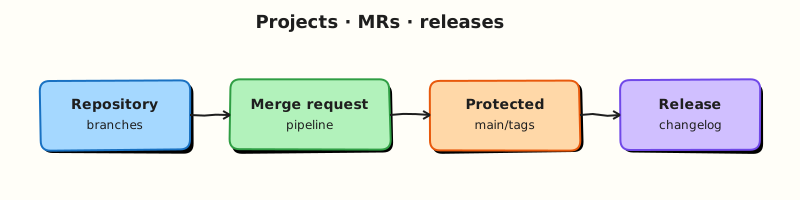
This topic’s control points and relationships are shown below.
Theory
What it is
A GitLab project wraps a Git repository plus integrations (CI/CD, issues, packages, environments). Branches hold work in progress; merge requests propose integrating a source branch into a target (often main). Protected branches restrict who can push or merge and which runners / variables apply. A tag marks a commit; a Release is a GitLab object that attaches notes, assets, and often a changelog to that tag.
| Concept | CI impact |
|---|---|
| Branch push | May start a branch pipeline |
| Merge request | Often starts an MR pipeline (merge_request_event) |
| Protected branch | Can unlock protected variables / environments |
| Tag / Release | Common trigger for publish and deploy jobs |
Why it matters
Production mistakes usually start as process gaps: anyone can push to main, deploy jobs run on every feature branch, or release tags are created without CI. Protected branches plus MR-required pipelines give you reviewable change before production. Release tags give ops a stable handle for rollbacks and artefact promotion.
How it works
Typical flow:
- Developer pushes a feature branch; optional branch pipeline runs lint/tests.
- They open an MR; GitLab runs an MR pipeline (prefer
rulesonmerge_request_event). - Reviewers approve; protected-branch rules require a successful pipeline before merge.
- Merge to
mainmay run a post-merge pipeline (build, publish). - Cutting
v1.2.3(and optionally creating a GitLab Release) triggers release/publish jobs.
Predefined variables such as $CI_MERGE_REQUEST_IID, $CI_COMMIT_BRANCH, $CI_COMMIT_TAG, and $CI_COMMIT_REF_PROTECTED tell jobs which context they are in.
Key concepts and comparisons
| Trigger | Typical use |
|---|---|
| Branch pipeline | Fast feedback on every push |
| MR pipeline | Required checks before merge |
| Tag pipeline | Versioned publish / deploy |
| Schedule / manual | Nightly scans, promotions |
Protected branch vs protected variable: protecting main alone is incomplete — pair it with protected CI/CD variables and protected environments so secrets never appear on unprotected feature branches.
Common pitfalls
- Assuming “pipeline on push” equals “pipeline on MR” — configure
rulesexplicitly. - Creating Releases without tags (or tags without CI) — keep one SemVer tag → one Release.
- Leaving
mainunprotected on shared projects. - Treating GitLab Releases as a replacement for artefact registries — Releases point at assets; registries store images/packages.
Hands-on Lab
Objective
Create an MR policy checklist, a project README, and a .gitlab-ci.yml with workflow:rules that runs different jobs on merge requests versus the default branch — all validated offline.
Prerequisites
- Python 3 with PyYAML (
pip install pyyaml) - Completed GitLab CI/CD Fundamentals lab files (optional starting point)
- Optional: GitLab project with protected
mainbranch
Lab environment
Workspace: ~/rebash-gitlab/module-02
File-first lab. Push to GitLab only when you want MR and branch pipelines on a runner.
Real-world scenario
Your platform team requires every service repo to document MR expectations and encode branch-aware CI. Feature branches must run fast lint checks on merge requests; the default branch runs an additional compliance job after merge. You ship reviewable YAML and a machine-readable MR policy before opening the first merge request.
Step-by-step tasks
Task 1 – Create the project README
Create README.md:
# rebash-gitlab-module-02

Sample service for GitLab projects, merge requests, and releases.

## Branch policy

- Feature work lands via merge request into `main`
- `main` is protected; direct pushes are blocked
- Tags matching `v*.*.*` trigger release pipelines
Verify the file exists:
Expected output
readme-head.txt shows the project title and description lines.
Task 2 – Define the MR checklist policy
Create mr-policy.yaml — a machine-readable checklist reviewers use before approving:
version: 1
merge_request:
  required_checks:
    - pipeline_must_pass
    - at_least_one_approval
    - no_wip_title_prefix
  blocked_if:
    - target_branch_unprotected
  notes:
    - "MR pipelines run on merge_request_event only"
    - "Release tags require protected tag rules in GitLab UI"
branch_protection:
  default_branch: main
  allow_force_push: false
  require_ci_pass_before_merge: true
Validate:
cd ~/rebash-gitlab/module-02
python3 -c "
import yaml
p = yaml.safe_load(open('mr-policy.yaml'))
assert p['merge_request']['required_checks'][0] == 'pipeline_must_pass'
assert p['branch_protection']['default_branch'] == 'main'
print('OK mr-policy', p['version'])
"
Expected output
Prints OK mr-policy 1.
Task 3 – Author branch-aware CI with workflow rules
Create src/app.py:
Create .gitlab-ci.yml:
workflow:
  rules:
    - if: $CI_PIPELINE_SOURCE == "merge_request_event"
    - if: $CI_COMMIT_BRANCH == $CI_DEFAULT_BRANCH

stages:
  - validate
  - release

mr_lint:
  stage: validate
  image: python:3.12-alpine
  rules:
    - if: $CI_PIPELINE_SOURCE == "merge_request_event"
  script:
    - python -m py_compile src/app.py
    - echo "MR pipeline for branch $CI_COMMIT_REF_NAME"

main_compliance:
  stage: validate
  image: python:3.12-alpine
  rules:
    - if: $CI_COMMIT_BRANCH == $CI_DEFAULT_BRANCH
  script:
    - python src/app.py
    - test -f README.md
    - test -f mr-policy.yaml

release_job:
  stage: release
  image: registry.gitlab.com/gitlab-org/release-cli:latest
  rules:
    - if: $CI_COMMIT_TAG
  script:
    - echo "Would create GitLab Release for tag $CI_COMMIT_TAG"
Validate offline:
cd ~/rebash-gitlab/module-02
python3 -c "
import yaml
d = yaml.safe_load(open('.gitlab-ci.yml'))
assert 'workflow' in d
jobs = [k for k in d if k not in ('workflow', 'stages')]
assert set(jobs) == {'mr_lint', 'main_compliance', 'release_job'}
print('OK', jobs)
"
Expected output
Prints OK with the three job names.
Task 4 – Simulate default-branch scripts locally
Prove the compliance job logic without a runner:
cd ~/rebash-gitlab/module-02
python3 -m py_compile src/app.py
python3 src/app.py | tee branch-out.txt
test -f README.md && test -f mr-policy.yaml
grep -q 'module-02 ok' branch-out.txt
Expected output
Compile succeeds; branch-out.txt contains module-02 ok; policy files exist.
Validation steps
-
README.mddocuments branch and tag policy -
mr-policy.yamlparses and lists required MR checks -
.gitlab-ci.ymldefinesworkflow:rulesfor MR and default branch -
release_jobruns only when$CI_COMMIT_TAGis set - Local simulation passes compile, run, and file checks
Common errors and fixes
| Error | Cause | Fix |
|---|---|---|
| Duplicate pipelines on MR push | Missing workflow:rules | Add MR-only and default-branch rules as shown |
release_job runs on every branch | rules omitted on release job | Gate with - if: $CI_COMMIT_TAG |
| MR pipeline never starts | Push without opening MR | Open a merge request or simulate with merge_request_event on GitLab |
| Compliance job fails on feature branch | Wrong rules on main_compliance | Restrict to $CI_COMMIT_BRANCH == $CI_DEFAULT_BRANCH |
Challenge exercise
Add CHANGELOG.md with a ## 0.1.0 section and extend release_job to cat CHANGELOG.md in its script. Validate YAML still parses.
Learning outcomes
- Documented MR expectations in a reviewable README and YAML policy file
- Separated MR pipelines from default-branch pipelines with
workflow:rules - Modelled tag-triggered release jobs without running them on every push
- Validated all project YAML offline before pushing
Cleanup
rm -f ~/rebash-gitlab/module-02/readme-head.txt ~/rebash-gitlab/module-02/branch-out.txt
# Keep project files for module 03
Validation
- Lab commands run under
~/rebash-gitlab/module-02/ - You can explain each Theory section in your own words
- You used modern tooling where it applies to this topic
- You can describe one production failure mode for this topic
Code Walkthrough
Production practice for GitLab Projects, Merge Requests, and Releases always combines:
- Inspect before you change (status, plan, logs, dry-run)
- Prefer reversible, documented changes (Git, IaC, drop-ins, version pins)
- Capture evidence (command output, pipeline logs) for handovers
- Prefer current tools and APIs over legacy shortcuts
- Least privilege — escalate credentials only when required
Keep runbooks short enough to follow under pressure. Automate checks; keep humans for judgement.
Security Considerations
- Treat credentials and tokens for gitlab as privileged — never commit them
- Prefer short-lived auth (OIDC, roles, SSO) over long-lived keys
- Validate blast radius before apply/deploy/delete operations
- Restrict who can approve production changes
- Collect audit logs; limit who can read sensitive traces
Common Mistakes
Assuming “pipeline on push” equals “pipeline on MR” — configure rules explicitly.
Validate assumptions against the Theory section and official docs before changing production.
Creating Releases without tags (or tags without CI) — keep one SemVer tag → one Release.
Lab shortcuts (open security groups, admin roles, skip approvals) must not ship unchanged.
Changing production without a rollback path
Always know how to revert (previous artefact, prior release, state rollback, DNS failback).
Best Practices
- Encode GitLab Projects, Merge Requests, and Releases changes as code and review them in pull requests
- Pin versions (images, modules, actions, provider plugins)
- Separate environments with clear promotion gates
- Alert on symptoms with runbooks attached
- Destroy lab resources; tag everything with owner and expiry where possible
Troubleshooting
| Symptom | Likely cause | Fix |
|---|---|---|
| Auth / permission denied | Wrong identity, policy, or scope | Check caller identity, roles, and least-privilege policies |
| Timeout / no route | Network, DNS, security group, or endpoint | Trace path, DNS, and allow-lists before retrying |
| Drift / unexpected plan | Manual change or wrong state/workspace | Reconcile desired vs actual; avoid click-ops on managed resources |
| Pipeline/job red | Flaky step, cache, or missing secret | Read failing step logs; bisect recent workflow/config changes |
| Cost spike | Idle load balancer, NAT, oversized compute | Inventory billable resources; stop/delete labs promptly |
Summary
GitLab Projects, Merge Requests, and Releases is essential for Cloud and DevOps engineers working with gitlab. Practise the lab until the inspection and change path is muscle memory, then continue the track.
Interview Questions
- Why prefer merge request pipelines over duplicate branch pipelines?
- What is detached merge request pipeline behaviour?
- How do draft MRs change your required checks strategy?
- Who should be allowed to merge to protected branches?
- How do releases relate to tags and permissions?
Sample answer — question 2
Check workflow rules and whether both branch and MR pipelines fired. Confirm required status checks match jobs that run on merge_request_event.
Sample answer — question 4
Protected branches, CODEOWNERS, and required pipelines enforce review. Keep secret variables away from untrusted fork MRs.