Building Docker Images in CI
Overview
Author a GitLab CI job that builds a multi-stage Dockerfile (BuildKit-friendly), tags the image with the commit SHA, and documents promotion from registry to later environments without rebuilding.
CI builds containers so every merge produces a reproducible image. GitLab provides a Container Registry per project ($CI_REGISTRY_IMAGE). Prefer BuildKit (or Kaniko/buildah on locked-down runners) over ad-hoc Docker-in-Docker. Tag with $CI_COMMIT_SHA (and optionally a digest); promote that same image through staging and production.
This is a core tutorial in Module 8 · Docker Pipelines of the REBASH Academy GitLab CI/CD for Cloud & DevOps Engineers series — written for Cloud, DevOps, Platform, and SRE engineers.
Prerequisites
Learning Objectives
By the end of this tutorial, you will be able to:
- Sketch a Docker / BuildKit CI job using
$CI_REGISTRY_* - Write a minimal multi-stage Dockerfile
- Explain SHA tags vs floating
latest - Describe image promotion without rebuild
- Note DinD vs rootless / Kaniko trade-offs
Architecture
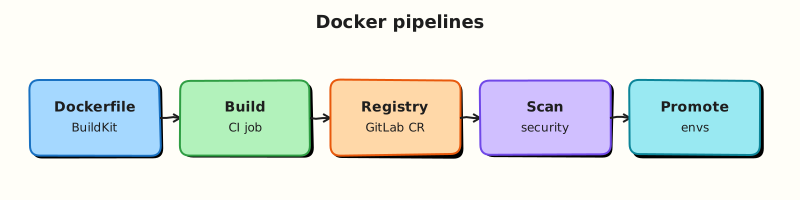
This topic’s control points and relationships are shown below.
Theory
What it is
A Docker pipeline compiles application code into an OCI image inside a GitLab job, then pushes it to a registry. Common builders:
| Builder | Typical setup | Notes |
|---|---|---|
| Docker + BuildKit | docker:cli + docker:dind service | Familiar; needs privileged or socket carefully |
| Kaniko / buildah | No daemon | Better for restricted Kubernetes runners |
| GitLab Container Registry | $CI_REGISTRY + job token | Default home for project images |
Multi-stage Dockerfiles keep build tools out of the final runtime image. Promotion means retagging or deploying the same digest — never “rebuild on main with different base layers” for production.
Why it matters
Laptop-built images drift from CI and skip scanners. Registry-hosted, SHA-tagged images are the unit of deploy for Kubernetes and cloud services. Layer caching and BuildKit cut minutes; digest pins stop surprise base-image moves. Without promotion discipline, staging and production silently diverge.
How it works
- Job authenticates to
$CI_REGISTRYwith$CI_REGISTRY_USER/$CI_REGISTRY_PASSWORD(or job token). - BuildKit builds the Dockerfile (
DOCKER_BUILDKIT=1ordocker buildx). - Tag
$CI_REGISTRY_IMAGE:$CI_COMMIT_SHA(and maybe a branch tag for non-prod). - Push; optionally record digest as an artefact or release note.
- Deploy jobs pull that SHA/digest; production never rebuilds from source for the same commit.
Cache mounts and registry pull-through caches accelerate rebuilds; they do not replace pinning base images by digest in production Dockerfiles.
Key concepts and comparisons
| Practice | Prefer | Avoid |
|---|---|---|
| Tags | Commit SHA / semver / digest | Only latest |
| Stages | Multi-stage slim runtime | Single fat image with compilers |
| Auth | CI job token / short-lived | Long-lived personal tokens in Git |
| Promote | Same digest across envs | Rebuild per environment |
Common pitfalls
- Privileged DinD on shared runners without isolation.
- Pushing
latestfrom every MR. - Baking secrets into image layers (
ENVwith API keys). - Assuming cache guarantees bit-identical images across builders.
- Rebuilding for production instead of promoting the tested digest.
Hands-on Lab
Objective
Create a Dockerfile, author a .gitlab-ci.yml with a Docker-in-Docker build stub using pinned images, and validate YAML offline — optionally building the image locally if Docker Engine is available.
Prerequisites
- Python 3 with PyYAML (
pip install pyyaml) - Optional: Docker Engine locally to run
docker build - Optional: GitLab runner with
docker:dindservice for live builds
Lab environment
Workspace: ~/rebash-gitlab/module-08
File-first lab. YAML validates without Docker; build steps are optional locally.
Real-world scenario
Your team ships containerised services. Security requires pinned base images and CI builds that push to the GitLab Container Registry. You create a minimal Dockerfile and a docker:dind job stub that builds and tags an image — validated offline before consuming runner capacity.
Step-by-step tasks
Task 1 – Create the application and Dockerfile
Create src/app.py:
Create Dockerfile:
Verify Dockerfile syntax offline:
cd ~/rebash-gitlab/module-08
grep -q 'FROM python:3.12-alpine' Dockerfile
grep -q 'COPY src/app.py' Dockerfile
Expected output
Both greps succeed silently.
Task 2 – Author the Docker build pipeline stub
Create .gitlab-ci.yml:
variables:
  DOCKER_DRIVER: overlay2
  IMAGE_TAG: $CI_REGISTRY_IMAGE:$CI_COMMIT_SHORT_SHA

stages:
  - build

docker_build:
  stage: build
  image: docker:27-cli
  services:
    - name: docker:27-dind
      alias: docker
  variables:
    DOCKER_TLS_CERTDIR: "/certs"
  before_script:
    - docker info
  script:
    - docker build -t "$IMAGE_TAG" .
    - echo "Built image $IMAGE_TAG"
  rules:
    - if: $CI_COMMIT_BRANCH == $CI_DEFAULT_BRANCH
Validate offline:
cd ~/rebash-gitlab/module-08
python3 -c "
import yaml
d = yaml.safe_load(open('.gitlab-ci.yml'))
assert d['docker_build']['image'] == 'docker:27-cli'
assert d['docker_build']['services'][0]['name'] == 'docker:27-dind'
print('OK docker build stub')
"
Expected output
Prints OK docker build stub.
Task 3 – Optional local build; required offline simulation
If Docker Engine is installed:
cd ~/rebash-gitlab/module-08
docker build -t rebash-module-08:lab .
docker run --rm rebash-module-08:lab | tee docker-out.txt
grep -q 'docker-ci ok' docker-out.txt
If Docker is not available, simulate the run path:
cd ~/rebash-gitlab/module-08
python3 src/app.py | tee docker-out.txt
grep -q 'docker-ci ok' docker-out.txt
Expected output
docker-out.txt contains docker-ci ok.
Validation steps
-
Dockerfilepinspython:3.12-alpine - CI job uses pinned
docker:27-clianddocker:27-dind -
.gitlab-ci.ymlparses with PyYAML - Build output contains
docker-ci ok(local Docker or Python simulation) - No registry credentials hard-coded in YAML
Common errors and fixes
| Error | Cause | Fix |
|---|---|---|
Cannot connect to Docker daemon | DinD service missing or TLS misconfigured | Add docker:27-dind service and DOCKER_TLS_CERTDIR |
| Wrong architecture image | Unpinned docker:latest | Pin docker:27-cli and matching dind tag |
| Push fails with 403 | CI_REGISTRY login not run | Add docker login with CI_JOB_TOKEN before push (next module pattern) |
| Build context too large | No .dockerignore | Add .dockerignore excluding .git and caches |
Challenge exercise
Add a kaniko_build job using gcr.io/kaniko-project/executor:v1.23.2-debug as an alternative that does not require DinD. Keep both jobs behind different rules so only one runs per pipeline.
Learning outcomes
- Wrote a minimal production-style Dockerfile with pinned base image
- Modelled Docker-in-Docker build jobs with pinned CI images
- Validated pipeline YAML offline before runner execution
- Understood when local
docker buildsubstitutes for CI
Cleanup
docker rmi rebash-module-08:lab 2>/dev/null || true
rm -f ~/rebash-gitlab/module-08/docker-out.txt
# Keep Dockerfile and .gitlab-ci.yml for module 09
Validation
- Lab commands run under
~/rebash-gitlab/module-08/ - You can explain each Theory section in your own words
- You used modern tooling where it applies to this topic
- You can describe one production failure mode for this topic
Code Walkthrough
Production practice for Building Docker Images in CI always combines:
- Inspect before you change (status, plan, logs, dry-run)
- Prefer reversible, documented changes (Git, IaC, drop-ins, version pins)
- Capture evidence (command output, pipeline logs) for handovers
- Prefer current tools and APIs over legacy shortcuts
- Least privilege — escalate credentials only when required
Keep runbooks short enough to follow under pressure. Automate checks; keep humans for judgement.
Security Considerations
- Treat credentials and tokens for gitlab as privileged — never commit them
- Prefer short-lived auth (OIDC, roles, SSO) over long-lived keys
- Validate blast radius before apply/deploy/delete operations
- Restrict who can approve production changes
- Collect audit logs; limit who can read sensitive traces
Common Mistakes
Privileged DinD on shared runners without isolation.
Validate assumptions against the Theory section and official docs before changing production.
Pushing latest from every MR.
Lab shortcuts (open security groups, admin roles, skip approvals) must not ship unchanged.
Changing production without a rollback path
Always know how to revert (previous artefact, prior release, state rollback, DNS failback).
Best Practices
- Encode Building Docker Images in CI changes as code and review them in pull requests
- Pin versions (images, modules, actions, provider plugins)
- Separate environments with clear promotion gates
- Alert on symptoms with runbooks attached
- Destroy lab resources; tag everything with owner and expiry where possible
Troubleshooting
| Symptom | Likely cause | Fix |
|---|---|---|
| Auth / permission denied | Wrong identity, policy, or scope | Check caller identity, roles, and least-privilege policies |
| Timeout / no route | Network, DNS, security group, or endpoint | Trace path, DNS, and allow-lists before retrying |
| Drift / unexpected plan | Manual change or wrong state/workspace | Reconcile desired vs actual; avoid click-ops on managed resources |
| Pipeline/job red | Flaky step, cache, or missing secret | Read failing step logs; bisect recent workflow/config changes |
| Cost spike | Idle load balancer, NAT, oversized compute | Inventory billable resources; stop/delete labs promptly |
Summary
Building Docker Images in CI is essential for Cloud and DevOps engineers working with gitlab. Practise the lab until the inspection and change path is muscle memory, then continue the track.
Interview Questions
- Why is Docker-in-Docker often avoided in favour of Kaniko/Buildah?
- How should image tags be chosen for traceability?
- What does --no-push buy you while learning CI image builds?
- How do you keep registry credentials out of the Dockerfile?
- What base-image practices reduce supply-chain risk?
Sample answer — question 2
Check Dockerfile path/context, registry auth, and whether the executor may spawn builders. Confirm destination before enabling push.
Sample answer — question 4
Authenticate via CI variables or OIDC-linked tokens, never ENV passwords in the image. Prefer minimal bases and non-root users.