Multi-Cloud Deployments with GitLab
Overview
Sketch OIDC-oriented GitLab CI patterns for AWS (IAM / EKS / ECS), Azure (login / AKS), and Google Cloud (Workload Identity / GKE / Cloud Run) without embedding long-lived cloud keys in the repository.
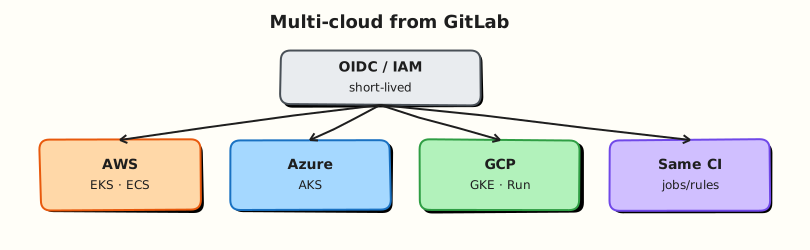
Modern GitLab deploy jobs federate identity: the job presents a GitLab-issued OIDC token; the cloud exchanges it for a short-lived role. That role then updates EKS/ECS, AKS, GKE, or Cloud Run. Patterns differ by cloud, but the CI shape is the same — authenticate, deploy immutable artefact, protect production.
This is a core tutorial in Module 11 · Cloud Deployments of the REBASH Academy GitLab CI/CD for Cloud & DevOps Engineers series — written for Cloud, DevOps, Platform, and SRE engineers.
Prerequisites
Learning Objectives
By the end of this tutorial, you will be able to:
- Explain OIDC federation vs static access keys
- Map AWS IAM roles to EKS/ECS deploy jobs
- Sketch Azure login + AKS kubectl context
- Sketch GCP Workload Identity + GKE/Cloud Run
- Scope identities per environment and branch
Architecture
This topic’s control points and relationships are shown below.
Theory
What it is
Multi-cloud deployment from GitLab means pipelines call cloud APIs with least-privilege, short-lived credentials:
| Cloud | Identity pattern | Common targets |
|---|---|---|
| AWS | IAM OIDC provider → assume role | EKS (aws eks update-kubeconfig), ECS update-service |
| Azure | Federated credentials → az login | AKS kubelogin / kubeconfig |
| Google Cloud | Workload Identity Federation | GKE, Cloud Run deploy |
GitLab’s JWT (CI_JOB_JWT_V2 / id tokens, depending on version) is trusted by a cloud identity provider you configure once. Jobs request id_tokens and exchange them in before_script.
Why it matters
Static keys in CI variables leak, rarely rotate, and often are over-privileged. OIDC binds trust to project, branch, and environment claims so a compromised MR runner cannot assume production roles. Multi-cloud teams need one mental model — federate, deploy SHA artefact, gate production — even when CLIs differ.
How it works
- Configure cloud trust for your GitLab issuer and subject conditions (project path,
ref, environment). - Job declares an id token and assumes/exchanges into a cloud role.
- Deploy uses that session: update ECS task definition,
helm upgradeon EKS/AKS/GKE, orgcloud run deploywith a digest. - Staging roles allow MR or default-branch pipelines; production roles require protected environments.
- Terraform (Module 10) often creates the OIDC providers and roles; deploy pipelines only consume them.
Never print tokens. Prefer environment-scoped variables for account IDs and cluster names, not secrets, when using federation.
Key concepts and comparisons
| Approach | Pros | Cons |
|---|---|---|
| OIDC / federation | Short-lived, auditable, branch-aware | Initial IdP setup |
| Static keys / PATs | Simple demos | Rotation, leak blast radius |
| Per-cloud deploy jobs | Clear ownership | Duplicate pipeline structure — use templates |
Common pitfalls
- Trusting
*subjects on the OIDC provider (any project can assume the role). - Giving one role rights to all accounts and clusters.
- Running production deploy jobs on shared MR runners.
- Mixing long-lived keys “just for break-glass” without separate process.
- Redeploying different image digests per cloud “environment” for the same commit.
Hands-on Lab
Objective
Author a multi-cloud OIDC comparison matrix and GitLab CI deploy job stubs for AWS, Azure, and Google Cloud — then validate structure offline with Python.
Prerequisites
- Python 3 with PyYAML (
pip install pyyaml) - Optional: GitLab project with cloud OIDC trusts configured
Lab environment
Workspace: ~/rebash-gitlab/module-11
File-first lab. Push to GitLab only when cloud identity providers are configured.
Real-world scenario
A platform team standardises multi-cloud deploy patterns before cloud admins wire OpenID Connect (OIDC) trust in each account. You deliver reviewed YAML stubs and a validated comparison matrix — no long-lived access keys in Git.
Step-by-step tasks
Task 1 – Multi-cloud OIDC matrix
Create multi-cloud-oidc.yaml:
# Module 11 — OIDC deploy comparison (offline reference)
clouds:
  aws:
    identity: IAM OIDC provider → assume role
    gitlab_id_token_aud: https://gitlab.com
    deploy_targets: [EKS, ECS]
    stub_role_arn: arn:aws:iam::000000000000:role/PLACEHOLDER-gitlab-oidc
    region: eu-west-1
  azure:
    identity: federated credentials → az login
    gitlab_id_token_aud: api://AzureADTokenExchange
    deploy_targets: [AKS]
    stub_client_id: PLACEHOLDER-CLIENT-ID
    stub_tenant_id: PLACEHOLDER-TENANT-ID
  gcp:
    identity: Workload Identity Federation
    gitlab_id_token_aud: https://gitlab.com
    deploy_targets: [GKE, Cloud Run]
    stub_project: placeholder-project
    stub_pool: gitlab-pool
    stub_provider: gitlab-provider
environments:
  staging:
    allowed_refs: [merge_request, default_branch]
  production:
    allowed_refs: [default_branch]
    manual_gate: true
Validate offline:
cd ~/rebash-gitlab/module-11
set -euo pipefail
python3 -c "
import yaml
doc = yaml.safe_load(open('multi-cloud-oidc.yaml'))
assert set(doc['clouds']) == {'aws', 'azure', 'gcp'}
assert doc['environments']['production']['manual_gate'] is True
print('multi-cloud-oidc.yaml OK')
"
Expected output
multi-cloud-oidc.yaml OK
Task 2 – GitLab CI deploy stubs per cloud
Create .gitlab-ci.yml:
stages:
  - deploy

.deploy_stub:
  stage: deploy
  image: alpine:3.20
  id_tokens:
    GITLAB_OIDC_TOKEN:
      aud: https://gitlab.com
  script:
    - echo "Cloud ${CLOUD} deploy stub — OIDC token present, no static keys"
    - test -n "${GITLAB_OIDC_TOKEN:-}" || echo "Token available on GitLab runner only"

deploy-aws-stub:
  extends: .deploy_stub
  variables:
    CLOUD: aws
  environment:
    name: staging-aws
  rules:
    - when: manual
      allow_failure: true

deploy-azure-stub:
  extends: .deploy_stub
  variables:
    CLOUD: azure
  environment:
    name: staging-azure
  rules:
    - when: manual
      allow_failure: true

deploy-gcp-stub:
  extends: .deploy_stub
  variables:
    CLOUD: gcp
  environment:
    name: staging-gcp
  rules:
    - when: manual
      allow_failure: true
Validate offline:
cd ~/rebash-gitlab/module-11
set -euo pipefail
python3 -c "
import yaml
d = yaml.safe_load(open('.gitlab-ci.yml'))
for job in ('deploy-aws-stub', 'deploy-azure-stub', 'deploy-gcp-stub'):
    assert job in d, job
    assert 'id_tokens' in d['.deploy_stub']
print('gitlab-ci OK', [k for k in d if k.startswith('deploy-')])
"
grep -q 'alpine:3.20' .gitlab-ci.yml
grep -q 'id_tokens' .gitlab-ci.yml
Expected output
gitlab-ci OK with three deploy stub job names; pinned Alpine image and id_tokens present.
Task 3 – Cross-check matrix against pipeline
Create validate-multi-cloud.sh:
#!/usr/bin/env bash
set -euo pipefail
python3 -c "
import yaml
matrix = yaml.safe_load(open('multi-cloud-oidc.yaml'))
ci = yaml.safe_load(open('.gitlab-ci.yml'))
clouds = set(matrix['clouds'])
jobs = {j.split('-')[1] for j in ci if j.startswith('deploy-') and j.endswith('-stub')}
assert clouds == jobs, (clouds, jobs)
print('matrix matches CI stubs')
"
grep -q 'PLACEHOLDER' multi-cloud-oidc.yaml && echo 'no real secrets committed'
echo 'module-11 multi-cloud lab passed'
Run it:
cd ~/rebash-gitlab/module-11
set -euo pipefail
chmod +x validate-multi-cloud.sh
./validate-multi-cloud.sh | tee validation.txt
Expected output
matrix matches CI stubs then module-11 multi-cloud lab passed
Validation steps
-
multi-cloud-oidc.yamldefines AWS, Azure, and GCP with placeholder identities only - Three manual deploy stub jobs extend a shared template with
id_tokens - Pinned image
alpine:3.20present - Python cross-check confirms matrix clouds match job names
- No real account IDs, keys, or tokens in committed files
Common errors and fixes
| Error | Cause | Fix |
|---|---|---|
| OIDC job fails immediately | Trust not configured in cloud | Expected offline; stubs use allow_failure: true |
| Wrong audience in token | aud mismatch | Align id_tokens.aud with cloud provider docs |
| One role for all clouds | Over-privileged pattern | Separate roles per cloud and environment |
| Production deploy on MR | Permissive rules | Restrict production to default branch + manual |
| Static keys in variables | Legacy pattern | Remove keys; use federation only |
Challenge exercise
Add a parallel: matrix job that reads cloud names from multi-cloud-oidc.yaml at runtime (via a small Python script in before_script) and echoes the deploy target list per cloud.
Learning outcomes
- Documented OIDC patterns per cloud in a reviewable matrix
- Authored GitLab CI stubs with
id_tokensinstead of static keys - Validated YAML structure offline before cloud trust exists
- Understood environment-scoped manual gates for production
Cleanup
Validation
- Lab commands run under
~/rebash-gitlab/module-11/ - You can explain each Theory section in your own words
- You used modern tooling where it applies to this topic
- You can describe one production failure mode for this topic
Code Walkthrough
Production practice for Multi-Cloud Deployments with GitLab always combines:
- Inspect before you change (status, plan, logs, dry-run)
- Prefer reversible, documented changes (Git, IaC, drop-ins, version pins)
- Capture evidence (command output, pipeline logs) for handovers
- Prefer current tools and APIs over legacy shortcuts
- Least privilege — escalate credentials only when required
Keep runbooks short enough to follow under pressure. Automate checks; keep humans for judgement.
Security Considerations
- Treat credentials and tokens for gitlab as privileged — never commit them
- Prefer short-lived auth (OIDC, roles, SSO) over long-lived keys
- Validate blast radius before apply/deploy/delete operations
- Restrict who can approve production changes
- Collect audit logs; limit who can read sensitive traces
Common Mistakes
Trusting * subjects on the OIDC provider (any project can assume the role).
Validate assumptions against the Theory section and official docs before changing production.
Giving one role rights to all accounts and clusters.
Lab shortcuts (open security groups, admin roles, skip approvals) must not ship unchanged.
Changing production without a rollback path
Always know how to revert (previous artefact, prior release, state rollback, DNS failback).
Best Practices
- Encode Multi-Cloud Deployments with GitLab changes as code and review them in pull requests
- Pin versions (images, modules, actions, provider plugins)
- Separate environments with clear promotion gates
- Alert on symptoms with runbooks attached
- Destroy lab resources; tag everything with owner and expiry where possible
Troubleshooting
| Symptom | Likely cause | Fix |
|---|---|---|
| Auth / permission denied | Wrong identity, policy, or scope | Check caller identity, roles, and least-privilege policies |
| Timeout / no route | Network, DNS, security group, or endpoint | Trace path, DNS, and allow-lists before retrying |
| Drift / unexpected plan | Manual change or wrong state/workspace | Reconcile desired vs actual; avoid click-ops on managed resources |
| Pipeline/job red | Flaky step, cache, or missing secret | Read failing step logs; bisect recent workflow/config changes |
| Cost spike | Idle load balancer, NAT, oversized compute | Inventory billable resources; stop/delete labs promptly |
Summary
Multi-Cloud Deployments with GitLab is essential for Cloud and DevOps engineers working with gitlab. Practise the lab until the inspection and change path is muscle memory, then continue the track.
Interview Questions
- How do you parameterise one pipeline for AWS and GCP deploys?
- What OIDC claim conditions should differ per cloud role?
- When is a matrix job better than separate deploy jobs?
- How do you avoid cross-cloud credential mix-ups in logs?
- What shared gates should every cloud deploy still pass?
Sample answer — question 2
Verify the job's cloud selector variables, matching OIDC trust, and that the correct provider CLI is in the image.
Sample answer — question 4
Isolate roles per cloud and environment; keep deploy jobs manual for production. File-only validation is enough until cloud trusts exist.