Users, Groups, and sudo
Overview
Every Linux server asks three questions on every login:
- Who are you? → user (account with a user ID, or UID)
- Which teams do you belong to? → groups (group ID, or GID)
- May you run admin commands? → sudo (“superuser do”)
When you SSH to a cloud VM, you log in as a user — not as “Linux itself”. File permissions, services, containers, and deploy scripts all depend on this identity layer. Wrong users or groups cause Permission denied, failed CI jobs, or accounts with far more power than they should have.
Plain problem: Many people stay logged in as root (full admin) because it “just works”. In production, one compromised script then owns the entire server. Good teams use normal users + small sudo rules.
This is Tutorial 6 in Module 4: Users & Permissions of the REBASH Academy Linux for Cloud & DevOps Engineers series — practical Linux for Cloud and DevOps work.
Lab safety
Create and delete lab users only on a practice VM. Do not run user-management tasks on a shared production server.
Prerequisites
- Disk Usage and File Attributes
- A practice Ubuntu 22.04/24.04 VM where you already have
sudo - Willingness to create temporary lab users (
rebash-alice,rebash-svc, …)
Learning Objectives
By the end of this tutorial, you will be able to:
- Explain users, groups, and sudo using
/etc/passwd,/etc/group, and/etc/sudoers.d/ - Create a login user and a system (service) account with the correct shell
- Add a user to a group with
usermod -aGwithout removing other groups - Create a limited sudoers file with
visudoand prove it withsudo -l - Demonstrate both allow and deny for sudo — then clean up lab accounts
Architecture
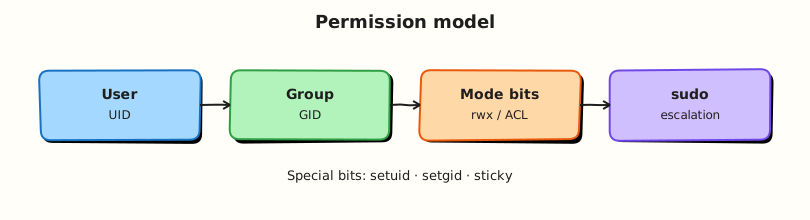
Linux identity sits between people (or automation) and the kernel. Account files store UID/GID. sudo decides which privileged commands are allowed. Files and processes then run as those identities.
Theory
The problem (before any jargon)
Imagine three people on a small team:
- Alice needs to restart one application service
- Bob owns files for a background app — but must not log in interactively
- You need to prove Alice cannot become full root
If everyone shares one root password, one stolen laptop key opens everything. Linux separates identities and gives small permission lists — the same idea as AWS Identity and Access Management (IAM), but on the server itself.
Users and groups — simple words
Analogy: A user is an employee badge. A group is a department badge shared by many employees. The UID/GID are the numeric IDs on the badge — storage systems care about numbers, not names.
| Term | Plain meaning | Where stored |
|---|---|---|
| User | Account with UID, home folder, login shell | /etc/passwd, /etc/shadow |
| Group | Named team with GID and member list | /etc/group |
| Primary group | Default group for new files the user creates | Field in /etc/passwd |
| Secondary groups | Extra teams (for example deploy, docker) | /etc/group membership |
| System user | Low UID, often nologin shell — for apps, not people | /etc/passwd |
| root | UID 0 — full admin | Special account |
What you can say in an interview: “Humans get login shells and limited sudo. Services get system accounts with nologin so nobody SSHs in as the app user.”
Tiny example:
What is sudo?
sudo lets an allowed user run specific commands as another user (usually root), based on rules in /etc/sudoers and files under /etc/sudoers.d/.
Analogy: sudo is borrowing a master key for one named door — not keeping the building master key on your lanyard all day.
| Pattern | Plain meaning | Risk |
|---|---|---|
sudo command | Run one command as root (if allowed) | Safe if allow-list is narrow |
sudo -l | List what you may run | Always check before assuming |
NOPASSWD:ALL | No password + any command | Very dangerous on shared servers |
visudo | Safe editor that checks syntax | Always use this — never raw vim on sudoers |
What you can say in an interview: “I grant exact command paths in /etc/sudoers.d/, run visudo -c, prove with sudo -l, and show one command that must fail.”
Tiny example:
How identity work flows
- Check —
id,getent passwd name,getent group name,sudo -l - Create —
useradd/groupadd(use--systemfor service accounts) - Add to group —
usermod -aG group user(-ameans add; without it you can replace the whole secondary group list) - Edit sudo rules — only with
visudoorvisudo -f /etc/sudoers.d/file - Prove — allow test + deny test + evidence files
Key comparisons
| Object | Important fields | Files |
|---|---|---|
| User | UID, home, shell, primary GID | /etc/passwd, /etc/shadow |
| Group | GID, members | /etc/group |
| sudo rule | Who, as whom, which commands | /etc/sudoers, /etc/sudoers.d/* |
| Account type | Shell | Use for |
|---|---|---|
| Login user | /bin/bash | People |
| System user | /usr/sbin/nologin | Apps, daemons |
| root | /bin/bash or restricted | Break-glass admin only |
Common pitfalls
- Using
usermod -Gwithout-a— removes other groups silently - Editing
/etc/sudoerswith nano/vim — one typo locks everyone out of sudo - Giving
NOPASSWD:ALL“for CI convenience” on a shared jump server - Same username, different UID on two servers sharing Network File System (NFS) — ownership breaks
- Assuming cloud “admin” group means least privilege — check
sudo -lon every new image
Hands-on Lab
Objective
On a practice Ubuntu VM, create a team group, one human lab user, one system service account, and a limited sudoers file. Prove group membership, sudo allow, and sudo deny — then pack evidence under ~/rebash-linux/lab06.
Prerequisites
| Item | Notes |
|---|---|
| Ubuntu 22.04/24.04 | Admin user with sudo |
| VM snapshot | Recommended before creating users |
| Packages | sudo, passwd (default on Ubuntu) |
Lab environment
mkdir -p ~/rebash-linux/lab06 && cd ~/rebash-linux/lab06
set -euo pipefail
whoami | tee admin-user.txt
id | tee admin-id.txt
sudo -n true 2>/dev/null || sudo -v
Expected output
admin-user.txt and admin-id.txt exist; sudo works (you may enter your password once).
Real-world scenario
Security ticket: set up a practice VM with (1) a shared deploy group, (2) a non-login service account for app files, and (3) a human engineer who may restart only rebash-lab.service with sudo — not full root. Attach proof to the change ticket.
Step-by-step tasks
Task 1 – Create group, human user, and service account
cd ~/rebash-linux/lab06
set -euo pipefail

sudo groupadd rebash-lab || true

if ! id rebash-alice >/dev/null 2>&1; then
  sudo useradd -m -s /bin/bash -G rebash-lab rebash-alice
fi

if ! id rebash-svc >/dev/null 2>&1; then
  sudo useradd --system --home /opt/rebash-lab-svc --shell /usr/sbin/nologin \
    --gid rebash-lab rebash-svc
fi

sudo usermod -aG rebash-lab rebash-alice

id rebash-alice | tee id-alice.txt
id rebash-svc | tee id-svc.txt
getent group rebash-lab | tee group-rebash-lab.txt
grep -E 'rebash-alice|rebash-svc' /etc/passwd | tee passwd-snippet.txt
Expected output
id-alice.txt shows group rebash-lab. id-svc.txt shows nologin shell. group-rebash-lab.txt lists members.
Task 2 – Limited sudoers file (file fence + visudo)
Create the sudoers drop-in as a file first:
# REBASH lab — limited sudo for rebash-alice
Defaults:rebash-alice !requiretty
rebash-alice ALL=(root) NOPASSWD: /bin/systemctl status rebash-lab.service, /bin/systemctl restart rebash-lab.service
cd ~/rebash-linux/lab06
set -euo pipefail

# Save the sudoers file-fence above as ~/rebash-linux/lab06/99-rebash-lab-alice first
test -f 99-rebash-lab-alice
sudo visudo -c -f 99-rebash-lab-alice
sudo install -m 0440 99-rebash-lab-alice /etc/sudoers.d/99-rebash-lab-alice
sudo visudo -c

sudo -u rebash-alice sudo -l | tee sudo-l-alice.txt
grep -F 'systemctl' sudo-l-alice.txt
ls -l /etc/sudoers.d/99-rebash-lab-alice | tee sudoers-mode.txt
Expected output
visudo -c reports syntax OK. sudo-l-alice.txt lists the two systemctl paths — not ALL. File mode is -r--r----- (0440).
Task 3 – Negative test and evidence pack
Prove alice is not full root.
cd ~/rebash-linux/lab06
set -euo pipefail

if sudo -u rebash-alice sudo -n /bin/true 2>sudo-denied.txt; then
  echo "ERROR: unrestricted sudo — abort" >&2
  exit 1
fi
grep -Ei 'not allowed|sorry|denied|password' sudo-denied.txt || test -s sudo-denied.txt

tar -czf identity-evidence.tgz \
  admin-user.txt admin-id.txt \
  id-alice.txt id-svc.txt group-rebash-lab.txt passwd-snippet.txt \
  sudo-l-alice.txt sudo-denied.txt sudoers-mode.txt 99-rebash-lab-alice
ls -l identity-evidence.tgz | tee evidence-ls.txt
test -s identity-evidence.tgz
Expected output
/bin/true with sudo is denied for alice. identity-evidence.tgz is not empty.
Validation steps
-
id rebash-aliceshows grouprebash-lab -
id rebash-svcuses a non-login shell -
/etc/sudoers.d/99-rebash-lab-alicemode is0440 -
sudo -u rebash-alice sudo -lshows only intendedsystemctlcommands -
identity-evidence.tgzexists under~/rebash-linux/lab06
Common errors and fixes
| Error | Cause | Fix |
|---|---|---|
useradd: user already exists | Lab re-run | Script checks with id; continue |
visudo: parse error | Wrong sudoers syntax | Fix file; never install broken drop-in |
sudo: a password is required | NOPASSWD rule missing | Check drop-in path; visudo -c |
| Locked out after bad sudoers | Edited without visudo | Root console / recovery; remove bad file |
Challenge exercise
Create user rebash-bob, add to rebash-lab, and add a second drop-in allowing only sudo -u rebash-svc /usr/bin/id:
cd ~/rebash-linux/lab06
set -euo pipefail
if ! id rebash-bob >/dev/null 2>&1; then
  sudo useradd -m -s /bin/bash rebash-bob
fi
sudo usermod -aG rebash-lab rebash-bob
sudo visudo -c -f 99-rebash-lab-bob
sudo install -m 0440 99-rebash-lab-bob /etc/sudoers.d/99-rebash-lab-bob
sudo -u rebash-bob sudo -l | tee sudo-l-bob.txt
Expected output
sudo-l-bob.txt shows only the narrow id command for rebash-svc.
Learning outcomes
- Created human and system accounts with correct shells
- Used
usermod -aGsafely - Installed checked sudoers files; proved allow and deny
- Saved identity proof suitable for a change ticket
Cleanup
cd ~/rebash-linux/lab06
set -euo pipefail

sudo rm -f /etc/sudoers.d/99-rebash-lab-alice /etc/sudoers.d/99-rebash-lab-bob
sudo visudo -c

sudo userdel -r rebash-alice 2>/dev/null || sudo userdel rebash-alice || true
sudo userdel -r rebash-bob 2>/dev/null || sudo userdel rebash-bob || true
sudo userdel rebash-svc 2>/dev/null || true
sudo groupdel rebash-lab 2>/dev/null || true
Validation
- Lab completed under
~/rebash-linux/lab06 - Can explain UID, GID, and why
usermod -aGmatters - Can explain risk of server-wide
NOPASSWD:ALL - Know when to use a system user with
nologin
Code Walkthrough
idandgetentbefore change — know current state.- Small files under
/etc/sudoers.d/— mode0440; one file per role. visudo -cbefore and after — syntax check is non-negotiable.- Prove allow and deny —
sudo -lplus one command that must fail. - Separate people from services — login shell vs
nologin.
Security Considerations
- Treat sudo access as critical — review in change tickets
- Never store passwords or API tokens in sudoers
- Prefer SSH keys for people; disable password login on internet-facing servers (later modules)
- Keep human accounts separate from service accounts
- Log privileged use in
/var/log/auth.logorjournalctl
Common Mistakes
❌ Using usermod -G without -a
✅ Secondary groups are replaced, not added. Fix: always usermod -aG group user, then id user.
❌ Editing sudoers with vim directly.
✅ One typo can remove sudo for everyone. Fix: use visudo only; keep root console open while testing.
❌ Giving NOPASSWD:ALL for convenience.
✅ Any process running as that user becomes root. Fix: allow only exact command paths.
❌ Deleting users without checking file ownership.
✅ Old files keep the old UID. Fix: find / -user name before userdel.