Troubleshooting Linux Systems
Overview
Panic looks like random command typing. Good troubleshooting looks like detective work: symptom → facts → one hypothesis → one change → proof. This tutorial builds that method on a real break-and-fix lab.
Plain problem: “The API is down.” Is it the app, the service unit, disk full, out of memory, or a bad deploy? Without order, you restart everything and hope — extending the outage.
This tutorial teaches a repeatable loop and a lab where you break a systemd unit, diagnose with logs and status commands, fix it, and prove recovery.
This is Tutorial 15 in Module 15: Troubleshooting of the REBASH Academy Linux for Cloud & DevOps Engineers series.
Prerequisites
- Ubuntu VM with systemd
- systemd Services and journalctl or equivalent comfort
sudofor unit files under/etc/systemd/system/
Learning Objectives
By the end of this tutorial, you will be able to:
- State a troubleshooting method in plain language
- Gather first facts: time, change, disk, memory, failed units, logs
- Diagnose a failed systemd unit with
systemctlandjournalctl - Break and fix a misconfigured unit on purpose
- Write a short incident evidence pack
- Answer fresher interview questions on Linux troubleshooting
Architecture
Incidents flow from user-visible symptom down through service state, resources, and logs. Your job is narrowing which layer failed before changing production.
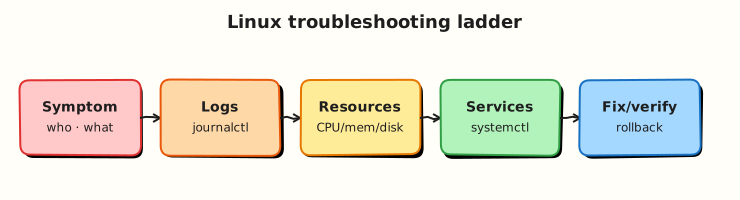
Theory
The problem (before any jargon)
3 am page: “Site unreachable.” Junior restarts nginx three times. Disk was 100% full from logs — nginx was innocent. Gather facts first would have shown df -h at 0 bytes free in thirty seconds.
The method (simple words)
Analogy: Doctor visit — symptoms, vitals, one test, one treatment, follow-up. Not random medicine.
| Step | Action |
|---|---|
| 1. Symptom | What fails, for whom, since when? |
| 2. Timeline | Deploys, cron, config changes? |
| 3. Scope | One host or many? One service? |
| 4. Facts | uptime, df -h, free -h, failed units, logs |
| 5. Hypothesis | One likely cause |
| 6. Change | One fix at a time |
| 7. Proof | Metric/log showing recovery |
| 8. Document | What broke, why, how you fixed |
Interview line: “I never restart without checking systemctl status, journalctl -u, disk, and recent changes.”
First-fact commands
systemd failure patterns
| Signal | Tool |
|---|---|
| Unit failed | systemctl status app.service |
| Why exit code | journalctl -u app.service -b |
| Config syntax | systemd-analyze verify unit.file |
| Dependency order | systemctl list-dependencies |
Common pitfalls
- Restarting before reading logs (loses evidence)
- Multiple changes at once (cannot tell what worked)
- Ignoring disk/memory until late
- No written timeline for post-incident review
Hands-on Lab
Objective
Deploy a small systemd app unit, break it with a bad ExecStart, diagnose and fix, prove recovery — evidence under ~/rebash-linux/lab23.
Prerequisites
| Item | Notes |
|---|---|
| Ubuntu VM | systemd |
sudo | Install unit to /etc/systemd/system/ |
Lab environment
Real-world scenario
Ticket: “rebash-report.service failed after deploy.” You have no prior context — only SSH. Follow the method and attach an evidence pack.
Step-by-step tasks
Task 1 – Working unit and baseline
Create report.sh:
#!/usr/bin/env bash
set -euo pipefail
echo "$(date -Is) report OK" >> /tmp/rebash-report.log
Create rebash-report.service:
[Unit]
Description=REBASH lab23 report oneshot

[Service]
Type=oneshot
ExecStart=/home/USER_PLACEHOLDER/rebash-linux/lab23/bin/report.sh

[Install]
WantedBy=multi-user.target
cd ~/rebash-linux/lab23
mkdir -p bin
cp report.sh bin/
chmod +x bin/report.sh
sed "s/USER_PLACEHOLDER/$USER/" rebash-report.service | sudo tee /etc/systemd/system/rebash-report.service >/dev/null
sudo systemctl daemon-reload
sudo systemctl enable --now rebash-report.service
systemctl status rebash-report.service --no-pager | tee status-ok.txt
test -f /tmp/rebash-report.log
tail -1 /tmp/rebash-report.log | tee log-ok.txt
Expected output
Unit active/exited successfully; log line with timestamp in log-ok.txt.
Task 2 – Break (bad ExecStart), diagnose
cd ~/rebash-linux/lab23
sudo sed -i 's|report.sh|report-MISSING.sh|' /etc/systemd/system/rebash-report.service
sudo systemctl daemon-reload
sudo systemctl start rebash-report.service 2>&1 | tee start-broken.txt || true
systemctl status rebash-report.service --no-pager | tee status-broken.txt
journalctl -u rebash-report.service -b --no-pager | tail -15 | tee journal-broken.txt
grep -i 'failed\|error\|not found' journal-broken.txt status-broken.txt | tee diagnosis.txt
Expected output
Status shows failed state; journal mentions missing script or exit code failure.
Task 3 – Fix and prove recovery
cd ~/rebash-linux/lab23
sudo sed -i 's|report-MISSING.sh|report.sh|' /etc/systemd/system/rebash-report.service
sudo systemctl daemon-reload
sudo systemctl start rebash-report.service
systemctl status rebash-report.service --no-pager | tee status-fixed.txt
journalctl -u rebash-report.service -b --no-pager | tail -5 | tee journal-fixed.txt
grep -q 'report OK' /tmp/rebash-report.log
echo "lab23 troubleshoot OK" | tee evidence.txt
Create incident-summary.md:
# Incident summary — lab23

- Symptom: rebash-report.service failed after change
- Cause: ExecStart pointed to missing script path
- Fix: restored correct path, daemon-reload, start
- Proof: status-fixed.txt and new log line in /tmp/rebash-report.log
Expected output
Service succeeds again; incident summary documents break→fix→prove.
Validation steps
- Baseline success captured before break
- Diagnosis used
systemctl+journalctl(not blind restart) - Fix restored service with evidence files
-
incident-summary.mdcompleted
Common errors and fixes
| Error | Cause | Fix |
|---|---|---|
| Unit not found | Not daemon-reload | sudo systemctl daemon-reload |
| Permission denied in script | Path or perms | chmod +x; absolute paths |
| Empty journal | Wrong unit name | Match -u to unit file |
| Fix does not apply | Forgot reload | Always reload after unit edit |
Challenge exercise
Add systemctl --failed output before and after fix to failed-units.txt.
Learning outcomes
- You followed a structured troubleshoot loop
- You broke and fixed a real systemd unit
- You produced interview-ready incident notes
Cleanup
sudo systemctl disable --now rebash-report.service 2>/dev/null || true
sudo rm -f /etc/systemd/system/rebash-report.service
sudo systemctl daemon-reload
rm -f /tmp/rebash-report.log
Validation
- Evidence under
~/rebash-linux/lab23 - Can recite first-fact commands from memory
- Ready for production hardening next
Code Walkthrough
Type=oneshot— runs script once per start; good for report/cron-style tasks.- Break via ExecStart typo — mirrors real deploy typo incidents.
journalctl -u -b— this boot’s unit story only.- One change fix — restore path, reload, start — scientific method.
incident-summary.md— habit hiring managers like in postmortems.
Security Considerations
- Preserve logs before restart during real incidents (audit trail).
- Do not paste production secrets into ticket evidence.
- Verify you are on the correct host (
hostname,ip) before fixes. - Use sudo deliberately; document privileged changes.
- Blameless postmortems focus on process, not individuals.
Common Mistakes
❌ Restart without logs.
✅ Read journalctl first — restarting may clear transient clues (still check after too).
❌ Many changes at once.
✅ One hypothesis, one change — otherwise you cannot explain what fixed it.
❌ Skipping disk and memory.
✅ df -h and free -h belong in the first two minutes.