systemd Targets, Timers, and Boot
Overview
Boot is not magic: targets group what should start, and timers replace many cron jobs with systemd-native schedules.
When a Linux server boots, something must decide what state the system reaches — command-line server, desktop, rescue mode. Targets are systemd’s way to group units into that desired state. Timers schedule recurring work (like cron, but integrated with systemd logs). Boot analysis tools show why startup is slow.
Plain problem: A backup should run every night, but cron emails nobody reads. A timer tied to a service gives you journalctl evidence and dependency ordering. After a kernel update, boot feels slow — systemd-analyze shows which unit delayed you.
This is Tutorial 11 in Module 7: Services & Boot of the REBASH Academy Linux for Cloud & DevOps Engineers series — practical Linux for Cloud and DevOps work.
Prerequisites
- systemd Services and journalctl
- A practice Ubuntu 22.04/24.04 VM with
sudo - Comfortable with
systemctlandjournalctlfrom the previous tutorial
Learning Objectives
By the end of this tutorial, you will be able to:
- Explain targets vs old runlevels and name common targets
- Read the default target and list units in the boot chain
- Create a systemd timer + service pair and verify with journalctl
- Use
systemd-analyzefor boot timing (read-only) - Remove the lab timer cleanly and save evidence under
~/rebash-linux/lab11 - Answer common fresher interview questions on boot and timers
Architecture
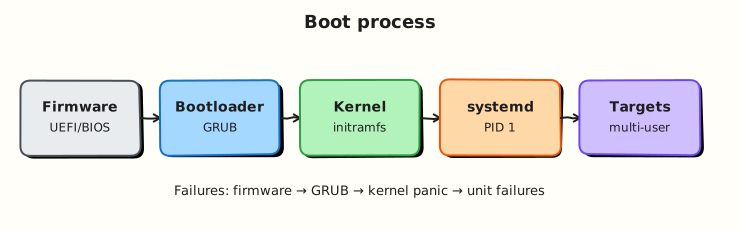
Boot flows from firmware to PID 1 (systemd), which activates a default target (usually multi-user.target on servers). Timers trigger services on a schedule.
Theory
The problem (before any jargon)
Old Linux used numbered runlevels (0 halt, 1 single-user, 3 multi-user, 5 graphical). systemd replaced that with targets — named goals like multi-user.target or graphical.target.
You also need scheduled jobs. cron still exists, but systemd timers integrate with units, journals, and randomised delay (jitter) — useful on fleets.
Targets (simple words)
Analogy: A target is a “mode” sign on the building — “server floor open” vs “maintenance only.” Activating a target pulls in the units grouped under it.
| Target | Plain meaning |
|---|---|
multi-user.target | Normal server — network, login, services, no GUI required |
graphical.target | Desktop environment (depends on multi-user) |
rescue.target | Minimal single-user repair shell |
emergency.target | Even more minimal — broken configs |
Tiny example:
systemctl get-default
systemctl list-dependencies multi-user.target --no-pager | head
systemctl isolate multi-user.target   # do NOT run rescue on remote VM without console
What you can say in an interview: “Targets group boot state; servers usually default to multi-user.target; I inspect with get-default and list-dependencies.”
Interview line: “I never isolate rescue.target on a remote cloud VM without console access — I can lock myself out of networking.”
systemd timers vs cron
| Feature | cron | systemd timer |
|---|---|---|
| Logs | Often email or silent | journalctl on linked service |
| Dependencies | Limited | After=, Requires= on units |
| Random delay | Manual | RandomizedDelaySec= built-in |
| Missed run | May skip | Persistent=true can catch up |
A timer unit (.timer) activates a service unit (.service) on calendar or monotonic schedule.
Tiny example — list timers:
Boot analysis
Interview line: “blame lists units by startup duration; critical-chain shows the longest dependency path this boot.”
Common pitfalls
- Changing default target to graphical on a headless server — wastes resources
- Isolating rescue/emergency on SSH-only hosts — no network, no help
- Timer without matching
.service— nothing runs - Forgetting
systemctl enable timer— timer does not survive reboot
Hands-on Lab
Objective
Inspect boot target and timing (read-only), create a lab timer that appends a line to a file every minute, prove runs in journalctl, then remove cleanly.
Prerequisites
| Item | Notes |
|---|---|
| Ubuntu VM with systemd | Previous lab completed |
sudo | Install timer units |
| Remote VM safety | Do not switch to rescue/emergency targets |
Lab environment
Real-world scenario
Ops wants a nightly disk-usage snapshot. They prefer systemd timers so failures appear in the same journal as other services. You prototype a one-minute timer locally, prove two firings, and attach logs to the change request.
Step-by-step tasks
Task 1 – Boot target and timing (read-only)
cd ~/rebash-linux/lab11
systemctl get-default | tee default-target.txt
systemd-analyze time | tee boot-time.txt
systemd-analyze blame | head -15 | tee boot-blame-head.txt
test -s default-target.txt && test -s boot-time.txt
cat default-target.txt
Expected output
default-target.txt usually shows graphical.target (desktop/WSL) or multi-user.target (server). boot-time.txt shows total boot duration.
Task 2 – Create timer service script and units
Create timer-task.sh:
#!/usr/bin/env bash
set -euo pipefail
echo "lab11 timer run $(date -Is)" >> /home/USER/rebash-linux/lab11/timer-runs.log
Create rebash-lab11.service:
[Unit]
Description=REBASH lab11 timer task

[Service]
Type=oneshot
ExecStart=/home/USER/rebash-linux/lab11/timer-task.sh
Create rebash-lab11.timer:
[Unit]
Description=REBASH lab11 timer every minute

[Timer]
OnBootSec=30
OnUnitActiveSec=1min
Persistent=true

[Install]
WantedBy=timers.target
Prepare local copies with your username:
cd ~/rebash-linux/lab11
sed "s|/home/USER|/home/$USER|g" timer-task.sh > timer-task.local.sh
mv timer-task.local.sh timer-task.sh
chmod +x timer-task.sh
sed "s|/home/USER|/home/$USER|g" rebash-lab11.service > rebash-lab11.local.service
sed "s|/home/USER|/home/$USER|g" rebash-lab11.timer > rebash-lab11.local.timer
touch timer-runs.log
test -x timer-task.sh
Expected output
Scripts and unit templates exist; timer-task.sh is executable.
Task 3 – Install, enable timer, wait for runs
cd ~/rebash-linux/lab11
sudo cp rebash-lab11.local.service /etc/systemd/system/rebash-lab11.service
sudo cp rebash-lab11.local.timer /etc/systemd/system/rebash-lab11.timer
sudo systemctl daemon-reload
sudo systemctl enable --now rebash-lab11.timer
systemctl list-timers rebash-lab11.timer --no-pager | tee timer-list.txt
echo "Waiting ~70s for timer firings..."
sleep 70
wc -l timer-runs.log | tee timer-run-count.txt
test "$(wc -l < timer-runs.log)" -ge 1
Expected output
timer-list.txt shows next trigger time. timer-runs.log has at least one line after waiting.
Task 4 – journalctl proof
cd ~/rebash-linux/lab11
sudo journalctl -u rebash-lab11.service -n 10 --no-pager | tee timer-journal.txt
grep -q 'Finished' timer-journal.txt || grep -q 'lab11' timer-journal.txt
systemctl is-enabled rebash-lab11.timer | tee timer-enabled.txt
echo "lab11 timers OK" | tee evidence.txt
Expected output
Journal shows service start/finish entries. timer-enabled.txt prints enabled.
Validation steps
- Default target and boot time captured without changing boot config
- Timer fired at least once (
timer-runs.log) -
journalctl -u rebash-lab11.serviceshows runs - You did not isolate rescue/emergency on a remote VM
Common errors and fixes
| Error | Cause | Fix |
|---|---|---|
| Timer listed but log empty | Service path wrong | Run timer-task.sh manually; check journal |
Failed to create timer-runs.log | Permissions | Ensure script writes to your home path |
| Timer not enabled at reboot | Only started timer | systemctl enable rebash-lab11.timer |
| No second run yet | 1min interval | Wait full 70s; check list-timers |
Challenge exercise
Add RandomizedDelaySec=15 to the timer, reload, and show the next trigger in list-timers (jitter spreads load in production fleets).
Add to timer [Timer] section, reinstall, and verify:
cd ~/rebash-linux/lab11
grep -q RandomizedDelaySec rebash-lab11.local.timer || echo "RandomizedDelaySec=15" >> rebash-lab11.local.timer
sudo cp rebash-lab11.local.timer /etc/systemd/system/rebash-lab11.timer
sudo systemctl daemon-reload
sudo systemctl restart rebash-lab11.timer
systemctl list-timers rebash-lab11.timer --no-pager | tee challenge-timer.txt
grep -q 'rebash-lab11' challenge-timer.txt
Learning outcomes
- You read default target and boot timing safely
- You created timer + oneshot service with journal evidence
- You understand why timers beat silent cron on managed hosts
Cleanup
sudo systemctl disable --now rebash-lab11.timer
sudo rm -f /etc/systemd/system/rebash-lab11.service /etc/systemd/system/rebash-lab11.timer
sudo systemctl daemon-reload
cd ~/rebash-linux/lab11
# Keep evidence and local unit copies for revision
Validation
- Lab completed under
~/rebash-linux/lab11 - Can explain target vs runlevel in one sentence
- Ready for storage tutorials next
Code Walkthrough
get-default— know server vs desktop boot goal before changing anything.- Timer + oneshot service — timer triggers; service does work once per firing.
Persistent=true— catch up missed runs after downtime (backups).systemd-analyze blame— read-only performance triage after updates.- Never isolate rescue on SSH-only hosts — keep a console path or use
systemctl restart networkinginstead.
Security Considerations
- Rescue/emergency targets can disable network — use only with out-of-band console.
- Timer scripts run as root unless
User=is set — prefer least-privilege service user. - Validate script paths — timers are a common persistence mechanism for attackers.
- Restrict write access to
/etc/systemd/system. - Review
systemctl list-timers --allduring audits.
Common Mistakes
❌ Rescue target over SSH.
✅ You lose network and may lock the session. Fix: use cloud serial console or avoid isolate on remote VMs.
❌ Enabled service but disabled timer.
✅ The schedule unit must be enabled: systemctl enable foo.timer.
❌ Monolithic cron migration.
✅ Copying cron lines without User= and logging loses audit trail. Fix: one service unit per job with journal.
❌ Ignoring boot regressions.
✅ Kernel updates can slow boot. Fix: capture systemd-analyze blame before/after in change notes.