Scheduling with cron, at, and Timers
Overview
Servers run tasks while people sleep: backups, certificate checks, report scripts, and disk cleanup. cron, at, and systemd timers are the usual ways to schedule that work.
Plain problem: A backup “ran every night” but nobody checked logs. Disk filled up because the cleanup job silently failed for weeks. Scheduling is not “set and forget” — you must see output and prove the job ran.
Linux offers three common schedulers:
- cron — recurring calendar jobs (every minute, daily at 2 am, …)
- at — one-shot jobs (“run this once at 3 pm”)
- systemd timers — modern unit-based schedules integrated with
journalctl
This is Tutorial 11 in Module 11: Scheduling & Automation of the REBASH Academy Linux for Cloud & DevOps Engineers series.
Prerequisites
- Ubuntu 22.04/24.04 practice VM with
sudo - Package Management completed (you can install packages)
- Basic understanding of shell commands and redirection
Learning Objectives
By the end of this tutorial, you will be able to:
- Explain cron,
at, and systemd timers in plain language - Write a user crontab entry and verify it ran
- Schedule a one-shot job with
at - Create a simple systemd timer and read logs with
journalctl - Diagnose a broken schedule (wrong path, missing env, silent failure)
- Answer fresher interview questions on Linux scheduling
Architecture
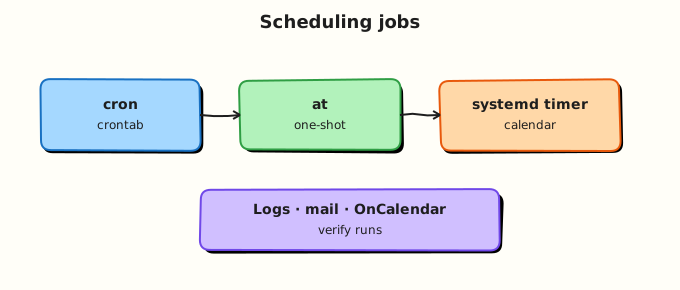
A scheduler wakes up at the right time and runs a command or unit. cron reads per-user crontab files and system files under /etc/cron.*. at queues one job in a spool. systemd pairs a .service unit (what to run) with a .timer unit (when to run).
Theory
The problem (before any jargon)
Your team’s SSL certificate expired. The renewal script exists — it “should run weekly”. It did not. Root cause: cron used a relative path; the job ran as a user with a different PATH than your SSH session; output went nowhere.
Scheduling failures are quiet. You learn to log to a file and check journal or mail.
What is cron? (simple words)
Analogy: cron is a wall calendar with alarms. Each line says “at this minute/hour/day, run this command”. The crontab is your personal calendar file; root and /etc/cron.d/ hold system calendars.
Five time fields + command:
* * * * * command
│ │ │ │ │
│ │ │ │ └── day of week (0–7, Sun=0)
│ │ │ └──── month (1–12)
│ │ └────── day of month (1–31)
│ └──────── hour (0–23)
└────────── minute (0–59)
Example — every 5 minutes, append a timestamp:
Interview line: “Cron jobs inherit a minimal environment — I use absolute paths and redirect stdout/stderr to a log file.”
at — one-shot scheduling
Analogy: at is a single alarm clock. “Run this script once at 15:00 today.”
Install on Ubuntu if missing: sudo apt install -y at (and enable atd).
systemd timers
Analogy: If cron is a paper calendar, a systemd timer is a calendar synced with your building’s maintenance system — same logs (journalctl), same dependency model as services.
A timer unit triggers a service unit. Prefer timers on modern Ubuntu when you already use systemd for services — easier observability.
| Tool | Best for | Logs |
|---|---|---|
| cron | Simple recurring user scripts | File you redirect to, or mail |
| at | Delayed one-shot | /var/spool/at/ / mail |
| systemd timer | Service-integrated schedules | journalctl -u |
Cron environment trap
Interactive SSH gives you full PATH, HOME, maybe AWS_* vars. Cron does not. Scripts that work in your shell fail in cron because python3 or kubectl is “not found”.
Fix: Absolute paths in scripts; set env in crontab (PATH=... line) or source a small env file at the top of the script.
Common pitfalls
- Forgetting
2>&1— errors hidden - Using
%in cron lines without escaping (cron treats%specially) - Running heavy jobs every minute on production
- No log rotation on cron output files
Hands-on Lab
Objective
Create a user cron job, schedule an at job, deploy a systemd timer, break the cron job on purpose, fix it, and prove all three under ~/rebash-linux/lab17.
Prerequisites
| Item | Notes |
|---|---|
| Ubuntu VM | systemd-based |
sudo | For timer install under /etc/systemd/system/ |
| Packages | cron, at (usually preinstalled) |
Lab environment
mkdir -p ~/rebash-linux/lab17/logs
cd ~/rebash-linux/lab17
systemctl is-active cron || sudo systemctl enable --now cron
Real-world scenario
Ticket: “Prove the nightly disk-report script runs and leaves evidence. Also schedule a one-time cleanup tomorrow. Platform team wants a systemd timer for the same report on reboot.” You implement all three and document proof.
Step-by-step tasks
Task 1 – User crontab with logging
Create disk-report.sh:
#!/usr/bin/env bash
set -euo pipefail
LOG="$HOME/rebash-linux/lab17/logs/disk-report.log"
{
  echo "=== $(date -Is) ==="
  df -h /
} >> "$LOG"
cd ~/rebash-linux/lab17
chmod +x disk-report.sh
./disk-report.sh
test -s logs/disk-report.log
crontab -l 2>/dev/null | tee crontab-before.txt || true
Add a crontab line (run every minute for lab speed):
( crontab -l 2>/dev/null; echo '* * * * * /home/$USER/rebash-linux/lab17/disk-report.sh' ) | crontab -
crontab -l | tee crontab-after.txt
sleep 65
tail -3 logs/disk-report.log | tee cron-proof.txt
grep -q '=== ' cron-proof.txt
Expected output
After ~65 seconds, cron-proof.txt shows a new timestamp line from the scheduled run.
Task 2 – Break, fix, and prove (wrong path)
cd ~/rebash-linux/lab17
( crontab -l 2>/dev/null | sed 's|disk-report.sh|disk-report-BROKEN.sh|'; ) | crontab -
sleep 65
wc -l logs/disk-report.log | tee lines-before-fix.txt
( crontab -l 2>/dev/null | sed 's|disk-report-BROKEN.sh|disk-report.sh|'; ) | crontab -
sleep 65
tail -1 logs/disk-report.log | tee cron-after-fix.txt
grep -q '===' cron-after-fix.txt
Expected output
During the broken window, log line count stops growing. After fix, new timestamp appears in cron-after-fix.txt.
Task 3 – at job and systemd timer
Create rebash-disk-report.service:
[Unit]
Description=REBASH lab17 disk report (oneshot)

[Service]
Type=oneshot
ExecStart=/home/USER_PLACEHOLDER/rebash-linux/lab17/disk-report.sh
Create rebash-disk-report.timer:
[Unit]
Description=REBASH lab17 disk report timer

[Timer]
OnBootSec=2min
Persistent=true

[Install]
WantedBy=timers.target
Replace USER_PLACEHOLDER with your username in the service file, then:
cd ~/rebash-linux/lab17
sed "s/USER_PLACEHOLDER/$USER/" rebash-disk-report.service | sudo tee /etc/systemd/system/rebash-disk-report.service >/dev/null
sudo cp rebash-disk-report.timer /etc/systemd/system/
sudo systemctl daemon-reload
sudo systemctl enable --now rebash-disk-report.timer
systemctl list-timers --all | grep rebash | tee timer-list.txt
echo "echo at-ok >> $HOME/rebash-linux/lab17/logs/at.log" | at now + 1 minute 2>&1 | tee at-schedule.txt
sleep 70
test -s logs/at.log && echo "at ran OK" | tee at-proof.txt
echo "lab17 scheduling OK" | tee evidence.txt
Expected output
timer-list.txt shows rebash-disk-report.timer. at-proof.txt confirms the one-shot job ran.
Validation steps
- Cron job ran and appended to
logs/disk-report.log - You broke cron with a bad path and fixed it
- systemd timer is listed in
systemctl list-timers -
atjob createdlogs/at.log
Common errors and fixes
| Error | Cause | Fix |
|---|---|---|
| Cron never runs | cron service stopped | sudo systemctl enable --now cron |
| Script works manually, not in cron | Relative path or missing PATH | Absolute paths; log stderr |
at: command not found | Package not installed | sudo apt install -y at; start atd |
| Timer inactive | Not enabled | sudo systemctl enable --now unit.timer |
Challenge exercise
Add a crontab comment line documenting RPO-style “max staleness 24h” for your disk report, and verify with crontab -l.
Learning outcomes
- You scheduled recurring, one-shot, and systemd-timer jobs
- You diagnosed a silent cron failure
- You can explain scheduling trade-offs in interviews
Cleanup
crontab -r 2>/dev/null || true
sudo systemctl disable --now rebash-disk-report.timer 2>/dev/null || true
sudo rm -f /etc/systemd/system/rebash-disk-report.{service,timer}
sudo systemctl daemon-reload
atrm $(atq | awk '{print $1}') 2>/dev/null || true
Validation
- Lab evidence under
~/rebash-linux/lab17 - Can draw cron vs timer vs at on a whiteboard
- Ready for logging tutorial next
Code Walkthrough
*/5 * * * *— every 5 minutes; use sparingly in production.- Absolute script path in crontab — avoids PATH surprises.
Type=oneshotservice — runs once per timer trigger; good for reports.OnBootSec=2min— timer fires after boot;Persistent=truecatches missed runs.- Break/fix task — mirrors real on-call: job stopped updating log → wrong path in crontab.
Security Considerations
- Cron runs as the user who owns the crontab — protect script permissions (
chmod 750, no world-writable dirs). - Do not store secrets in crontab; use restricted env files with
0600permissions. - Review
/etc/cron.d/and root crontab on shared servers. - Limit who can use
at(/etc/at.deny,/etc/at.allow). - systemd unit
ExecStartmust not invoke untrusted writable scripts.
Common Mistakes
❌ No logging from cron jobs.
✅ Always redirect stdout and stderr. Silent failure is the default failure mode.
❌ Editing system cron as root casually.
✅ A typo in /etc/cron.d/ affects the whole host. Test as user crontab first.
❌ Every-minute jobs in production.
✅ Wastes CPU and fills logs. Choose intervals that match business need.