Production Hardening and Performance
Overview
Moving from “it works on my VM” to production raises two questions: Is it safe? and Will it stay fast under load? You need sensible baselines for hardening and performance — not kernel-developer depth on day one.
Plain problem: A server accepts connections from everywhere, time drifts breaking TLS, one runaway process consumes all file descriptors, and nobody measured normal CPU before launch day.
This tutorial covers lab-scoped hardening (sysctl, limits) and performance baselines (time sync, listening ports audit) with proof under ~/rebash-linux/lab24.
This is Tutorial 16a in Module 16: Production Linux of the REBASH Academy Linux for Cloud & DevOps Engineers series.
Prerequisites
- Ubuntu practice VM with
sudo - Troubleshooting Linux Systems
- SSH Hardening (conceptual overlap)
Learning Objectives
By the end of this tutorial, you will be able to:
- Explain hardening vs performance baselines in plain language
- Apply a sysctl drop-in safely and verify values
- Set limits for open files in a lab drop-in
- Verify time sync with chrony/timedatectl
- Audit listening ports and failed units
- Answer fresher interview questions on production Linux baselines
Architecture
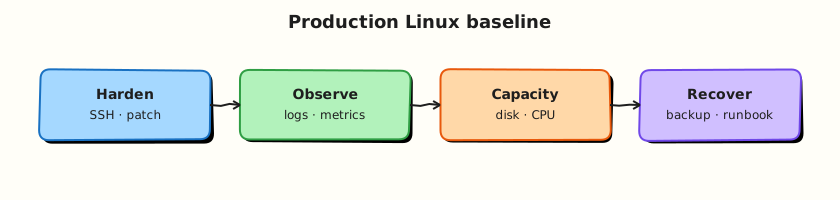
Hardening reduces attack surface and resource exhaustion risk. Performance baselines measure normal behaviour so alerts mean something. Both use drop-in config files and verification commands — not one-off magic tweaks.
Theory
The problem (before any jargon)
Launch day: API TLS fails because clock was five minutes wrong. Separate incident: legacy service opens thousands of sockets — hits default nofile limit — partial outage. Baselines prevent both classes of surprise.
Hardening (simple words)
Analogy: Hardening is locking side doors, not just the front — fewer ways in, fewer ways one guest can wreck the building.
Common areas:
| Area | Tool | Example |
|---|---|---|
| Kernel network knobs | sysctl | net.ipv4.ip_forward, SYN cookies |
| Process limits | limits.conf / systemd | Max open files, processes |
| Time | chrony | Accurate clock for TLS/logs |
| Exposure audit | ss, systemctl | What listens; what failed |
Interview line: “I apply sysctl via drop-ins, verify with sysctl, sync time with chrony, and audit listening ports after deploy.”
sysctl
Live values in /proc/sys/. Persistent drop-ins under /etc/sysctl.d/*.conf.
Lab example (syncookies help under SYN flood — teach concept, do not over-tune on laptop):
Always: sudo sysctl --system after adding drop-in.
limits (ulimit / PAM / systemd)
Analogy: limits cap how many files or processes one user may have — stops one leak from eating the host.
/etc/security/limits.d/ drop-ins for login sessions; systemd units can set LimitNOFILE=.
Performance baselines
Not the same as hardening — you measure normal:
vmstat/iostatidle and util (prior tutorial)- Peak connection counts
- Application latency under expected load
Without baseline, alerts are guesses.
Common pitfalls
- Copying random sysctl lists from blogs without understanding
- Setting limits so low legitimate apps fail
- Disabling NTP “because VM clock looks fine”
- Hardening without monitoring — brittle unknown state
Hands-on Lab
Objective
Add lab sysctl and limits drop-ins, verify time sync, audit listeners, break sysctl with a typo, fix, prove — evidence under ~/rebash-linux/lab24.
Prerequisites
| Item | Notes |
|---|---|
| Ubuntu VM | chrony or systemd-timesyncd |
sudo | For /etc/sysctl.d, limits.d |
Lab environment
mkdir -p ~/rebash-linux/lab24 && cd ~/rebash-linux/lab24
timedatectl status | tee time-before.txt
Real-world scenario
Platform ticket: “Baseline new app server — syncookies on, nofile raised for app user, time synced, document listeners.” You implement lab-scoped drop-ins and an audit snapshot.
Step-by-step tasks
Task 1 – sysctl drop-in and verify
Create 99-rebash-lab24.conf:
cd ~/rebash-linux/lab24
sudo cp 99-rebash-lab24.conf /etc/sysctl.d/99-rebash-lab24.conf
sudo sysctl --system 2>&1 | tee sysctl-apply.txt
sysctl net.ipv4.tcp_syncookies | tee syncookies-value.txt
grep -q '= 1' syncookies-value.txt
Expected output
syncookies-value.txt shows net.ipv4.tcp_syncookies = 1.
Task 2 – limits drop-in and port audit
Create 99-rebash-lab24.conf (limits):
# REBASH lab24 — raised open files for lab user
* soft nofile 8192
* hard nofile 8192
cd ~/rebash-linux/lab24
sudo cp 99-rebash-lab24-limits.conf /etc/security/limits.d/99-rebash-lab24.conf
ulimit -n | tee ulimit-before-login.txt
ss -tlnp | tee listening-ports.txt
systemctl --failed --no-pager | tee failed-units.txt
timedatectl status | tee time-after.txt
grep -q 'synchronized: yes' time-after.txt || grep -q 'System clock synchronized: yes' time-after.txt
Expected output
Listening ports listed; time sync shows synchronized (may need systemd-timesyncd/chrony active).
Task 3 – Break sysctl syntax, fix, prove
cd ~/rebash-linux/lab24
echo 'not.a.real.key = banana' | sudo tee /etc/sysctl.d/99-rebash-broken.conf >/dev/null
sudo sysctl --system 2>&1 | tee sysctl-broken.txt || true
grep -qi 'error\|unknown\|invalid' sysctl-broken.txt || echo "sysctl reported bad key" | tee sysctl-broken.txt
sudo rm -f /etc/sysctl.d/99-rebash-broken.conf
sudo sysctl --system 2>&1 | tee sysctl-fixed.txt
sysctl net.ipv4.tcp_syncookies | tee syncookies-after-fix.txt
echo "lab24 production baseline OK" | tee evidence.txt
Expected output
Bad key produces sysctl warning/error; after removal, apply succeeds and syncookies still 1.
Validation steps
- sysctl drop-in applied and verified
- limits drop-in installed (new login may be needed for full effect)
- Time sync and listening port audit saved
- Break/fix sysctl demonstrated
Common errors and fixes
| Error | Cause | Fix |
|---|---|---|
| sysctl not applied | Typo in path | Files must end .conf in /etc/sysctl.d/ |
| ulimit unchanged | Existing session | Log out/in or su - user |
| Time not synced | NTP disabled | sudo systemctl enable --now systemd-timesyncd |
| ss permission denied | Needs root for process names | Use sudo ss -tlnp |
Challenge exercise
Save vmstat 1 3 baseline to vmstat-baseline.txt for future comparison (links to monitoring tutorial).
Learning outcomes
- You applied kernel and limits drop-ins safely
- You audited exposure and time sync
- You validated config before assuming success
Cleanup
sudo rm -f /etc/sysctl.d/99-rebash-lab24.conf /etc/security/limits.d/99-rebash-lab24.conf
sudo sysctl --system
Validation
- Evidence under
~/rebash-linux/lab24 - Can explain one sysctl and one limit knob
- Ready for backup and DR next
Code Walkthrough
/etc/sysctl.d/drop-ins — modular kernel tuning; easier rollback than one giant file.sysctl --system— load all drop-ins; shows errors on bad keys.- limits.d — PAM applies on new sessions; document for app users.
ss -tlnp— production exposure audit after every deploy.- timedatectl — TLS and distributed logs need correct time.
Security Considerations
- sysctl changes affect whole host — test on staging; document rollback.
- Raising limits increases DoS surface if one user compromised — scope per service user.
- Remove unused listeners; firewall complements ss audit.
- Automate baseline checks in CI for golden images.
- Combine with SSH and MAC layers from prior security tutorials.
Common Mistakes
❌ Random sysctl paste.
✅ Understand each knob; wrong TCP settings hurt latency and debuggability.
❌ Ignoring time sync.
✅ Certificate validation and log correlation break with clock skew.
❌ No baseline before tuning.
✅ Measure first; tune second; measure again.