Permissions, ACLs, and Special Bits
Overview
This error shows up constantly in Linux work:
Permission denied
Most of the time it is not a mysterious kernel bug. It is mode (read/write/execute bits), ownership, umask, or an Access Control List (ACL) — plus occasionally special bits (sticky, SUID, SGID).
Linux file access starts with three classes: user (owner), group, and other. Each can have read (4), write (2), and execute (1). Directories need the execute bit to traverse (enter) the path. ACLs add named users or groups beyond those three classes. The sticky bit on /tmp-style folders stops users deleting each other’s files.
This is Tutorial 7 in Module 4: Users & Permissions of the REBASH Academy Linux for Cloud & DevOps Engineers series — practical Linux for Cloud and DevOps work.
Lab safety
Create lab users only on a practice VM. Requires sudo and the acl package.
Prerequisites
- Users, Groups, and sudo — you understand users, groups, and
id - A practice Ubuntu 22.04/24.04 VM with
sudo - Install ACL tools:
sudo apt-get install -y acl
Learning Objectives
By the end of this tutorial, you will be able to:
- Set and verify POSIX modes with
chmodand ownership withchown/chgrp - Explain umask and check the current umask
- Grant a named user read access with
setfacland prove it withgetfacl - Apply the sticky bit on a shared drop directory and explain why it matters
- Pack allow/deny evidence under
~/rebash-linux/lab07
Architecture
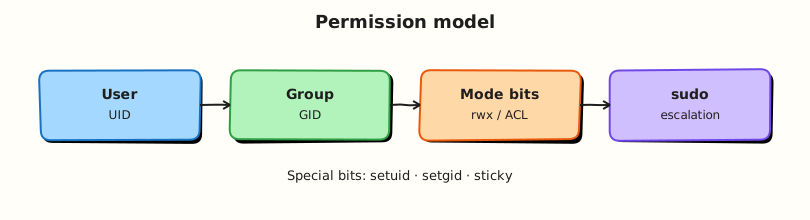
Permissions sit between identity (UID/GID from the previous tutorial) and the filesystem. Mode bits, ACLs, and special bits decide whether a process may read, write, traverse, or delete.
Theory
The problem (before any jargon)
Your team shares a deploy folder. A junior runs chmod 777 shared so “everyone can write”. Security rejects the change ticket. Auditors flag world-writable paths. Meanwhile a contractor needs read-only access but is not in the deploy group.
POSIX owner/group/other is not enough. You need groups, ACLs, and sometimes the sticky bit — not 777.
POSIX permissions — simple words
Analogy: A file is a room. Owner holds the main key. Group members share a team key. Other is everyone else in the building.
| Class | Letter in ls -l | Meaning |
|---|---|---|
| User (u) | First rwx triplet | Owner |
| Group (g) | Second triplet | Members of file’s group |
| Other (o) | Third triplet | Everyone else |
| Bit | Value | On a file | On a directory |
|---|---|---|---|
| r | 4 | Read content | List names |
| w | 2 | Change content | Create/delete names |
| x | 1 | Run as program | Traverse (enter/search) |
What you can say in an interview: “Without execute on every directory in the path, you get Permission denied even if the file mode looks open.”
Tiny example:
umask — default mask for new files
umask subtracts bits from the default when you create files. Common 0022 yields 644 files and 755 directories.
What you can say in an interview: “Loose umask on CI can create world-readable artefacts; tight umask can break the next job — set it deliberately and verify with stat.”
Tiny example:
ACLs — named users beyond owner/group/other
Analogy: ACLs are guest badges with their own rules — “contractor may read, not write” — without opening the building to other.
| Command | Plain meaning |
|---|---|
getfacl path | Show ACL + POSIX mode |
setfacl -m u:alice:r-- path | Give alice read |
setfacl -d -m … | Default ACL for new children |
What you can say in an interview: “I use ACLs when two users need different access but should not share a primary group — and I prove with getfacl plus login-as tests.”
Tiny example:
Special bits — sticky, SUID, SGID
| Bit | On directories | On executables |
|---|---|---|
| Sticky (+t) | Only owner/root can delete others’ files (/tmp) | Rare |
| SGID (+s on dir) | New files inherit directory’s group | Runs with file’s group |
| SUID (+s on file) | N/A | Runs with file owner’s UID — audit carefully |
What you can say in an interview: “Sticky on shared drop dirs; SGID on team project trees; SUID on random binaries is a security finding.”
Tiny example:
Common pitfalls
- Fixing access with
chmod 777instead of group or ACL - Forgetting directory execute — path lookup fails
- Leaving test SUID binaries on a server
- ACLs on filesystems mounted without ACL support
- Changing ownership of SSH keys and locking yourself out (
~/.sshshould be700/600)
Hands-on Lab
Objective
Create a shared project directory with correct group modes, grant a contractor read-only ACL, demonstrate sticky-bit delete protection, and save evidence under ~/rebash-linux/lab07.
Prerequisites
| Item | Notes |
|---|---|
| Ubuntu with sudo | chmod, chown, acl package |
| Lab users | Created in Task 1 |
Lab environment
mkdir -p ~/rebash-linux/lab07 && cd ~/rebash-linux/lab07
set -euo pipefail
sudo DEBIAN_FRONTEND=noninteractive apt-get install -y acl
umask | tee umask-default.txt
whoami | tee lab-admin.txt
Expected output
acl tools available. umask-default.txt shows a value such as 0022.
Real-world scenario
Security ticket: shared deploy folder on a practice VM — group-writable for deployers, read-only ACL for a contractor, sticky bit so users cannot delete each other’s drop files. Prove allow and deny before closing the ticket.
Step-by-step tasks
Task 1 – Group, users, and POSIX modes (SGID directory)
cd ~/rebash-linux/lab07
set -euo pipefail

sudo groupadd rebash-perm || true
if ! id rebash-dev >/dev/null 2>&1; then
  sudo useradd -m -s /bin/bash -G rebash-perm rebash-dev
fi
if ! id rebash-contractor >/dev/null 2>&1; then
  sudo useradd -m -s /bin/bash rebash-contractor
fi
sudo usermod -aG rebash-perm rebash-dev

sudo mkdir -p /opt/rebash-perm/shared
sudo chown root:rebash-perm /opt/rebash-perm/shared
sudo chmod 2770 /opt/rebash-perm/shared

sudo -u rebash-dev bash -c 'echo deploy-artefact > /opt/rebash-perm/shared/app.txt'
sudo -u rebash-dev bash -c 'ls -l /opt/rebash-perm/shared/app.txt' | tee ls-shared-file.txt
stat -c '%A %U %G %n' /opt/rebash-perm/shared /opt/rebash-perm/shared/app.txt | tee stat-shared.txt
getent group rebash-perm | tee group-rebash-perm.txt
grep 's' stat-shared.txt
Expected output
Directory mode shows SGID (s in group execute). app.txt group is rebash-perm. rebash-dev could create the file.
Task 2 – ACL for contractor (read allow, write deny)
cd ~/rebash-linux/lab07
set -euo pipefail

sudo setfacl -m u:rebash-contractor:rx /opt/rebash-perm/shared
sudo setfacl -m u:rebash-contractor:r /opt/rebash-perm/shared/app.txt
sudo getfacl /opt/rebash-perm/shared /opt/rebash-perm/shared/app.txt | tee getfacl-shared.txt

sudo -u rebash-contractor cat /opt/rebash-perm/shared/app.txt | tee contractor-read.txt
if sudo -u rebash-contractor bash -c 'echo hack > /opt/rebash-perm/shared/app.txt' 2>contractor-write-deny.txt; then
  echo "ERROR: contractor could write" >&2
  exit 1
fi
grep -Ei 'Permission denied|denied' contractor-write-deny.txt
grep -F 'user:rebash-contractor:r' getfacl-shared.txt
Expected output
Contractor read succeeds. Write fails with Permission denied. getfacl shows contractor entries.
Task 3 – Sticky drop box and evidence pack
cd ~/rebash-linux/lab07
set -euo pipefail

sudo mkdir -p /opt/rebash-perm/drop
sudo chown root:rebash-perm /opt/rebash-perm/drop
sudo chmod 1770 /opt/rebash-perm/drop

sudo -u rebash-dev bash -c 'echo from-dev > /opt/rebash-perm/drop/dev.txt'
if ! id rebash-dev2 >/dev/null 2>&1; then
  sudo useradd -m -s /bin/bash -G rebash-perm rebash-dev2
fi
sudo -u rebash-dev2 bash -c 'echo from-dev2 > /opt/rebash-perm/drop/dev2.txt'

if sudo -u rebash-dev2 rm -f /opt/rebash-perm/drop/dev.txt 2>sticky-deny.txt; then
  echo "ERROR: sticky bit did not block delete" >&2
  exit 1
fi
grep -Ei 'Permission denied|denied|Operation not permitted' sticky-deny.txt
ls -ld /opt/rebash-perm/drop | tee ls-drop.txt
grep -E 't|T' ls-drop.txt

tar -czf permissions-evidence.tgz \
  lab-admin.txt umask-default.txt \
  ls-shared-file.txt stat-shared.txt group-rebash-perm.txt \
  getfacl-shared.txt contractor-read.txt contractor-write-deny.txt \
  sticky-deny.txt ls-drop.txt
ls -l permissions-evidence.tgz | tee evidence-ls.txt
test -s permissions-evidence.tgz
Expected output
Sticky delete of another user’s file is denied. ls-drop.txt shows t in mode. Archive exists.
Validation steps
-
/opt/rebash-perm/sharedis mode2770(ordrwxrws---) -
getfaclshows contractor read on the file - Contractor write fails; sticky delete fails
-
permissions-evidence.tgzexists under~/rebash-linux/lab07
Common errors and fixes
| Error | Cause | Fix |
|---|---|---|
setfacl: command not found | acl package missing | sudo apt-get install -y acl |
Operation not supported | FS without ACL | Use ext4/xfs; check mount options |
| Contractor cannot enter dir | Missing x on directory ACL | setfacl -m u:user:rx on directory |
| Sticky test succeeds | Mode not sticky | chmod 1770 / chmod +t; re-check |
Challenge exercise
Add a default ACL so new files grant contractor read automatically:
cd ~/rebash-linux/lab07
sudo setfacl -d -m u:rebash-contractor:r /opt/rebash-perm/shared
sudo -u rebash-dev bash -c 'echo new-file > /opt/rebash-perm/shared/new.txt'
sudo getfacl /opt/rebash-perm/shared/new.txt | tee default-acl-proof.txt
grep 'user:rebash-contractor:r' default-acl-proof.txt
Expected output
New file inherits contractor read ACL without manual setfacl on each file.
Learning outcomes
- Applied SGID group-shared directory modes
- Used ACLs for a named user without widening “other”
- Proved sticky-bit delete protection
- Saved permission evidence for a change ticket
Cleanup
cd ~/rebash-linux/lab07
set -euo pipefail
sudo rm -rf /opt/rebash-perm
sudo userdel -r rebash-dev 2>/dev/null || true
sudo userdel -r rebash-dev2 2>/dev/null || true
sudo userdel -r rebash-contractor 2>/dev/null || true
sudo groupdel rebash-perm 2>/dev/null || true
Validation
- Lab completed under
~/rebash-linux/lab07 - Can explain POSIX mode vs ACL vs sticky bit
- Know why
chmod 777fails security review - Can list when SUID on files is a finding
Code Walkthrough
ls -l+stat+id— who is trying what?namei -l path— which directory denies traverse?- Prefer group (
2770) or ACL overchmod o+rwx getfaclafter every ACL change — prove named entries- Allow + deny tests as the real user — not only as root
Security Considerations
- Never make secrets world-readable (
o+ron keys) - Keep
~/.sshat700and private keys at600 - Audit unexpected SUID/SGID binaries on hardened images
- ACLs can hide access — include
getfaclin reviews - Sticky bit reduces cross-user deletion in shared directories
Common Mistakes
❌ Fixing access with chmod 777
✅ World-writable paths fail audits. Fix: group (2770) or named ACL.
❌ Forgetting directory execute.
✅ Path lookup fails even when file mode looks open. Fix: x on every directory in the path.
❌ Assuming ACL works on every mount.
✅ Some network mounts ignore ACLs. Fix: verify with getfacl after mount.
❌ Casual SUID binaries.
✅ Bugs become privilege escalation. Fix: capabilities, sudo allow-lists, or narrow root helpers.