Containers — Namespaces, cgroups, OverlayFS, and OCI
Overview
When people say “we run it in Docker” or “Kubernetes pods”, beginners often think containers are tiny virtual machines (VMs). They are not. This tutorial shows what the Linux kernel actually does — namespaces, cgroups, and overlays — without requiring a Kubernetes cluster.
Plain problem: A container exits with Out Of Memory (OOM) killed, or disk fills with “image layers”. YAML and kubectl do not explain why — namespaces, cgroups, and OverlayFS on the host do.
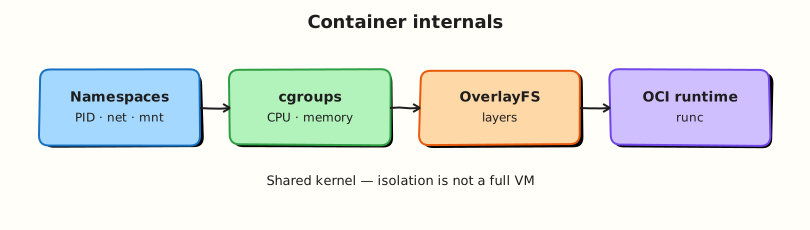
A container is a normal Linux process (or tree of processes) with:
- Namespaces — isolated view (own process IDs, network, mount table, …)
- cgroups — CPU/memory/I/O limits
- Often OverlayFS — layered root filesystem
- OCI standards — portable image and runtime formats (
runc,crun)
This is Tutorial 14 in Module 14: Containers & Cloud of the REBASH Academy Linux for Cloud & DevOps Engineers series.
Prerequisites
- Ubuntu practice VM with
sudo - Docker Engine or
docker.iopackage (lab installs if missing) - Basic process concepts from Process Management helpful
Learning Objectives
By the end of this tutorial, you will be able to:
- Explain containers vs VMs in plain language
- Name key namespaces and what each isolates
- Explain cgroups memory/CPU limits simply
- Inspect a running container from the host with
ps,lsns,findmnt - Run a safe
unsharedemo without full Kubernetes - Answer fresher interview questions on container internals
Architecture
Container runtimes (Docker → containerd → runc) configure namespaces and cgroups, mount overlay rootfs, then exec your process. Kubernetes schedules pods on nodes that use the same kernel primitives.
Theory
The problem (before any jargon)
Interview question: “What is a container?” Weak answer: “Docker.” Strong answer: “A process with isolated namespaces and cgroup limits, started by an OCI runtime on Linux.” That answer comes from this page.
Containers vs VMs (simple words)
Analogy: A VM is a whole flat with its own kitchen (guest OS + kernel). A container is a roommate with labelled cupboards — same building kernel, separate labelled spaces (namespaces), and a lease on electricity (cgroups).
| VM | Container | |
|---|---|---|
| Kernel | Guest + host | Shared host kernel |
| Boot | Full OS | Starts one app/process |
| Isolation | Hardware virtualisation | Namespaces + cgroups |
| Typical start time | Minutes | Seconds |
Interview line: “Containers share the host kernel; isolation is OS-level, not hardware-level like VMs.”
Namespaces (plain first)
Namespaces make a process think it has its own system slice:
| Namespace | Isolates |
|---|---|
| pid | Process IDs |
| net | Network interfaces, routes |
| mnt | Mount points |
| uts | Hostname |
| ipc | Inter-process communication |
| user | User/group IDs (user namespaces) |
cgroups (control groups)
Analogy: cgroups are utility caps — “this container may use 512 MB RAM and half a CPU.” Exceed memory → OOM kill inside the cgroup.
Modern Linux uses cgroups v2 unified hierarchy under /sys/fs/cgroup/.
(Docker path varies — lab inspects live container.)
OverlayFS
OverlayFS stacks read-only lower layers + writable upper layer → container root filesystem. Many layers → disk use on the node.
OCI
Open Container Initiative (OCI) defines:
- Image spec — filesystem bundle format
- Runtime spec — how to run a container (
config.json+ rootfs)
Docker builds OCI-compatible images; runc is a common low-level runtime.
Safe unshare demo (no Docker required)
Requires user namespaces available; run on lab VM only.
Common pitfalls
- Treating containers as VM substitutes for strong isolation boundaries
- No memory limits → one container OOMs the node
- Ignoring host disk from image/layer buildup
- Debugging only inside container without checking node cgroups
Hands-on Lab
Objective
Run a Docker container with a memory limit, inspect namespaces and cgroups from the host, run unshare, and save proof under ~/rebash-linux/lab22.
Prerequisites
| Item | Notes |
|---|---|
| Ubuntu VM | 2 GB+ RAM recommended |
| Docker | Lab installs docker.io if needed |
User in docker group OR use sudo docker |
Lab environment
mkdir -p ~/rebash-linux/lab22 && cd ~/rebash-linux/lab22
sudo apt update && sudo apt install -y docker.io util-linux
sudo systemctl enable --now docker
Real-world scenario
Platform ticket: “Pod OOMKilled — prove whether the cgroup memory limit caused it.” You reproduce a small limit, watch the container die, inspect cgroup files, and document host-side evidence.
Step-by-step tasks
Task 1 – Run container with memory limit
cd ~/rebash-linux/lab22
sudo docker run -d --name lab22-mem --memory=64m nginx:alpine
sudo docker ps --filter name=lab22-mem | tee docker-ps.txt
CID=$(sudo docker inspect -f '{{.Id}}' lab22-mem)
echo "$CID" | tee container-id.txt
test -n "$CID"
Expected output
Container lab22-mem running; container-id.txt holds full ID.
Task 2 – Host inspection (namespaces, mounts, cgroups)
cd ~/rebash-linux/lab22
PID=$(sudo docker inspect -f '{{.State.Pid}}' lab22-mem)
echo "container pid=$PID" | tee container-pid.txt
sudo lsns -p "$PID" | tee lsns-container.txt
sudo findmnt -T /proc/"$PID"/root 2>/dev/null | tee findmnt-container.txt || sudo findmnt | grep overlay | head -5 | tee findmnt-container.txt
sudo cat /proc/"$PID"/cgroup | tee cgroup-proc.txt
test -s lsns-container.txt
Expected output
lsns-container.txt shows multiple namespace types (pid, net, mnt, …). Overlay mount appears in findmnt output.
Task 3 – Break (OOM), fix (raise limit), prove
cd ~/rebash-linux/lab22
sudo docker update --memory=32m lab22-mem
sudo docker exec lab22-mem sh -c 'dd if=/dev/zero of=/dev/shm/fill bs=1M count=64' 2>&1 | tee oom-attempt.txt || true
sleep 2
sudo docker inspect -f '{{.State.Status}} {{.State.OOMKilled}}' lab22-mem | tee oom-status.txt
sudo docker rm -f lab22-mem 2>/dev/null || true
sudo docker run -d --name lab22-mem-fixed --memory=256m nginx:alpine
sudo docker inspect -f '{{.State.Status}}' lab22-mem-fixed | tee fixed-status.txt
unshare --fork --pid --mount-proc echo unshare-ok 2>&1 | tee unshare-proof.txt
echo "lab22 containers OK" | tee evidence.txt
Expected output
Low memory limit may show OOMKilled true or container restarted. After 256m limit, status running. unshare-proof.txt shows success or documents permission note.
Validation steps
- Docker container ran with
--memorylimit -
lsnsoutput saved for container PID - OOM or stress behaviour observed and documented
- You can explain container vs VM in one minute
Common errors and fixes
| Error | Cause | Fix |
|---|---|---|
| Cannot connect to Docker | Daemon down | sudo systemctl start docker |
| Permission denied | Not in docker group | Use sudo docker |
| unshare fails | User namespaces restricted | Note in evidence; use Docker inspect path |
| No overlay in findmnt | Different storage driver | docker info — graph driver |
Challenge exercise
Run sudo docker info | grep -E 'Storage Driver|Cgroup' and save to docker-info.txt.
Learning outcomes
- You saw containers as host processes with namespaces
- You linked memory limits to OOM behaviour
- You have host-side inspection commands for interviews
Cleanup
Validation
- Evidence under
~/rebash-linux/lab22 - Can whiteboard namespaces + cgroups
- Ready for troubleshooting methodology next
Code Walkthrough
docker run --memory=64m— sets cgroup memory max; lab scales down to trigger OOM.docker inspect State.Pid— maps container to host process forlsns.lsns -p— proves namespaces without Kubernetes./proc/PID/cgroup— shows cgroup membership path.unshare --fork --pid— minimal “container feel” without Docker.
Security Considerations
- Containers are not VMs — kernel escapes are critical CVE class; patch nodes.
- Run as non-root inside containers; use user namespaces where supported.
- Limit capabilities (
--cap-drop); read-only rootfs when possible. - SELinux/AppArmor profiles apply to container processes on the host.
- Scan images for CVEs; signed images from trusted registries.
Common Mistakes
❌ No resource limits.
✅ Always set memory/CPU requests and limits (Docker flags or Kubernetes resources).
❌ Debugging only inside container.
✅ OOM and disk are host cgroup/filesystem stories — inspect from the node.
❌ Root in Dockerfile.
✅ Use non-root USER; reduces risk if container boundary fails.