Load Balancer Operations and Health Checks
Overview
Load balancer operations is day-2 work on pools that already exist: health checks that reflect truth, connection draining during deploys, capacity and timeout tuning, and diagnosing flapping or uneven distribution. Fundamentals covered Layer 4 vs Layer 7; this tutorial is how you keep the virtual IP (VIP) healthy in production.
In Cloud and DevOps work most user-visible outages are balancers sending traffic to dead or overloaded targets — or marking healthy targets down because the probe is wrong. Bad drains cause 502/503/504 spikes every release. Operators who understand health and drain maths ship safer.
In production, a static /health that always returns 200 while the app cannot reach its database is worse than no check. Idle timeout mismatches produce mysterious gateway timeouts while the app is fine. Align cloud deregistration delay with Kubernetes readiness and preStop sleeps.
This is Tutorial 25 in Module 16: Production Networking of the REBASH Academy Networking for Cloud & DevOps Engineers series. It is written for Cloud, DevOps, Platform, and SRE engineers. By the end you will run local backends and a health-check script that detects a failed instance under ~/rebash-networking/lab25.
Prerequisites
- Load Balancing Fundamentals
- Production DNS Operations
- Practice host with
bash,python3,curl
Learning Objectives
By the end of this tutorial, you will be able to:
- Tune health check path, interval, and thresholds in principle
- Run local backend processes that expose
/health - Detect a failed backend with a probe script
- Explain draining / deregister before terminate
- Interpret common 502/503/504 causes at the balancer
- Coordinate DNS TTL with LB cutovers
Architecture
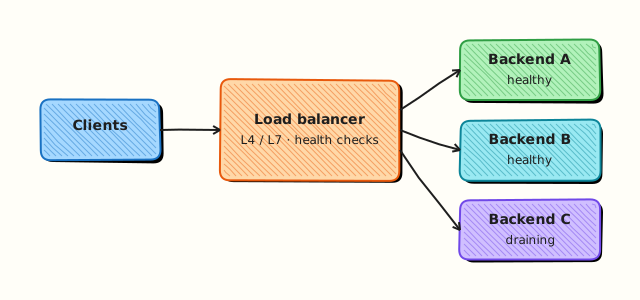
Clients hit the load balancer; the balancer probes backends and sends traffic only to healthy targets.
Theory
What it is
A load balancer distributes connections across backends. A health check periodically asks each backend if it is ready. Failed checks remove the target from the pool (after unhealthy thresholds). Draining stops new connections while in-flight requests finish.
Why it matters
Wrong probes empty the pool (outage) or keep serving dead app processes (errors). Flapping thresholds cause oscillation. Cold starts fail checks until warmup completes — capacity planning must include that window.
How it works
- Define readiness —
/healthshould fail if critical dependencies are down (or use a dedicated readiness that matches user needs). - Probe — interval, timeout, healthy/unhealthy thresholds.
- Route — only healthy targets receive new work.
- Drain — deregister, wait deregistration delay, then terminate.
- Watch — healthy host count, 5xx, latency, targets per AZ.
| Concern | Operational focus |
|---|---|
| Truthful health | Probe real readiness, not a static always-200 file |
| Flapping | Raise thresholds; fix unstable deps |
| Draining | Stop new cons; allow in-flight; then kill |
| Timeouts | LB idle timeout vs app timeouts |
| Deploy safety | Surge capacity + readiness gates |
Common pitfalls
- Health check on
/that is slow or auth-protected - Thresholds so tight that brief GC pauses empty the pool
- Terminating instances before drain completes
- Ignoring AZ imbalance (all healthy hosts in one AZ)
- DNS cutover without enough healthy capacity on the new pool
Hands-on Lab
Objective
Start two local HTTP backends with /health, run a health-check script that curls each backend, then fail one backend and show detection. Work under ~/rebash-networking/lab25.
Prerequisites
python3,curl,bash- Ports
18081and18082free on localhost
Lab environment
Workspace: ~/rebash-networking/lab25
mkdir -p ~/rebash-networking/lab25 && cd ~/rebash-networking/lab25
set -euo pipefail
whoami | tee admin-user.txt
python3 --version | tee python-version.txt
Expected output
workspace ready; Python available.
Real-world scenario
Before changing a cloud target group, you rehearse health-check behaviour locally: two app instances, a probe that matches production’s /health path, and proof that killing one instance flips it to UNHEALTHY without guessing from user 502s alone.
Step-by-step tasks
Task 1 – Create backends with /health
Create backend_server.py:
#!/usr/bin/env python3
"""Tiny backend with /health for LB health-check labs."""
from http.server import BaseHTTPRequestHandler, HTTPServer
import os
import sys
PORT = int(sys.argv[1])
NAME = sys.argv[2]
FLAG = sys.argv[3] # path to flag file; missing => unhealthy
class Handler(BaseHTTPRequestHandler):
def log_message(self, fmt, *args):
return
def do_GET(self):
if self.path.split("?", 1)[0] == "/health":
if os.path.exists(FLAG):
body = f"ok {NAME}\n".encode()
self.send_response(200)
else:
body = f"fail {NAME}\n".encode()
self.send_response(503)
self.send_header("Content-Type", "text/plain")
self.send_header("Content-Length", str(len(body)))
self.end_headers()
self.wfile.write(body)
return
body = f"hello from {NAME}\n".encode()
self.send_response(200)
self.send_header("Content-Type", "text/plain")
self.send_header("Content-Length", str(len(body)))
self.end_headers()
self.wfile.write(body)
if __name__ == "__main__":
HTTPServer(("127.0.0.1", PORT), Handler).serve_forever()
# Healthy flags
touch backend-a.healthy backend-b.healthy
pkill -f 'backend_server.py 18081' 2>/dev/null || true
pkill -f 'backend_server.py 18082' 2>/dev/null || true
python3 backend_server.py 18081 A backend-a.healthy >backend-a.log 2>&1 &
echo $! > backend-a.pid
python3 backend_server.py 18082 B backend-b.healthy >backend-b.log 2>&1 &
echo $! > backend-b.pid
sleep 1
curl -sS http://127.0.0.1:18081/health | tee health-a-initial.txt
curl -sS http://127.0.0.1:18082/health | tee health-b-initial.txt
grep -q '^ok A' health-a-initial.txt
grep -q '^ok B' health-b-initial.txt
Expected output
both /health responses start with ok.
Task 2 – Health-check script across the pool
Create healthcheck.sh:
#!/usr/bin/env bash
set -euo pipefail
OUT="${1:-pool-health.tsv}"
shift || true
TARGETS=("$@")
if [[ ${#TARGETS[@]} -eq 0 ]]; then
TARGETS=(http://127.0.0.1:18081/health http://127.0.0.1:18082/health)
fi
ts="$(date -u +%Y-%m-%dT%H:%M:%SZ)"
if [[ ! -f "$OUT" ]]; then
printf 'timestamp\ttarget\thttp_code\tstatus\tbody\n' > "$OUT"
fi
unhealthy=0
for url in "${TARGETS[@]}"; do
set +e
body="$(curl -sS --max-time 2 "$url" 2>/dev/null)"
code="$(curl -sS -o /dev/null --max-time 2 -w '%{http_code}' "$url" 2>/dev/null || echo 000)"
set -e
status=UNHEALTHY
if [[ "$code" == "200" ]]; then
status=HEALTHY
else
unhealthy=$((unhealthy + 1))
fi
body_one="$(printf '%s' "$body" | tr '\n' ' ' | head -c 80)"
printf '%s\t%s\t%s\t%s\t%s\n' "$ts" "$url" "$code" "$status" "$body_one" | tee -a "$OUT"
done
echo "summary_unhealthy=${unhealthy}" | tee summary.txt
if [[ "$unhealthy" -gt 0 ]]; then
exit 2
fi
exit 0
chmod +x healthcheck.sh
./healthcheck.sh pool-health.tsv \
http://127.0.0.1:18081/health \
http://127.0.0.1:18082/health | tee healthcheck-all-ok.txt
test "$(cat summary.txt)" = "summary_unhealthy=0"
Expected output
both targets HEALTHY; script exits 0.
Task 3 – Fail one backend and detect it
cd ~/rebash-networking/lab25
set -euo pipefail
# Fail backend B (simulates process not ready / dependency down)
rm -f backend-b.healthy
sleep 1
set +e
./healthcheck.sh pool-health.tsv \
http://127.0.0.1:18081/health \
http://127.0.0.1:18082/health | tee healthcheck-one-down.txt
rc=$?
set -e
test "$rc" -eq 2
grep -q 'summary_unhealthy=1' summary.txt
grep -E '18082/health.*UNHEALTHY' pool-health.tsv
grep -E '18081/health.*HEALTHY' pool-health.tsv
# Restore B
touch backend-b.healthy
./healthcheck.sh pool-health-restored.tsv \
http://127.0.0.1:18081/health \
http://127.0.0.1:18082/health | tee healthcheck-restored.txt
tar -czf lb-ops-evidence.tgz \
admin-user.txt python-version.txt backend_server.py healthcheck.sh \
health-a-initial.txt health-b-initial.txt \
pool-health.tsv pool-health-restored.tsv summary.txt \
healthcheck-all-ok.txt healthcheck-one-down.txt healthcheck-restored.txt
ls -l lb-ops-evidence.tgz | tee evidence-ls.txt
Expected output
script detects B as UNHEALTHY while A stays HEALTHY; restore succeeds; archive exists.
Validation steps
- Two backends served
/healthon 18081/18082 - Failure of B produced
summary_unhealthy=1and exit code 2 - A remained HEALTHY during B’s failure
- Evidence under
~/rebash-networking/lab25
Common errors and fixes
| Error | Cause | Fix |
|---|---|---|
Address already in use | Ports busy | Change ports or pkill old backend_server.py |
| Always UNHEALTHY | Flag file path wrong | Ensure backend-*.healthy paths match argv |
curl: (7) Failed to connect | Server not started | Check backend-a.log / PID files |
| Script exit 0 with one down | Logic bug | Confirm Task 3 uses exit 2 path |
Challenge exercise
Write mini-lb.sh that loops backends in order (round-robin) for / requests, skipping UNHEALTHY targets using the same /health rule. Show ten curl requests through the mini-LB while B is down, all served by A. Save mini-lb-out.txt.
Learning outcomes
- Ran truthful
/healthbackends - Detected a failed target with an automated probe
- Related local detection to cloud target-group behaviour
Cleanup
cd ~/rebash-networking/lab25
set -euo pipefail
if [[ -f backend-a.pid ]]; then kill "$(cat backend-a.pid)" 2>/dev/null || true; fi
if [[ -f backend-b.pid ]]; then kill "$(cat backend-b.pid)" 2>/dev/null || true; fi
pkill -f 'backend_server.py 18081' 2>/dev/null || true
pkill -f 'backend_server.py 18082' 2>/dev/null || true
rm -f backend-a.pid backend-b.pid backend-a.healthy backend-b.healthy
Validation
- Lab finished under
~/rebash-networking/lab25/ - You can explain healthy/unhealthy thresholds
- You know why always-200 health checks are dangerous
- You can describe drain-before-terminate
Code Walkthrough
Production LB operations usually follow:
- Inspect — healthy host count, 5xx, target states
- Validate probes — curl
/healthfrom a vantage that matches the LB - Drain before terminate; wait deregistration delay
- Watch cold start — do not send full traffic before readiness
- Least surprise — align DNS TTL and LB capacity during cutovers
Security Considerations
- Health endpoints should not leak secrets or stack traces
- Prefer internal probe networks; do not expose admin health on the public internet without care
- Protect LB management APIs with strong IAM
- TLS on listeners; manage certificate expiry
- Rate-limit abusive clients at the edge where possible
Common Mistakes
Health check returns 200 while the app cannot serve users
The pool looks healthy and serves errors. Fix: make /health (or readiness) check critical dependencies.
Terminate before drain
In-flight requests become 502/504. Fix: deregister, wait the configured delay, then stop the process.
Probe interval/timeout longer than deploy patience
You wait forever or force-kill. Fix: tune thresholds with deploy automation in mind.
All targets in one AZ
AZ failure takes the VIP down. Fix: balance capacity across AZs; watch per-AZ healthy counts.
Best Practices
- Separate liveness vs readiness ideas (especially on Kubernetes)
- Alert on healthy host count = 0 and on flapping
- Load test with one AZ loss scenario
- Document 502 vs 503 vs 504 meaning for your stack
- Keep a canary target group for risky deploys
Troubleshooting
| Symptom | Likely cause | Fix |
|---|---|---|
| 502 Bad Gateway | Upstream crash / RST | Check target health and app logs |
| 503 Service Unavailable | No healthy targets | Fix health; add capacity |
| 504 Gateway Timeout | Idle/app timeout mismatch | Align LB and app timeouts |
| Flapping targets | Unstable health / tight thresholds | Fix app; relax thresholds carefully |
| One backend never used | Failed health / wrong SG | Curl health from LB subnet vantage |
Summary
Load balancer reliability is mostly truthful health checks, careful drains, and capacity across AZs. Practise detection locally before changing cloud pools. Next, ship firewall changes safely in Firewall Change Control and Production ACLs.
Interview Questions
1. What should a production /health (or readiness) endpoint verify?
Reveal answer
Enough to know the instance can serve user work — often local process health plus critical dependency reachability (for example database). A static page that always returns 200 while the app is wedged hides outages.
2. Difference between healthy threshold and unhealthy threshold?
Reveal answer
Unhealthy threshold is how many failed probes mark a target down. Healthy threshold is how many successes bring it back. Tuning them reduces flapping while still removing bad targets quickly enough.
3. What is connection draining / deregistration delay?
Reveal answer
When removing a target, the balancer stops new connections and allows existing ones to finish for a configured time before the target is fully gone. Deploy systems must wait at least that long before killing the process.
4. How do you triage 502 vs 503 vs 504 at an LB?
Reveal answer
502 often means the upstream returned an invalid response or reset. 503 often means no healthy backend or deliberate overload response. 504 means the gateway timed out waiting on the upstream. Confirm with healthy host count, target states, and app timeouts.
5. Why might health checks pass from your laptop but fail from the load balancer?
Reveal answer
Different network path: Security Groups may allow your IP but not the LB probe addresses, or the app binds only to localhost. Always test from a vantage equivalent to the balancer’s probes.
6. How do DNS TTL and LB cutovers interact?
Reveal answer
Clients may keep the old VIP until TTL expires. You need capacity on both sides during overlap, or a carefully lowered TTL (see production DNS ops) so traffic moves when you intend.
7. How did your lab prove health-check detection?
Reveal answer
Two local backends exposed /health; removing the healthy flag on B made the probe script mark B UNHEALTHY (exit 2) while A stayed HEALTHY. That is the same idea as a cloud target leaving the pool.
Related Tutorials
- Networking for Cloud & DevOps – Overview
- Production DNS Operations (previous)
- Firewall Change Control and Production ACLs (next)
- Load Balancing Fundamentals
- Reverse Proxy and Ingress Basics