Firewall Change Control and Production ACLs
Overview
Firewall change control turns “please open port 443” into a reviewed, validated, reversible Access Control List (ACL) or Security Group change. Production ACLs include cloud security groups, network ACLs, host firewalls (nftables, iptables, Uncomplicated Firewall (UFW)), and perimeter rules. The artefact is a change package: intent, exact rule, risk, validation, rollback, and expiry for temporary allows.
In Cloud and DevOps work most “security” outages are change outages — a blocked health check or a forgotten 0.0.0.0/0. Treat SG/NSG/nft/UFW edits like production code: pull request, plan, canary, verify, rollback.
In production, a single wrong deny can lock out SSH and monitoring. Never practise lockout rules on a shared jump server. This lab applies only a temporary localhost rule you can remove safely.
This is Tutorial 26 in Module 16: Production Networking of the REBASH Academy Networking for Cloud & DevOps Engineers series. It is written for Cloud, DevOps, Platform, SRE, and DevSecOps engineers. By the end you will have a proposed rule file, a validation script, and cleanup proof under ~/rebash-networking/lab26. Next you enter Module 17: Troubleshooting.
Prerequisites
- Firewalls and Access Control
- Load Balancer Operations and Health Checks
- Practice Ubuntu VM with
sudo(not a shared production bastion)
Learning Objectives
By the end of this tutorial, you will be able to:
- Write a change request with source, destination, port, justification, and expiry
- Author a proposed
nft/ufwrule file with rollback notes in comments - Validate syntax and rule order before apply
- Apply only a temporary localhost rule and prove it
- Roll back quickly without production lockout
- Prefer temporary break-glass allows with automatic expiry planning
Architecture
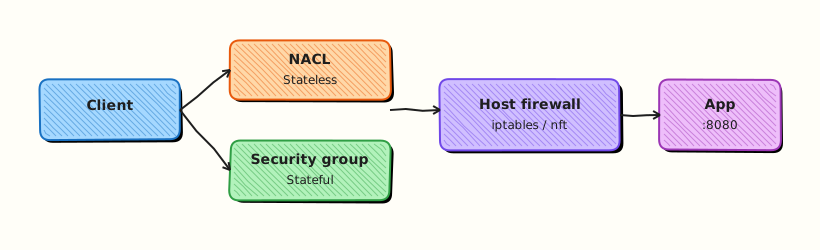
Change control wraps every ACL edit: request → review → validate → limited apply → prove → rollback/expiry.
Theory
What it is
An ACL or firewall rule decides whether a packet is accepted or denied. Change control is the process around editing those rules so the team can answer: who approved it, what exactly changed, how you proved it, and how you undo it.
# Example intent (do not paste into production blindly)
# allow tcp 127.0.0.1:18090 from 127.0.0.1 for lab expiry 2h
Why it matters
Untracked firewall edits cause outages and breaches. Auditors ask who approved the rule and when it expires. Dual control and Infrastructure as Code (IaC) exist because a single typing mistake can expose a database or block every health check.
How it works
- Capture intent and ticket (who needs what, for how long).
- Specify the exact rule: source, protocol, port, direction, destination.
- State blast radius (which apps break if wrong) — plain meaning: how wide the damage can be.
- List validation commands for before/after.
- Prepare rollback (previous IaC commit or explicit delete).
- Set expiry for temporary allows and calendar a removal.
- Apply in a small window; prove allow and deny; keep evidence.
| Field | Example |
|---|---|
| Source | 127.0.0.1/32 or sg-app |
| Destination | 127.0.0.1:18090 |
| Protocol/port | TCP 18090 |
| Justification | Lab health-check listener |
| Expiry | Delete before end of change window |
| Rollback | Delete lab chain / previous IaC commit |
Common pitfalls
- Applying broad
0.0.0.0/0“just for now” - No rollback tested
- Rule order mistakes (first match wins on many systems)
- Blocking the health-check path
- Editing production SSH filters from your only SSH session with no console
Hands-on Lab
Objective
Write a proposed nft/ufw rule file with rollback comments, build a validation script (syntax/order checks), and apply only a temporary localhost rule that you remove in Cleanup. Never lock out remote SSH. Workspace: ~/rebash-networking/lab26.
Prerequisites
- Ubuntu with
sudo - Prefer
nftif available; otherwiseiptables - Optional:
ufwfor proposal text only
Lab environment
Workspace: ~/rebash-networking/lab26
mkdir -p ~/rebash-networking/lab26 && cd ~/rebash-networking/lab26
set -euo pipefail
whoami | tee admin-user.txt
command -v nft >/dev/null 2>&1 && nft --version | tee nft-version.txt || echo "nft: not installed" | tee nft-version.txt
command -v iptables >/dev/null 2>&1 && iptables --version | tee iptables-version.txt || true
command -v ufw >/dev/null 2>&1 && ufw version | tee ufw-version.txt || echo "ufw: not installed" | tee ufw-version.txt
Expected output
tool versions recorded.
Real-world scenario
A developer asks to open a temporary port for a local diagnostic listener. You refuse a vague “open 18090 to the world,” write a precise localhost-only proposal with expiry and rollback, validate it, apply a short-lived host rule that cannot strand remote SSH, and attach evidence to the change ticket.
Step-by-step tasks
Task 1 – Proposed rule file with rollback notes
Create proposed-lab26.nft:
# CHANGE REQUEST (lab26)
# Ticket: LAB-26-LOCALHOST
# Intent: Allow TCP 18090 only on loopback for a temporary diagnostic listener
# Source: 127.0.0.1
# Destination: 127.0.0.1:18090
# Direction: ingress on lo
# Expiry: delete before end of lab (see Cleanup)
# Blast radius: localhost only — must NOT touch remote SSH access or the host default input policy
# Validation: nft -c -f this file; curl 127.0.0.1:18090 after listener up
# ROLLBACK:
# nft delete table inet rebash_lab26
# # If using iptables fallback instead:
# # iptables -D INPUT -i lo -p tcp --dport 18090 -s 127.0.0.1 -j ACCEPT
# ORDER NOTES:
# - Lab table is isolated (inet rebash_lab26)
# - Do not insert broad drops into the host's main SSH path
# - First-match systems: keep specific allows before wide denies
table inet rebash_lab26 {
chain input {
type filter hook input priority 0; policy accept;
iifname "lo" tcp dport 18090 accept
}
}
Create proposed-lab26.ufw.txt:
# UFW-style proposal (documentation artefact — not auto-applied in this lab)
# ufw allow from 127.0.0.1 to 127.0.0.1 port 18090 proto tcp
# ROLLBACK: ufw delete allow from 127.0.0.1 to 127.0.0.1 port 18090 proto tcp
# NEVER in this lab: ufw deny 22 / ufw --force reset / default deny without console access
Expected output
proposal files exist with rollback comments.
Task 2 – Validation script (syntax and safety checks)
Create validate-firewall-change.sh:
#!/usr/bin/env bash
set -euo pipefail
FILE="${1:-proposed-lab26.nft}"
report=validation-report.txt
: > "$report"
pass() { echo "PASS: $*" | tee -a "$report"; }
fail() { echo "FAIL: $*" | tee -a "$report"; exit 1; }
[[ -f "$FILE" ]] || fail "missing $FILE"
grep -qi 'ROLLBACK' "$FILE" || fail "proposal missing ROLLBACK notes"
grep -qi 'expiry' "$FILE" || fail "proposal missing expiry notes"
if grep -E '0\.0\.0\.0/0|anywhere' "$FILE" >/dev/null 2>&1; then
fail "proposal contains wide open source"
else
pass "no 0.0.0.0/0 in proposal"
fi
if grep -Ei 'dport 22|--dport 22|deny 22|drop.*22' "$FILE" >/dev/null 2>&1; then
fail "proposal appears to change SSH port 22"
else
pass "no SSH port 22 deny/drop in proposal"
fi
if command -v nft >/dev/null 2>&1; then
if nft -c -f "$FILE" 2>nft-check.err; then
pass "nft -c syntax OK"
else
cat nft-check.err | tee -a "$report"
fail "nft -c syntax error"
fi
else
pass "nft not installed — skipped nft -c (iptables fallback path allowed)"
fi
grep -q 'table inet rebash_lab26' "$FILE" || fail "expected isolated lab table name"
pass "isolated lab table present"
echo "validation_ok=1" | tee -a "$report"
chmod +x validate-firewall-change.sh
./validate-firewall-change.sh proposed-lab26.nft
grep -q 'validation_ok=1' validation-report.txt
Expected output
validation-report.txt shows PASS lines and validation_ok=1.
Task 3 – Temporary localhost apply, prove, evidence
cd ~/rebash-networking/lab26
set -euo pipefail
# Start a tiny localhost listener on 18090
python3 - << 'PY' >listener-18090.log 2>&1 &
from http.server import BaseHTTPRequestHandler, HTTPServer
class H(BaseHTTPRequestHandler):
def log_message(self, *a): return
def do_GET(self):
b = b"lab26-ok\n"
self.send_response(200)
self.send_header("Content-Length", str(len(b)))
self.end_headers()
self.wfile.write(b)
HTTPServer(("127.0.0.1", 18090), H).serve_forever()
PY
echo $! > listener-18090.pid
sleep 1
APPLY_MODE=none
if command -v nft >/dev/null 2>&1; then
sudo nft delete table inet rebash_lab26 2>/dev/null || true
sudo nft -f proposed-lab26.nft
sudo nft list table inet rebash_lab26 | tee nft-applied.txt
APPLY_MODE=nft
else
# iptables localhost-only allow (idempotent-ish)
sudo iptables -C INPUT -i lo -p tcp --dport 18090 -s 127.0.0.1 -j ACCEPT 2>/dev/null \
|| sudo iptables -I INPUT -i lo -p tcp --dport 18090 -s 127.0.0.1 -j ACCEPT
sudo iptables -L INPUT -n -v | head -n 20 | tee iptables-applied.txt
APPLY_MODE=iptables
fi
echo "apply_mode=${APPLY_MODE}" | tee apply-mode.txt
curl -sS --max-time 2 http://127.0.0.1:18090/ | tee curl-localhost.txt
grep -q 'lab26-ok' curl-localhost.txt
# Negative note: we did not open 18090 on non-loopback interfaces
ss -lnt | grep 18090 | tee ss-18090.txt
grep -E '127\.0\.0\.1:18090|::1:18090' ss-18090.txt
tar -czf firewall-change-evidence.tgz \
admin-user.txt nft-version.txt proposed-lab26.nft proposed-lab26.ufw.txt \
validate-firewall-change.sh validation-report.txt apply-mode.txt \
curl-localhost.txt ss-18090.txt \
$(ls nft-applied.txt iptables-applied.txt iptables-version.txt ufw-version.txt nft-check.err 2>/dev/null || true)
ls -l firewall-change-evidence.tgz | tee evidence-ls.txt
Expected output
localhost curl succeeds; listener bound to loopback; evidence archive created. Remote SSH path untouched.
Validation steps
- Proposal includes ROLLBACK and expiry notes
-
validate-firewall-change.shexits 0 - Temporary rule applied with
apply_modenft or iptables - Cleanup removes lab table/rule and stops the listener
Common errors and fixes
| Error | Cause | Fix |
|---|---|---|
nft: command not found | nftables tools missing | Use iptables fallback in Task 3 |
nft -c fails on iif "lo" | Older nft / different syntax | Adjust to iifname "lo" if required on your distro |
| Port in use | 18090 busy | Change port in proposal + listener consistently |
Tempted to ufw default deny | High lockout risk | Do not — lab forbids remote lockout experiments |
Challenge exercise
Extend validate-firewall-change.sh to require these comment headers: Ticket:, Intent:, Expiry:, ROLLBACK:. Fail with a clear message if any are missing. Save a failing run against a broken proposal as validation-fail-demo.txt, then keep the good proposal passing.
Learning outcomes
- Wrote a change-ready firewall proposal with rollback notes
- Validated syntax and safety heuristics before apply
- Applied and removed a localhost-only temporary rule
Cleanup
cd ~/rebash-networking/lab26
set -euo pipefail
if [[ -f listener-18090.pid ]]; then
kill "$(cat listener-18090.pid)" 2>/dev/null || true
fi
pkill -f 'HTTPServer\(\(\"127.0.0.1\", 18090\)' 2>/dev/null || true
# Fallback kill by port if needed
if command -v fuser >/dev/null 2>&1; then
fuser -k 18090/tcp 2>/dev/null || true
fi
if command -v nft >/dev/null 2>&1; then
sudo nft delete table inet rebash_lab26 2>/dev/null || true
fi
sudo iptables -D INPUT -i lo -p tcp --dport 18090 -s 127.0.0.1 -j ACCEPT 2>/dev/null || true
echo "cleanup_done=1" | tee cleanup.txt
Validation
- Lab finished under
~/rebash-networking/lab26/ - You can list the fields of a firewall change package
- You know why localhost-only was required in this lab
- You can explain rollback before apply
Code Walkthrough
Production firewall changes usually follow:
- Write the package — intent, exact rule, expiry, rollback
- Validate — syntax, policy-as-code, peer review
- Apply narrowly — canary host or single SG first
- Prove — positive and negative tests
- Expire temporary allows — calendar + automation
Security Considerations
- Never open data ports to
0.0.0.0/0without executive-level justification - Prefer SG-to-SG references over CIDR soup in cloud
- Keep console/serial access before hardening SSH filters
- Log who approved and who applied
- Treat break-glass rules as incidents — short TTL, mandatory removal
Common Mistakes
Applying deny rules that include SSH without console access
You can lock everyone out. Fix: practise on a disposable VM; keep serial console; change from a second session.
Wide temporary opens without expiry
Forgotten 0.0.0.0/0 becomes a breach. Fix: expiry in the ticket and automated drift alerts.
No negative test
You proved allow but not that others stay denied. Fix: include a deny probe in the change package.
Editing live rules with no IaC copy
Drift and unknown rollback. Fix: manage production ACLs as code whenever possible.
Best Practices
- One change ticket → one rule set → one evidence pack
- Peer review for production ACL modules
- Prefer temporary allows with calendar removal
- Validate health-check paths after every edge deny
- Keep rollback commands in the same file as the proposal
Troubleshooting
| Symptom | Likely cause | Fix |
|---|---|---|
| App down after ACL change | Blocked dependency/health | Roll back; add least allow |
| Rule present but no effect | Wrong table/chain/order | List rules; check first match |
nft -c OK, apply fails | Permissions / conflicting table | Use sudo; delete old lab table |
| Locked out | Over-broad deny | Cloud serial console; remove bad rule |
Summary
Firewall change control is a package: intent, exact rule, validation, proof, and rollback. Practise with localhost-only temporary rules — never production lockout experiments. Next, systematise failures in Network Troubleshooting Methodology.
Interview Questions
1. What belongs in a firewall change request?
Reveal answer
Source, destination, protocol/port, direction, justification, blast radius, validation steps, rollback steps, and expiry for temporary allows. “Open 443” without those fields is incomplete.
2. Why prefer temporary allows with expiry?
Reveal answer
Debugging opens are forgotten and become permanent exposure. Expiry forces removal or a renewed reviewed request. Automation should alert when expired rules still exist.
3. How do you validate a host firewall change before apply?
Reveal answer
Use nft -c -f file (or equivalent dry-run), peer review, and safety checks (no accidental SSH deny, no 0.0.0.0/0 on data ports). Then apply on a canary and run positive/negative tests.
4. What is a safe rollback strategy?
Reveal answer
Know the exact delete/revert command before apply (previous IaC commit, nft delete table …, or SG rule removal). Test rollback on a practice host. Keep console access for emergencies.
5. Why was this lab limited to localhost?
Reveal answer
To teach change discipline without risking remote lockout or exposing a service on the network. Production changes still need the same package, but with peer review and canaries.
6. How do cloud Security Group changes fit the same model?
Reveal answer
Same package in IaC: precise SG rules, plan/diff in a pull request, policy checks, apply, prove with curl/nc/flow logs, and revert the previous commit if wrong.
7. An engineer wants ufw default deny on a live bastion during your call. What do you say?
Reveal answer
Not without console access, a tested allow for SSH from the admin path, and a rollback window. Default deny on a bastion is a classic lockout. Practise on a disposable VM first.
Related Tutorials
- Networking for Cloud & DevOps – Overview
- Load Balancer Operations and Health Checks (previous)
- Network Troubleshooting Methodology (next · Module 17)
- Firewalls and Access Control
- Network Security Hardening