SELinux, AppArmor, Fail2Ban, Auditd, and PAM
Overview
File permissions (chmod) feel like the whole security story — until something still fails with “Permission denied” and the mode bits look correct. Linux often has extra layers beyond owner/group/other: SELinux or AppArmor, PAM, Fail2Ban, and auditd.
Plain problem: A web server cannot write to a directory you chmod 777’d (bad practice anyway). Logs show AppArmor or SELinux denials. Someone suggests “disable security” — that is almost never the right first move.
This tutorial explains, in simple words first:
- Mandatory Access Control (MAC) — AppArmor (Ubuntu) and SELinux (RHEL family)
- Fail2Ban — ban IPs after repeated SSH failures
- auditd — security audit trail
- Pluggable Authentication Modules (PAM) — how login and sudo really authenticate
This is Tutorial 13b in Module 13: Linux Security of the REBASH Academy Linux for Cloud & DevOps Engineers series.
Prerequisites
- Ubuntu practice VM (AppArmor enabled by default)
- SSH Hardening and Firewalls
sudofor installing Fail2Ban and reading audit logs
Learning Objectives
By the end of this tutorial, you will be able to:
- Explain DAC vs MAC with a simple analogy
- Check AppArmor status on Ubuntu without disabling it
- Describe SELinux modes and where you meet SELinux at work
- Install Fail2Ban, trigger a lab ban, and verify unban
- Query auditd / journal for denial-style events
- Name what PAM controls (login, sudo, password policy)
- Answer fresher interview questions on these tools
Architecture
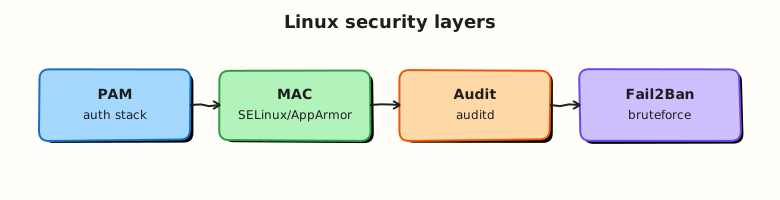
Discretionary Access Control (DAC) is classic Unix permissions. MAC adds policy labels enforced by the kernel regardless of chmod. PAM stacks authentication modules for login paths. Fail2Ban watches logs and updates firewall. auditd records auditable events.
Theory
The problem (before any jargon)
You deploy nginx to a new path. Config test passes. Service fails. journalctl shows AppArmor DENIED. Beginners often blame “Linux is broken”. The fix is read the denial, adjust policy or path — not turn off MAC globally.
DAC vs MAC (simple words)
Analogy: DAC is a sticky note on your desk — “only Alice may open this drawer” (the owner decides). MAC is building security — even if Alice owns the drawer, fire policy says “no flammable liquids in this wing”.
| Layer | Who decides | Example |
|---|---|---|
| DAC | File owner | chmod 640 file |
| MAC | System policy | AppArmor profile, SELinux context |
AppArmor (Ubuntu): profiles per program (/etc/apparmor.d/).
SELinux (RHEL/Rocky): labels on processes and files (contexts).
Interview line: “If permissions look correct but access fails, I check MAC denials and audit logs before chmod 777.”
AppArmor on Ubuntu
Profiles can be enforce or complain mode. Use complain while debugging new apps.
SELinux (you will meet on RHEL/AWS)
Even on Ubuntu labs, interviews ask SELinux basics:
| Mode | Behaviour |
|---|---|
| Enforcing | Blocks policy violations |
| Permissive | Logs but allows |
| Disabled | Off (avoid without reason) |
Fix paths: correct context (restorecon), booleans, or tailored policy — not permanent disable.
Fail2Ban
Analogy: A door sensor — after five bad key attempts, block that IP at the firewall for ten minutes.
Watches logs (often /var/log/auth.log or journal), updates iptables/nftables via actions.
auditd
auditd writes structured security events — who changed what, MAC denials (AVC), syscall access. Compliance teams rely on it.
PAM
PAM is the stack of modules for authentication: local password, LDAP, MFA, sudo rules, session limits. Files under /etc/pam.d/ (e.g. sshd, sudo).
Interview line: “SSH auth goes through PAM; a typo in /etc/pam.d/sshd can lock login even when keys are fine.”
Common pitfalls
setenforce 0/ disabling AppArmor on first error- Fail2Ban jailing yourself during lab brute-force tests (use localhost carefully)
- Editing PAM without a console backup
- Confusing Fail2Ban with MAC — different layers
Hands-on Lab
Objective
Collect AppArmor status, configure a minimal Fail2Ban jail for SSH, simulate failed logins to trigger a ban, fix by unbanning, and save evidence under ~/rebash-linux/lab21 — without disabling MAC.
Prerequisites
| Item | Notes |
|---|---|
| Ubuntu VM | AppArmor active |
sudo | Fail2Ban install |
| Lab-only | Do not aim brute force at production IPs |
Lab environment
mkdir -p ~/rebash-linux/lab21 && cd ~/rebash-linux/lab21
sudo aa-status 2>&1 | tee apparmor-status.txt | head -20
Real-world scenario
Security review: “Prove AppArmor is enforcing, Fail2Ban protects SSH, and you can read a denial or ban event from logs — without turning off AppArmor.”
Step-by-step tasks
Task 1 – AppArmor and audit evidence
cd ~/rebash-linux/lab21
sudo aa-status | tee apparmor-full.txt
grep -c 'enforce' apparmor-full.txt | tee apparmor-enforce-count.txt
sudo systemctl is-active auditd 2>/dev/null | tee auditd-state.txt || echo "inactive" | tee auditd-state.txt
sudo journalctl -k --no-pager | grep -i 'apparmor\|denied' | tail -10 | tee kernel-denial-sample.txt || echo "no recent denials" | tee kernel-denial-sample.txt
test -s apparmor-full.txt
Expected output
apparmor-full.txt lists profiles; many show enforce mode on Ubuntu desktop/server images.
Task 2 – Fail2Ban install and jail
Create jail.local:
[sshd]
enabled = true
port = ssh
filter = sshd
logpath = /var/log/auth.log
maxretry = 3
bantime = 300
findtime = 60
cd ~/rebash-linux/lab21
sudo apt install -y fail2ban
sudo cp jail.local /etc/fail2ban/jail.d/rebash-lab21.local
sudo systemctl enable --now fail2ban
sudo fail2ban-client status sshd | tee fail2ban-sshd-before.txt
Expected output
Fail2Ban active; fail2ban-sshd-before.txt shows sshd jail.
Task 3 – Break (trigger ban), fix (unban), prove
cd ~/rebash-linux/lab21
for i in 1 2 3 4; do
  ssh -o BatchMode=yes -o StrictHostKeyChecking=no -o ConnectTimeout=2 baduser@127.0.0.1 2>/dev/null || true
done
sleep 3
sudo fail2ban-client status sshd | tee fail2ban-after-failures.txt
grep -q 'Banned IP list' fail2ban-after-failures.txt
sudo fail2ban-client set sshd unbanip 127.0.0.1 2>/dev/null || sudo fail2ban-client set sshd unbanip ::1 2>/dev/null || true
sudo fail2ban-client status sshd | tee fail2ban-after-unban.txt
echo "lab21 security layers OK" | tee evidence.txt
Expected output
After deliberate failed SSH attempts, banned IP list may include 127.0.0.1. After unban, list clears or SSH succeeds again.
Validation steps
- AppArmor status captured — not disabled
- Fail2Ban sshd jail active
- Ban/unban cycle demonstrated with logs
- You can explain DAC vs MAC verbally
Common errors and fixes
| Error | Cause | Fix |
|---|---|---|
| Fail2Ban no ban | Wrong logpath | Ubuntu uses /var/log/auth.log; check journal backend |
| Locked out (real IP) | Testing on production IP | Use lab VM; unban via console |
| aa-status empty | AppArmor not installed | Rare on Ubuntu server — apt install apparmor-utils |
| auditd inactive | Minimal image | Note in evidence; use journal for denials |
Challenge exercise
Read /etc/pam.d/sshd and list two module types (auth, account, session) in pam-notes.md.
Learning outcomes
- You inspected MAC without disabling it
- You operated Fail2Ban ban/unban safely
- You know where to look when “permissions look fine”
Cleanup
Validation
- Evidence under
~/rebash-linux/lab21 - Can explain AppArmor vs SELinux audience (Ubuntu vs RHEL)
- Ready for container internals next
Code Walkthrough
aa-status— quick AppArmor health check on Ubuntu.- Fail2Ban jail.local — small override; do not edit entire jail.conf.
- Deliberate failed SSH — lab-only; triggers filter on auth.log lines.
fail2ban-client unbanip— recovery without disabling Fail2Ban.- journal AppArmor lines — real denial signals when profiles block paths.
Security Considerations
- Never disable MAC fleet-wide to “fix” one app — tune profile or path.
- Fail2Ban can block legitimate IPs behind NAT — tune thresholds.
- PAM edits can brick login — test on console-backed VM only.
- auditd logs may contain sensitive data — protect
/var/log/audit/. - Document break-glass accounts and MFA outside PAM experiments.
Common Mistakes
❌ chmod 777 instead of reading MAC denial.
✅ Fix policy or file location; world-writable dirs are worse than the original problem.
❌ Permanently disabling SELinux.
✅ Enterprises expect Enforcing. Learn audit2allow / vendor guides instead.
❌ Fail2Ban on wrong log path.
✅ Journal-only systems may need backend=systemd in jail — read distro docs.