Logging — syslog, journald, and logrotate
Overview
Incidents start with one question: “What do the logs say?” This tutorial covers where Linux stores logs, how journald and classic syslog fit together, and how logrotate stops disks filling with old files.
Plain problem: A service failed at 2 am. Someone says “check the logs”. You open random files under /var/log and feel lost. Modern Ubuntu centralises much output in journald (read with journalctl). Classic apps still write text files. Those files grow until logrotate archives them — or until the disk is full.
This tutorial teaches:
- What journald and syslog are
- How to query logs with
journalctl - How logrotate prevents disk-full outages
- How to break and fix a bad logrotate rule
This is Tutorial 12a in Module 12: Logging & Monitoring of the REBASH Academy Linux for Cloud & DevOps Engineers series.
Prerequisites
- Ubuntu 22.04/24.04 with systemd (default)
sudofor logrotate config under/etc/logrotate.d/- Comfort with basic shell commands
Learning Objectives
By the end of this tutorial, you will be able to:
- Explain journald vs classic syslog file logs in plain language
- Follow a systemd unit with
journalctl -uand time filters - Write a logrotate rule for an application log
- Force rotation and verify compressed archives
- Diagnose “disk full because logs grew forever”
- Answer fresher interview questions on Linux logging
Architecture
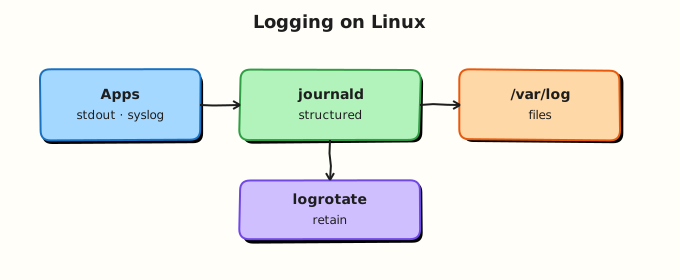
Programs send log messages to journald (structured, binary journal) and/or rsyslog/syslog-ng (text files under /var/log). logrotate runs daily (usually via cron or systemd timer) to compress and delete old text logs.
Theory
The problem (before any jargon)
Production alert: disk 100% full. Oldest culprit: a 40 GB application log nobody rotated. The app “worked” — the host did not. Logging is not optional housekeeping; it is capacity management.
journald (simple words)
Analogy: journald is the building’s central incident diary — timestamped entries from the kernel, services, and anything systemd manages. You search it with journalctl instead of opening fifty text files.
| Task | Command |
|---|---|
| Last boot logs | journalctl -b |
| Follow live | journalctl -f |
| One unit | journalctl -u nginx |
| Since time | journalctl --since "1 hour ago" |
| Errors only | journalctl -p err -b |
Interview line: “On systemd hosts I start with journalctl -u <unit> -b for this boot’s service story.”
syslog and /var/log
syslog is the classic protocol and daemons (rsyslog, syslog-ng) that write text logs — auth.log, syslog, app files. Many tutorials still point here. On Ubuntu both coexist: journald for systemd world, files for legacy apps and central forwarding.
logrotate
Analogy: logrotate is the archives team — weekly it boxes old diaries (compress), labels them .1.gz, and shreds ancient boxes (rotate N).
Key directives:
| Directive | Meaning |
|---|---|
weekly / daily | Rotation frequency |
rotate 4 | Keep 4 old copies |
compress | gzip old files |
missingok | No error if log absent |
copytruncate | Copy then truncate (simple apps) |
Common pitfalls
- Only knowing
tail -f /var/log/syslogon journald-first hosts - Forgetting logrotate for custom app logs in
/var/log/myapp/ - Using
copytruncateon databases (corruption risk — use app-specific signals) - No
--sincefilter — drowning in old lines during incidents
Hands-on Lab
Objective
Query journald, create an app log, add logrotate, break the config, fix it, force rotation, and save proof under ~/rebash-linux/lab18.
Prerequisites
| Item | Notes |
|---|---|
| Ubuntu VM | systemd + logrotate installed |
sudo | For /etc/logrotate.d/ drop-in |
Lab environment
mkdir -p ~/rebash-linux/lab18 /tmp/rebash-app/logs
cd ~/rebash-linux/lab18
journalctl --version | head -1 | tee journal-version.txt
Real-world scenario
You deploy a small API that writes /tmp/rebash-app/logs/api.log. On-call warns: “No logrotate — disk will fill.” You add a rule, test with logrotate -f, then fix a typo that broke rotation.
Step-by-step tasks
Task 1 – journalctl evidence
cd ~/rebash-linux/lab18
journalctl -b --no-pager | tail -20 | tee journal-boot-tail.txt
journalctl -u cron --no-pager -n 5 2>/dev/null | tee journal-cron.txt || echo "no cron unit logs yet" | tee journal-cron.txt
test -s journal-boot-tail.txt
Expected output
journal-boot-tail.txt has timestamped lines from this boot.
Task 2 – App log and logrotate rule
Create api-log-writer.sh:
#!/usr/bin/env bash
LOG="/tmp/rebash-app/logs/api.log"
for i in $(seq 1 200); do
  echo "$(date -Is) request_id=lab-$i status=200" >> "$LOG"
done
Create rebash-api:
/tmp/rebash-app/logs/api.log {
    daily
    rotate 3
    compress
    missingok
    notifempty
    copytruncate
}
cd ~/rebash-linux/lab18
chmod +x api-log-writer.sh
./api-log-writer.sh
wc -c /tmp/rebash-app/logs/api.log | tee api-log-size-before.txt
sudo cp rebash-api /etc/logrotate.d/rebash-api
sudo logrotate -d /etc/logrotate.d/rebash-api 2>&1 | tee logrotate-debug.txt
sudo logrotate -f /etc/logrotate.d/rebash-api
ls -la /tmp/rebash-app/logs/ | tee log-dir-after-rotate.txt
test -f /tmp/rebash-app/logs/api.log.1.gz -o -f /tmp/rebash-app/logs/api.log.1
Expected output
After force rotate, api.log.1 or api.log.1.gz appears; active api.log is smaller or recreated.
Task 3 – Break, fix, and prove
cd ~/rebash-linux/lab18
sudo sed -i 's|/tmp/rebash-app/logs/api.log|/tmp/rebash-app/logs/TYPOS.log|' /etc/logrotate.d/rebash-api
sudo logrotate -f /etc/logrotate.d/rebash-api 2>&1 | tee rotate-broken.txt || true
./api-log-writer.sh
ls /tmp/rebash-app/logs/*.gz 2>/dev/null | wc -l | tee gz-count-broken.txt
sudo cp rebash-api /etc/logrotate.d/rebash-api
sudo logrotate -f /etc/logrotate.d/rebash-api
ls -la /tmp/rebash-app/logs/ | tee log-dir-after-fix.txt
echo "lab18 logging OK" | tee evidence.txt
Expected output
Wrong path fails to rotate the real log (count unchanged or error in rotate-broken.txt). After fix, compressed rotated file exists again.
Validation steps
-
journalctl -bsample saved - logrotate rule installed and force-rotation succeeded
- Break/fix demonstrated with evidence files
- You can explain journald vs
/var/logtext files
Common errors and fixes
| Error | Cause | Fix |
|---|---|---|
logrotate: error opening state file | Permissions | Run with sudo |
| No rotation | Wrong log path in config | Match exact file path |
| Empty gzip | notifempty + empty log | Write data first |
| App stops logging after rotate | Needs copytruncate or postrotate signal | Match app behaviour |
Challenge exercise
Add journalctl --since "today" export of one failed unit (pick ssh or cron) to journal-sample.txt for your notes.
Learning outcomes
- You queried journald like an on-call engineer
- You configured and tested logrotate
- You fixed a misconfigured path — a common real mistake
Cleanup
sudo rm -f /etc/logrotate.d/rebash-api
rm -rf /tmp/rebash-app
# Keep ~/rebash-linux/lab18 evidence for revision
Validation
- Evidence under
~/rebash-linux/lab18 - Can demonstrate one
journalctlfilter in an interview - Ready for host monitoring next
Code Walkthrough
journalctl -b— current boot only; shrinks noise during incidents.journalctl -u— service-scoped story; pairs with systemd units from prior tutorials.- logrotate path — must match real file; typos cause silent non-rotation.
logrotate -f— force test in lab; use-ddry run first.copytruncate— simple for append-only lab logs; production apps may needpostrotate/kill -HUP.
Security Considerations
- Logs may contain credentials, tokens, and Personal Identifiable Information (PII) — restrict read access.
- Forward sensitive logs to a central SIEM with encryption in transit.
- Protect
/etc/logrotate.d/— attackers hide persistence in cron/logrotate. - Set retention to meet compliance, not “keep forever”.
- Scrub secrets before sharing log excerpts in tickets.
Common Mistakes
❌ No rotation for custom app logs.
✅ Anything writing to /var/log or /tmp on a long-lived server needs a logrotate rule or central collection with retention.
❌ Only tailing text files on systemd hosts.
✅ Start with journalctl -u for services; use files when the app writes them directly.
❌ Disk full before alerting.
✅ Monitor free space on /var and /; log growth is a leading cause of outages.