Filesystem Paths, Links, Mounts, and Inodes
Overview
Sooner or later every Linux learner hits these problems:
- A deploy “worked” but the site still serves the old version — broken symbolic link
- “Disk full” but
df -hshows free space — inode exhaustion - A cron job fails while the same command works in SSH — relative path vs working directory
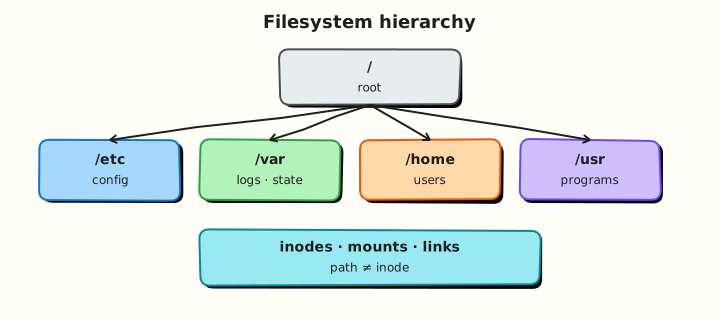
Linux presents storage as one tree starting at /. A path names a place in that tree. An inode holds the real file metadata. Hard links and symbolic links (symlinks) create extra names. Mounts attach other filesystems onto directories.
This tutorial answers, in order:
- What is the difference between absolute and relative paths?
- What is an inode, and how do hard links differ from symlinks?
- What is a mount point, and why can mounts “hide” files?
- How do teams use a
current→releases/v1symlink pattern in deploys?
This is Tutorial 4 in Module 3: Linux Filesystem of the REBASH Academy Linux for Cloud & DevOps Engineers series — practical Linux for Cloud and DevOps work.
Prerequisites
- Essential Linux Commands — you can
mkdir,ln,ls, andcat - A practice Ubuntu 22.04/24.04 VM with write access under your home directory
findmntavailable (util-linux, default on Ubuntu)
Learning Objectives
By the end of this tutorial, you will be able to:
- Explain absolute vs relative paths and why cron prefers absolute paths
- Show inode numbers with
ls -iand relate them to hard links - Create and resolve symlinks with
ln -sandreadlink -f - List mounts with
findmntand check inode capacity withdf -i - Build a versioned release layout with a
currentsymlink and prove it
Architecture
Directory entries map names to inode numbers. Hard links share one inode. Symlinks store a path string. Mounts graft other filesystems into the tree so disks and pseudo-filesystems appear as ordinary paths.
Theory
The problem (before any jargon)
Your team deploys by unpacking releases/2026-08-04/ and pointing current at it. After a cleanup script deletes the old release folder, the site breaks — but files still exist somewhere. The current symlink now points at a missing target (dangling link).
Or: a script uses logs/app.log (relative path). It works in your SSH session but fails in cron because cron’s working directory is not your home folder.
This section gives you the model behind those tickets.
Paths — absolute vs relative
Analogy: An absolute path is a full postal address starting from the country (/). A relative path is “turn left at the next corridor” — it only works if everyone agrees where you are standing.
| Style | Starts with | Example | Breaks when |
|---|---|---|---|
| Absolute | / | /home/ubuntu/app/logs/app.log | Home moves (rare) |
| Relative | No leading / | logs/app.log | Working directory changes |
What you can say in an interview: “Cron and systemd units should use absolute paths, or set WorkingDirectory= deliberately — relative paths depend on cwd.”
Tiny example:
Inodes and hard links
Analogy: An inode is the warehouse slot number. The filename is the label on the shelf pointing at that slot. A hard link is a second label on the same slot — same data, two names.
| Term | Plain meaning |
|---|---|
| Inode | Metadata + pointers to data blocks; identified by number on one filesystem |
| Hard link | Another directory entry for the same inode (same filesystem only) |
| Link count | How many names point at the inode; data deleted when count hits 0 and no process holds the file open |
What you can say in an interview: “Hard links share an inode; you cannot hard-link across filesystems. Deleting one name does not delete data until the last link is gone.”
Tiny example:
Symbolic links (symlinks)
Analogy: A symlink is a signpost with directions written on it — not the warehouse slot itself. If you move the building the sign points at, the sign is wrong (dangling).
| Type | Same inode? | Cross filesystem? | Typical use |
|---|---|---|---|
| Hard link | Yes | No | Extra name for one file |
| Symlink | No (stores path) | Yes | current → releases/v1 |
What you can say in an interview: “Deploys use symlinks for a stable current name. Flip with ln -sfn new current and verify with readlink -f.”
Tiny example:
Mounts
Analogy: A mount is grafting a separate storage disk onto a doorway in the building. Walk through that door and you see the disk’s contents — which may hide whatever was behind the door before.
| Term | Plain meaning |
|---|---|
| Mount point | Directory where another filesystem is attached |
| Bind mount | Mount an existing directory at another path |
| Persistence | /etc/fstab or systemd .mount units (prefer UUID) |
What you can say in an interview: “Mounting over a directory hides previous contents until unmount. Always findmnt before assuming files are gone.”
Tiny example:
Common pitfalls
- Symlinks with relative targets that break when the link file moves
- Hard links across disks (
Invalid cross-device link) - Assuming
df -his enough — checkdf -ifor inode exhaustion - Cron scripts with relative paths that worked only in SSH
- Deleting a symlink target and leaving a dangling
currentlink
Hands-on Lab
Objective
Prove paths, inodes, hard links, symlinks, and mounts with a deploy-style release layout under ~/rebash-linux/lab04, and pack evidence.
Prerequisites
| Item | Notes |
|---|---|
| Ubuntu practice VM | Work under $HOME only |
| Commands | ln, readlink, findmnt, stat, df |
Lab environment
mkdir -p ~/rebash-linux/lab04 && cd ~/rebash-linux/lab04
set -euo pipefail
rm -rf pathlab
mkdir -p pathlab/releases/v1
pwd | tee pwd-pathlab.txt
Expected output
pwd-pathlab.txt ends with pathlab/releases/v1 or similar after cd.
Real-world scenario
Your team deploys by unpacking release directories and flipping a current symlink. You practise that pattern, prove inode behaviour with a hard link, and document mounts for the lab filesystem.
Step-by-step tasks
Task 1 – Absolute vs relative paths (prove cwd matters)
Create pathlab/releases/v1/app.txt:
cd ~/rebash-linux/lab04/pathlab
set -euo pipefail

printf 'v1 app\n' > releases/v1/app.txt
cat releases/v1/app.txt | tee ../read-relative.txt

ABS="$(pwd)/releases/v1/app.txt"
echo "$ABS" | tee ../abs-path.txt
cat "$ABS" | tee ../read-absolute.txt

cd /tmp
if cat releases/v1/app.txt 2>../relative-fail.txt; then
  echo 'ERROR: relative path should fail from /tmp' >&2
  exit 1
fi
cd ~/rebash-linux/lab04/pathlab
grep -Ei 'No such file|cannot' ../relative-fail.txt
Expected output
Reads succeed from pathlab; relative read from /tmp fails and is recorded in relative-fail.txt.
Task 2 – Inodes, hard links, and deploy symlink
cd ~/rebash-linux/lab04/pathlab
set -euo pipefail

echo 'payload' > releases/v1/data.bin
ln releases/v1/data.bin releases/v1/data-hard.bin
ln -s data.bin releases/v1/data.sym
ln -s "$(pwd)/releases/v1" current-release

ls -li releases/v1/data.bin releases/v1/data-hard.bin | tee ../inode-hardlinks.txt
INO1=$(stat -c '%i' releases/v1/data.bin)
INO2=$(stat -c '%i' releases/v1/data-hard.bin)
test "$INO1" = "$INO2"

stat -c 'links=%h inode=%i name=%n' releases/v1/data.bin | tee ../stat-hard.txt
readlink releases/v1/data.sym | tee ../symlink-target.txt
readlink -f current-release | tee ../current-resolved.txt
ls -l current-release | tee ../current-ls.txt
Expected output
Same inode for both hard links; link count ≥ 2. current-resolved.txt points at …/releases/v1.
Task 3 – Mounts, inodes, dangling link, evidence pack
cd ~/rebash-linux/lab04
set -euo pipefail

findmnt -T "$HOME" | tee findmnt-home.txt
findmnt -o TARGET,SOURCE,FSTYPE,OPTIONS / | tee findmnt-root.txt
df -hT . | tee df-pathlab.txt
df -i . | tee dfi-pathlab.txt

ln -sf /no/such/target pathlab/dangling.sym
readlink pathlab/dangling.sym | tee dangling-target.txt
ls -l pathlab/dangling.sym | tee dangling-ls.txt
test ! -e /no/such/target

tar -czf paths-links-evidence.tgz \
  pwd-pathlab.txt read-relative.txt abs-path.txt read-absolute.txt relative-fail.txt \
  inode-hardlinks.txt stat-hard.txt symlink-target.txt current-resolved.txt current-ls.txt \
  findmnt-home.txt findmnt-root.txt df-pathlab.txt dfi-pathlab.txt \
  dangling-target.txt dangling-ls.txt pathlab
ls -l paths-links-evidence.tgz | tee evidence-ls.txt
test -s paths-links-evidence.tgz
Expected output
findmnt-home.txt shows the mount holding your home. dfi-pathlab.txt shows inode use. Archive is non-empty.
Validation steps
- Relative read from
/tmpfails; absolute read succeeds - Hard links share one inode
-
current-releaseresolves withreadlink -f -
findmntanddf -ioutputs exist -
paths-links-evidence.tgzexists under~/rebash-linux/lab04
Common errors and fixes
| Error | Cause | Fix |
|---|---|---|
Invalid cross-device link | Hard link across mounts | Use symlink |
| Symlink wrong after move | Relative target + moved link | Prefer absolute targets for system links |
findmnt: command not found | Minimal image | Install util-linux |
Challenge exercise
Create pathlab/releases/v2/app.txt:
cd ~/rebash-linux/lab04/pathlab
mkdir -p releases/v2
printf 'v2 app\n' > releases/v2/app.txt
ln -sfn "$(pwd)/releases/v2" current-release
readlink -f current-release | tee ../current-v2.txt
grep -q 'v2' releases/v2/app.txt
Expected output
current-v2.txt ends with releases/v2. Both v1 and v2 directories remain for rollback practice.
Learning outcomes
- Proved why absolute paths matter when cwd changes
- Created hard links and symlinks; inspected inodes
- Listed mounts and inode capacity
- Practised deploy-style
current→ release layout
Cleanup
Validation
- Lab completed under
~/rebash-linux/lab04 - Can explain inode vs filename vs symlink in plain English
- Know hard link vs symlink trade-offs
- Know mounts can hide directory contents and that
df -imatters
Code Walkthrough
- Absolute paths in automation — cron/systemd do not share your SSH cwd.
readlink -fbefore deploy checks — confirmcurrentpoints where you think.ls -ifor hard links — same inode = same data.findmnt -T path— which filesystem am I on?df -iin capacity incidents — inodes exhaust before bytes sometimes.
Security Considerations
- Symlinks in world-writable directories can be abused (symlink races) — be careful in
/tmp - Do not follow untrusted symlinks in privileged scripts without checks
- Mount options (
nosuid,nodev,noexec) matter on user-writable volumes - Document bind mounts — they confuse audits and backups
- Restrict who can edit
fstabor mount filesystems
Common Mistakes
❌ Relative paths in cron or systemd.
✅ Working directory is not your SSH home. Fix: absolute paths or explicit WorkingDirectory=.
❌ Dangling current symlink after cleanup.
✅ Site down though files exist elsewhere. Fix: flip symlink before deleting old release; verify with readlink -f.
❌ Only checking df -h.
✅ Inodes can be exhausted first. Fix: always run df -i in capacity tickets.
❌ Hard links across filesystems.
✅ Kernel rejects them. Fix: use symlinks for cross-mount references.