TCP and UDP Deep Dive
Overview
Transport protocols decide how applications exchange data. Transmission Control Protocol (TCP) is reliable, ordered, and connection-oriented. User Datagram Protocol (UDP) is lightweight and best-effort. Most production symptoms — connection refused, timeouts, “too many open files,” and TIME_WAIT storms — land at this layer.
You will use ss to read socket states, nc (netcat) for localhost TCP and UDP demos, and curl timings for a real HTTPS sample. These are the same tools you use on jump servers and in incident bridges.
This is Tutorial 9 in Module 8: TCP & UDP of the REBASH Academy Networking for Cloud & DevOps Engineers series. It is written for Cloud, DevOps, Site Reliability Engineering (SRE), and platform engineers. Evidence goes under ~/rebash-networking/lab09.
Prerequisites
- ICMP, ARP, DHCP, and Network Services
- Ubuntu practice host with
ss,nc(netcat-openbsdorncat), andcurl - Comfort with client–server ideas (one process listens, another connects)
Learning Objectives
By the end of this tutorial, you will be able to:
- Contrast TCP and UDP for real Cloud / DevOps workloads
- Explain the TCP three-way handshake and common socket states
- Use
ssto show listening ports and established connections - Demo localhost TCP and UDP with
ncand prove states - Read basic
curltiming output and relate it to connect vs transfer
Architecture
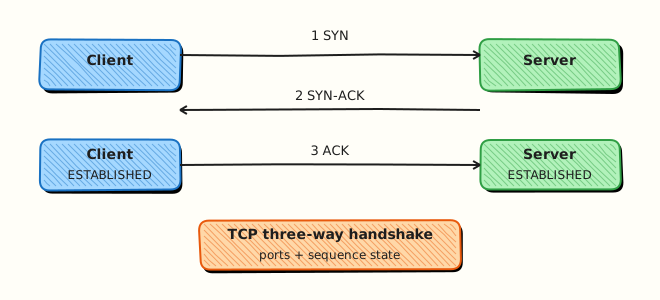
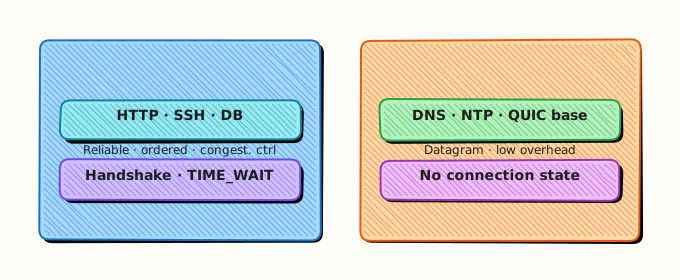
TCP builds a connection with a three-way handshake before data. UDP sends datagrams without that setup.
Theory
What it is
A port is a 16-bit number that identifies an application endpoint on a host. A socket is the local address + port (and for TCP, the remote pair) that the kernel tracks. TCP provides a byte stream with acknowledgements, retransmission, and congestion control. UDP provides datagrams with no built-in delivery guarantee — Domain Name System (DNS), QUIC, and many discovery protocols use it.
Why it matters
“Connection refused” means nothing is listening (or a reject rule sent RST). A timeout often means drops or a black hole — different fix. Load balancers, Kubernetes Services, and health checks are all port and protocol decisions. Choosing TCP vs UDP wrong (for example forcing TCP-only health checks on a UDP service) creates false downs.
How it works
TCP three-way handshake: client sends SYN → server replies SYN-ACK → client sends ACK → state becomes ESTABLISHED. Teardown uses FIN/ACK (or RST on abort). Common states you will see in ss: LISTEN, ESTAB, TIME-WAIT, CLOSE-WAIT.
UDP: no handshake. ss -lu shows listening UDP sockets; “connected” UDP is optional and means the kernel remembers a default peer.
Key concepts and comparisons
| Feature | TCP | UDP |
|---|---|---|
| Connection | Yes | No (usually) |
| Ordered / reliable | Yes | No |
| Header cost | Higher | Lower |
| Typical uses | HTTP(S), SSH, databases | DNS, DHCP, metrics, games, QUIC |
| Symptom | Often means |
|---|---|
| Connection refused | No listener / active reject |
| Timeout | Filter, drop, or wrong route |
TIME-WAIT many entries | Recent closes; usually normal, can stress under churn |
Common pitfalls
- Using
netstatonly — preferss. - Forgetting
-uwhen checking UDP listeners. - Treating
TIME-WAITas a leak without checking connection rate. - Binding
0.0.0.0in a lab and exposing ports beyond localhost by mistake.
Hands-on Lab
Objective
Prove TCP and UDP behaviour on localhost with nc, inspect states with ss, and capture curl timings to a public HTTPS endpoint. Save evidence under ~/rebash-networking/lab09.
Prerequisites
iproute2(ss),curl, and netcat (nc -hshould work)- Outbound HTTPS allowed for the curl task (or note failure honestly)
Lab environment
Workspace: ~/rebash-networking/lab09
mkdir -p ~/rebash-networking/lab09 && cd ~/rebash-networking/lab09
set -euo pipefail
whoami | tee admin-user.txt
command -v ss | tee tools-ss.txt
command -v nc | tee tools-nc.txt
command -v curl | tee tools-curl.txt
ss -lntu | head -n 40 | tee ss-baseline.txt
Expected output
tool paths recorded; baseline ss snapshot saved.
Real-world scenario
An API owner says “the load balancer is broken.” You must show whether anything listens on the port, whether a TCP handshake completes on localhost, whether UDP reachability works for a sidecar check, and how long TLS connect takes from this host — with files for the bridge call.
Step-by-step tasks
Task 1 – TCP listen / connect on localhost
cd ~/rebash-networking/lab09
set -euo pipefail

TCP_PORT=19090
# Start listener in background
nc -l 127.0.0.1 "$TCP_PORT" > tcp-server.out 2>tcp-server.err &
echo $! > tcp-server.pid
sleep 0.3

ss -lnt "( sport = :$TCP_PORT )" | tee ss-tcp-listen.txt
grep -E ":$TCP_PORT|LISTEN" ss-tcp-listen.txt

printf 'rebash-tcp-ok\n' | nc -w 2 127.0.0.1 "$TCP_PORT" | tee tcp-client.out || true
sleep 0.2
cat tcp-server.out | tee tcp-payload.txt
grep -q 'rebash-tcp-ok' tcp-payload.txt

# States snapshot (listener may have closed after one connection depending on nc)
ss -nt | tee ss-tcp-after.txt || true

kill "$(cat tcp-server.pid)" 2>/dev/null || true
wait "$(cat tcp-server.pid)" 2>/dev/null || true
Expected output
ss-tcp-listen.txt shows LISTEN on 19090; tcp-payload.txt contains rebash-tcp-ok.
Task 2 – UDP localhost demo
cd ~/rebash-networking/lab09
set -euo pipefail

UDP_PORT=19091
nc -u -l 127.0.0.1 "$UDP_PORT" > udp-server.out 2>udp-server.err &
echo $! > udp-server.pid
sleep 0.3

ss -lun "( sport = :$UDP_PORT )" | tee ss-udp-listen.txt
grep -E ":$UDP_PORT|UNCONN|udp" ss-udp-listen.txt || test -s ss-udp-listen.txt

printf 'rebash-udp-ok\n' | nc -u -w 2 127.0.0.1 "$UDP_PORT"
sleep 0.3
cat udp-server.out | tee udp-payload.txt
grep -q 'rebash-udp-ok' udp-payload.txt

kill "$(cat udp-server.pid)" 2>/dev/null || true
wait "$(cat udp-server.pid)" 2>/dev/null || true
Expected output
UDP listener visible in ss; udp-payload.txt contains rebash-udp-ok.
Task 3 – curl timings + evidence pack
cd ~/rebash-networking/lab09
set -euo pipefail

# connect / starttransfer / total (seconds)
curl -sS -o /dev/null -w 'namelookup=%{time_namelookup}\nconnect=%{time_connect}\nappconnect=%{time_appconnect}\nstarttransfer=%{time_starttransfer}\ntotal=%{time_total}\nhttp_code=%{http_code}\n' \
  https://example.com | tee curl-timings.txt

grep -E 'connect=|total=|http_code=' curl-timings.txt

ss -s | tee ss-summary.txt

tar -czf tcp-udp-evidence.tgz \
  admin-user.txt ss-baseline.txt \
  ss-tcp-listen.txt tcp-payload.txt \
  ss-udp-listen.txt udp-payload.txt \
  curl-timings.txt ss-summary.txt ss-tcp-after.txt
ls -l tcp-udp-evidence.tgz | tee evidence-ls.txt
Expected output
timings file has numeric fields; HTTPS http_code is often 200 (or another valid code if the edge changes); archive exists.
Validation steps
- TCP payload
rebash-tcp-okreceived - UDP payload
rebash-udp-okreceived -
ssshowed the TCP LISTEN socket during Task 1 -
curl-timings.txtincludes connect and total times -
tcp-udp-evidence.tgzexists under~/rebash-networking/lab09
Common errors and fixes
| Error | Cause | Fix |
|---|---|---|
nc: Address already in use | Port busy | Choose another high port or kill leftover nc |
| OpenBSD vs traditional nc flags | Different nc packages | Use nc -l 127.0.0.1 port / nc -u; check nc -h |
| UDP payload empty | Timing / buffering | Small sleep after send; retry Task 2 |
| curl DNS/connect fail | No egress | Record the error in curl-timings.txt; localhost tasks still pass |
ss filter syntax error | Older ss | Use ss -lnt \| grep 19090 instead |
Challenge exercise
Write prove-states.sh that: starts nc -l 127.0.0.1 19092 in the background, runs ss -lnt | grep 19092, connects once with nc, saves both ss snapshots to states-listen.txt and states-after.txt, then kills the listener. This script is the stretch artefact.
Learning outcomes
- Proved TCP and UDP localhost delivery with evidence
- Used
ssas the modern socket inspector - Linked curl timing fields to connect vs transfer delay
Cleanup
cd ~/rebash-networking/lab09
set -euo pipefail
kill "$(cat tcp-server.pid 2>/dev/null)" 2>/dev/null || true
kill "$(cat udp-server.pid 2>/dev/null)" 2>/dev/null || true
pkill -f 'nc -l 127.0.0.1 1909' 2>/dev/null || true
# rm -f tcp-udp-evidence.tgz *.txt *.out *.err *.pid
Validation
- Lab finished under
~/rebash-networking/lab09/ - You can explain SYN / SYN-ACK / ACK in one short paragraph
- You can contrast connection refused vs timeout
- You prefer
ssover legacynetstatfor daily work
Code Walkthrough
Transport debugging in production usually follows:
- Is anything listening? —
ss -lntu - Can this host connect? — localhost/
ncorcurlto the real port - What state are sockets in? —
ESTAB,TIME-WAIT,CLOSE-WAIT - Where is time spent? — curl
%{time_connect}vs%{time_starttransfer} - Least exposure — bind lab listeners to
127.0.0.1only
Packet capture comes after these basics, not before.
Security Considerations
- Bind practice listeners to localhost only
- Do not open high ports on public interfaces “for a quick test”
- TCP clearsight into ESTABLISHED peers can reveal unexpected clients — handle as sensitive
- UDP amplification risks exist for some services — rate-limit on the edge
- Prefer TLS on application protocols that carry credentials (covered next modules)
Common Mistakes
Calling every failure a timeout
Refused vs timeout vs TLS error need different fixes. Fix: capture the exact client error and a matching ss snapshot.
Ignoring UDP in health checks
A TCP probe against a UDP-only service is a false signal. Fix: match probe protocol to the service.
Panicking at TIME_WAIT
Short-lived connections create many TIME-WAIT entries. Fix: check churn and file-descriptor limits before changing kernel timers casually.
Using 0.0.0.0 in shared labs
Others on the network may connect. Fix: 127.0.0.1 for demos.
Best Practices
- Standardise on
ssin runbooks - Record listen address and port in every change ticket
- Separate connect failures from application 5xx after handshake
- Use curl timing format for slow HTTPS complaints
- Know which of your stack is TCP vs UDP (DNS, metrics, QUIC)
Troubleshooting
| Symptom | Likely cause | Fix |
|---|---|---|
| Connection refused | Nothing on port / wrong IP | ss -lnt; fix bind address |
| Timeout | Drop / wrong security group | Trace path; open correct proto/port |
CLOSE-WAIT pile-up | App not reading/closing | Fix application close path |
| UDP “works sometimes” | No reliability | Add app-level retry or use TCP/QUIC |
| High connect time | Network/TLS | Use curl timings; check DNS and TLS |
Summary
TCP gives you a reliable stream and visible connection states; UDP gives you speed with less help from the kernel. Prove both with ss, nc, and curl timings before you blame the load balancer. Next: DNS Fundamentals.
Interview Questions
1. Walk through the TCP three-way handshake.
Reveal answer
Client sends SYN, server replies SYN-ACK, client sends ACK. After that the connection is ESTABLISHED and data can flow. Interviewers also expect you to know teardown uses FIN/ACK (or RST on abort) and that middleboxes can interfere with handshake packets.
2. How do you distinguish connection refused from a timeout?
Reveal answer
Refused usually means the host responded with a TCP RST (nothing listening, or an active reject). A timeout means no useful response — often a drop in a firewall/security group or a black hole. Refused → check listener/ss. Timeout → check path and filters.
3. When would you choose UDP over TCP?
Reveal answer
When you want low overhead and can handle loss in the application — classic DNS, DHCP, many telemetry streams, and modern QUIC (UDP-based). Choose TCP when you need a reliable byte stream without implementing retransmission yourself (HTTP/1.1, databases, SSH).
4. What does ss -lntu show you that ping cannot?
Reveal answer
It shows which ports are listening for TCP and UDP and related socket state. Ping only tests ICMP reachability. Services can be up on TCP 443 while ping fails, or listening only on localhost while the world cannot connect.
5. What is TIME_WAIT and is it always a problem?
Reveal answer
After an active close, TCP keeps the tuple in TIME_WAIT so delayed packets do not corrupt a new connection with the same 4-tuple. Many short connections create many TIME_WAIT entries — often normal. It becomes a problem under extreme churn or port exhaustion; fix connection reuse or architecture before randomly tuning timeouts.
6. How do curl time_connect and time_starttransfer help in an incident?
Reveal answer
time_connect covers TCP connect (and related network delay to the accept). time_appconnect adds TLS. time_starttransfer waits until the first response byte. Large connect time → network/LB. Large gap after connect → slow TLS or slow app. This splits “network” from “application” quickly.
7. Why bind lab nc servers to 127.0.0.1?
Reveal answer
Binding to all interfaces can expose an unauthenticated listener on the LAN or public IP. Localhost keeps the demo safe while still proving TCP/UDP and ss states. Production services should bind intentionally and sit behind controls.
Related Tutorials
- Networking for Cloud & DevOps – Overview
- ICMP, ARP, DHCP, and Network Services (previous)
- DNS Fundamentals (next)
- HTTP, HTTPS, and the Application Layer