
Lesson 4: Processes, Users & Permissions — The Core of Linux Security & Execution
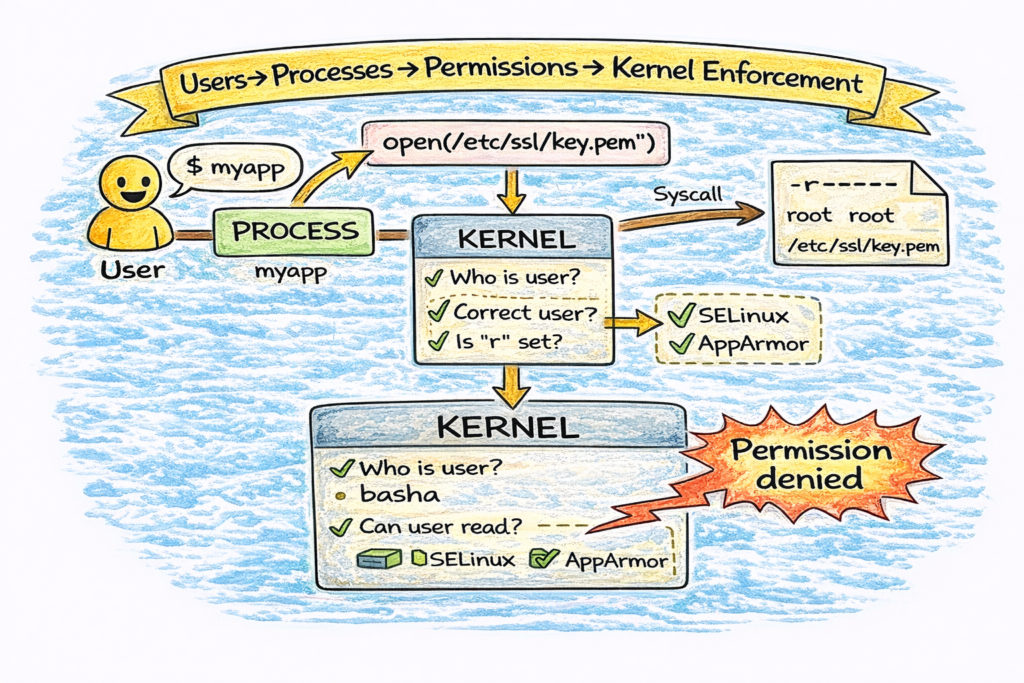
1️⃣ Why This Topic Matters (Production Context)
Every time software runs on Linux — whether it’s Nginx, PostgreSQL, Kubernetes components, Docker containers, or CI agents — it runs as:
A process → running as a specific user → accessing resources with permissions
Most real production issues labeled as “app failures” are really:
- permission problems
- ownership problems
- process identity problems
- security enforcement problems
- kernel resource policy problems
Example failures caused by misunderstanding this lesson:
❌ Nginx can’t read TLS certificates (wrong permissions)
❌ Kafka can’t write to data directories (wrong ownership)
❌ Docker container can’t bind to port <1024 (requires root)
❌ Systemd kills background jobs (wrong service unit config)
❌ SSH login fails due to incorrect home directory permissions
If you work in:
- DevOps
- SRE
- Platform
- Cloud
- Linux Administration
- Security
…you must understand the relationship between users → processes → permissions.
2️⃣ Core Concepts (Explained Simply)
✔ Concept 1: Processes
A process is:
- a running program
- with its own memory
- scheduled by the kernel
- identified by a PID (Process ID)
Example:
$ ps -p $$ -o pid,ppid,user,cmd
  PID  PPID USER     CMD
 2831  2771 basha    -bash
✔ Concept 2: Users
Linux has 3 main categories of users:
| Type | Example | Purpose |
|---|---|---|
| Superuser | root | Full control |
| System users | nginx, mysql, redis | Run services safely |
| Human users | basha, devops | Interact via shells/SSH |
Users are defined in:
/etc/passwd✔ Concept 3: Permissions
Permissions define what actions are allowed:
- r = read
- w = write
- x = execute
And apply to:
| Level | Meaning |
|---|---|
| user (u) | owner of file |
| group (g) | group members |
| others (o) | everyone else |
Example:
-rwxr-x---✔ Concept 4: Ownership
Two kinds:
- user ownership (UID)
- group ownership (GID)
Example:
-rw-r----- 1 nginx webteam /etc/nginx/conf.d/default.confMeans:
- Owned by
nginx - Group
webteamcan read - Others blocked
✔ Concept 5: Kernel Enforcement
When a process runs:
- User performs action (via a process)
- Process requests access via system call
- Kernel checks permissions
- Access granted or denied
If denied:
Permission denied3️⃣ Commands (With Real Output Examples)
⭐ Inspect Processes
$ ps aux | head
USER   PID %CPU %MEM  COMMAND
root     1  0.1  0.2  /sbin/init
mysql 1279  4.3  4.5  mysqld
nginx 2034  0.0  0.1  nginx: worker
⭐ Inspect Users
$ cat /etc/passwd | head
root:x:0:0:root:/root:/bin/bash
nginx:x:997:996:Nginx user:/var/cache/nginx:/sbin/nologin
Field breakdown:
user:passwd:UID:GID:comment:home:shell⭐ Inspect Groups
$ cat /etc/group | grep docker
docker:x:999:basha
⭐ Inspect Permissions
$ ls -l /etc/ssl/private
-r-------- 1 root root cert.key
Meaning:
- Only root can read private key
⭐ Change Ownership
sudo chown nginx:nginx /var/www/html⭐ Change Permissions
chmod 640 config.yaml⭐ Check Effective User of Process
$ ps -o user,group,pid,cmd -p <pid>4️⃣ Real DevOps / SRE Scenarios
Scenario A: Nginx TLS Key Permission Failure
Symptom:
nginx: [emerg] cannot load certificate key "/etc/ssl/private/key.pem"Cause:
-r-------- 1 root root key.pemFix:
- Either allow group read:
chown root:nginx key.pem
chmod 640 key.pem- OR use
ssl_certificate_keyin correct path
Scenario B: Docker Port Binding
Binding to port <1024 requires root:
docker run -p 80:80 nginxKubernetes uses nodeport >30000 to avoid this.
Scenario C: Log Write Failures
App fails with:
Permission denied: /var/log/myapp/Debug:
ls -ld /var/log/myapp
ps -o user= -p $(pgrep myapp)
Solution: adjust chown/chmod for log directory.
Scenario D: Sudo Without Environment
A common beginner issue:
sudo systemctl restart myappworks but:
sudo myappfails because it lacks environment variables.
Understanding shells + users + permissions prevents these mistakes.
5️⃣ Common Mistakes Engineers Make
❌ Running everything as root
❌ Using chmod 777 as a bandaid
❌ Forgetting which user systemd runs as
❌ Assuming containers run as same user as host
❌ Placing TLS keys in world-readable directories
❌ Using shared user accounts for automation
❌ Confusing file owner vs process owner
Each leads to outages or security incidents.
6️⃣ Intermediate & Advanced Notes (For Mid-Level Engineers)
🧠 System Call Pipeline
When a user opens a file:
- Process issues
open()syscall - Kernel checks permission bits
- LSM hooks apply (SELinux/AppArmor/seccomp)
- VFS layer handles mapping to actual filesystem
🧠 Capabilities
Linux breaks root into capability bits:
CAP_NET_BIND_SERVICE
CAP_SYS_ADMIN
CAP_CHOWN
CAP_NET_ADMIN
Docker & Kubernetes use these to avoid full root.
🧠 Namespaces & Cgroups (Containerization)
Containers rely on:
- user namespaces → UID isolation
- mount namespaces → filesystem view
- pid namespaces → process tree isolation
- cgroups → resource enforcement
This is why container users are often remapped.
🧠 SELinux/AppArmor
Adds Mandatory Access Control (MAC) beyond chmod/chown.
Example SELinux denial:
permission denied (13): AVC message=denied { read }7️⃣ Practical Takeaways (Checklist)
✔ Every process runs as a user
✔ Permissions control file access
✔ Group ownership is powerful for service sharing
✔ Kernel enforces access via syscalls
✔ Never use chmod 777 in production
✔ TLS keys should not be world-readable
✔ System users exist for security isolation
✔ Containers add namespaces + capabilities on top