
Lesson 3: Understanding the Linux Filesystem Layout (FHS Deep Dive)
1️⃣ Why This Topic Matters (Production Context)
If you ask junior DevOps engineers where logs, configs, binaries or service units live, most will guess — or search blindly.
In real infrastructure work, filesystem knowledge is required when:
✔ Debugging Kubernetes nodes
✔ Investigating “disk full” outages
✔ Reading application logs in /var/log
✔ Inspecting /proc for performance issues
✔ Installing systemd services in /etc/systemd
✔ Managing certificates in /etc/ssl
✔ Working with containers & base images
✔ Understanding bind mounts (docker run -v)
✔ Automating config management (Ansible/Salt/Chef)
Filesystem navigation is one of the biggest productivity differentiators between beginners and production engineers.
Production failures caused by filesystem ignorance include:
❌ Logs filling up /var and taking down nodes
❌ Wrong permissions on /etc breaking boot
❌ Misplaced binaries not found in $PATH
❌ Kubernetes persistent volumes mounting incorrectly
❌ Certificates installed in wrong dirs leading to TLS failures
So we must understand how Linux organizes itself, and why.
2️⃣ Core Concepts (Explained Simply)
✔ Linux Follows FHS (Filesystem Hierarchy Standard)
FHS defines what goes where and why.
You don’t need to memorize everything — but you must know the big directories and their purpose.
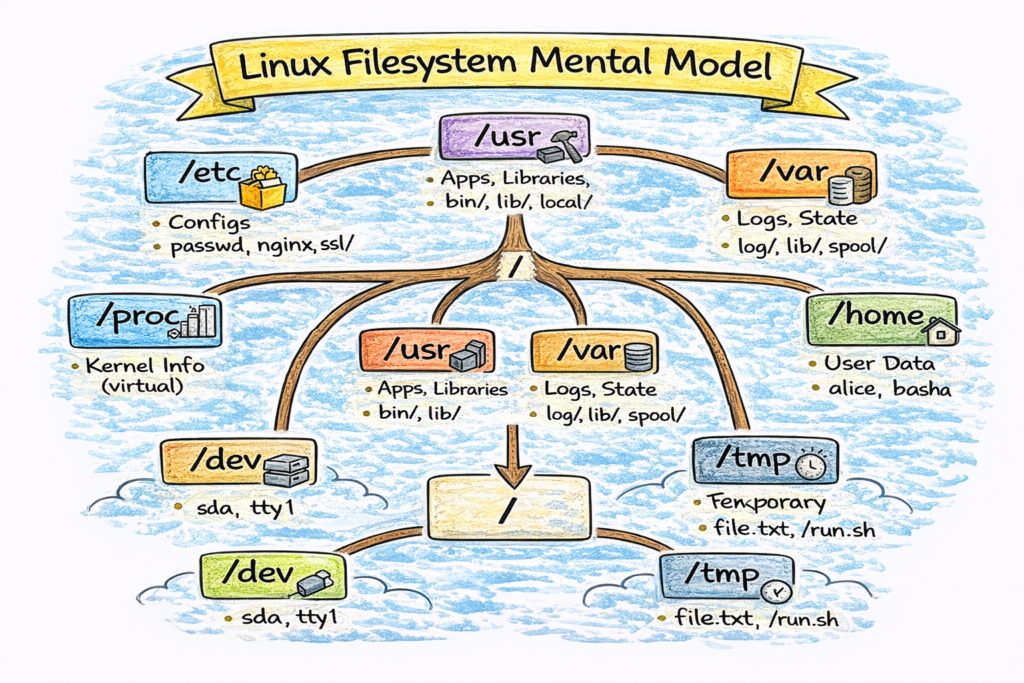
✔ High-Level View
Think of Linux filesystem like a city:
| Area | Purpose |
|---|---|
/ | City center (root of everything) |
/home | Residential area (user data) |
/etc | Government offices (config) |
/bin /sbin | Tools for daily life (commands) |
/usr | Industrial area (apps/libraries) |
/var | Storage yards (logs, spool, state) |
/tmp | Temporary stalls (scratch space) |
/proc /sys | Real-time dashboards (kernel interfaces) |
✔ Core Directories & Their Jobs
Below are the most critical directories, with examples:
🏠 /home — Users’ Personal Space
Contains user directories:
/home/alice
/home/basha
where dotfiles live:
.ssh/.bashrc.vimrc
Cloud relevance:
- Dev boxes
- Bastion hosts
- WSL environments
🏢 /root — Superuser Home
Separate from /home for safety.
Used when logged in as root.
⚙️ /etc — Configuration Files
Stores system-wide configs.
Examples:
| File | Purpose |
|---|---|
/etc/hosts | Local DNS overrides |
/etc/resolv.conf | DNS resolver |
/etc/passwd | User definitions |
/etc/group | Group definitions |
/etc/fstab | Filesystem mounts |
/etc/systemd/ | systemd service files |
/etc/nginx/ | Application configs |
Golden rule:
If it’s config, it’s probably in
/etc.
📦 /bin, /sbin — Essential Binaries
Contains critical system commands needed even in recovery mode.
Examples:
/bin/bash
/bin/cat
/bin/ls
/sbin/ip
/sbin/ifconfig
🧰 /usr — User-Space Software (Major Area)
| Subdir | Purpose |
|---|---|
/usr/bin | Most user commands |
/usr/sbin | System admin binaries |
/usr/lib | Libraries |
/usr/local/ | Locally built software |
Kubernetes nodes frequently store tooling in /usr/local/bin e.g.:
kubelet
kubeadm
kubectl
So understanding /usr/* is key for SREs.
📈 /var — Variable Data (Logs, Cache, State)
This directory changes frequently.
Contents include:
| Path | Contains |
|---|---|
/var/log/ | Application/system logs |
/var/cache/ | Cached downloads |
/var/spool/ | Print/mail queues |
/var/lib/ | Stateful data (dbs, kubelet, containers) |
Example Kubernetes node:
/var/lib/kubelet
/var/lib/dockershim
/var/log/containers
SRE production alert:
“/var is full → kubelet can’t write logs → pods crashloop.”
🧪 /tmp — Temporary Storage
Used for scratch space.
Rules:
- Automatically cleared on reboot (not guaranteed)
- Anyone can write here
- Do NOT store production state here
🧠 /proc — Kernel Virtual Filesystem
Not a real filesystem — it exposes the kernel state.
Examples:
| File | Purpose |
|---|---|
/proc/cpuinfo | CPU details |
/proc/meminfo | Memory stats |
/proc/interrupts | IRQs |
/proc/<pid>/ | Process info |
/proc/self/ | Current process |
Tools like top, htop, ps read from /proc.
⚡ /sys — Kernel & Hardware Interface
Exposes kernel → hardware interaction.
Used for:
- cgroups
- block devices
- network interfaces
✔ Container Perspective
Alpine base image example:
/
├── bin
├── etc
├── lib
├── proc
├── root
├── usr
└── var
Containers mirror the Linux FS layout because they rely on kernel namespaces.
3️⃣ Commands (With Real Output Examples)
List filesystem structure:
$ ls -l /Inspect kernel info:
$ cat /proc/versionInspect process directories:
$ ls /proc/1234/Find where a binary lives:
$ which nginx
/usr/sbin/nginx
Find where logs are:
$ ls /var/logCheck mounts:
$ mount | column -tIdentify filesystem usage:
$ df -hIdentify inode exhaustion:
$ df -i4️⃣ Real DevOps / SRE Scenarios
Scenario A: Disk Full Incident
Alert:
DiskUsageHigh on node x: /var at 95%Symptoms:
- Pods crash due to log writes failing
- kubelet cannot create containers
- journald fills
/var/log/journal
Debug flow:
df -h
du -h /var | sort -hr | head
journalctl --disk-usage
Root cause: log explosion in /var/log/containers.
Scenario B: TLS Certificates Not Found
Engineer places certificates in:
/home/app/certsBut Nginx expects them in /etc/ssl/.
Fix: place them properly OR update path in .conf.
Scenario C: systemd Service Failure
Service installed in:
/opt/myapp/But systemd unit expects the binary in /usr/local/bin.
Fix involves adjusting PATH or unit file.
Scenario D: Kubelet State Missing
Deleting /var/lib/kubelet wipes node state.
Never modify system /var/lib/* lightly.
5️⃣ Common Mistakes Engineers Make
❌ Storing permanent data under /tmp
❌ Ignoring /var until disks fill up
❌ Putting configs inside app directories instead of /etc
❌ Deleting /proc or /sys entries thinking they are files
❌ Not knowing where applications log
❌ Confusing /usr/local/bin vs /usr/bin
❌ Mounting PVs into wrong paths in Kubernetes
6️⃣ Intermediate & Advanced Notes
For mid-level engineers:
/procexposes kernel syscalls/sysexposes kernel drivers/devprovides device nodes/runstores runtime state/bootholds kernel + initramfs/lib/modulesstores kernel modules/usr/localis preserved across upgrades
Filesystem types:
| FS | Use |
|---|---|
| ext4 | General purpose |
| xfs | Preferred for container workloads |
| btrfs | Snapshots, CoW |
| tmpfs | In-memory fs |
Kubernetes node images often use:
- container overlay + xfs/ext4 + tmpfs + mounts
7️⃣ Practical Takeaways (Checklist)
✔ Know where configs live (/etc)
✔ Know where logs live (/var/log)
✔ Know where binaries live (/bin, /usr/bin)
✔ Know how to debug /proc and /sys
✔ Know how containers mimic FHS
✔ Know how Kubernetes uses /var/lib and /etc