
Lesson 2: What Linux Distributions Actually Are (and How They Differ in Production)
1️⃣ Why This Topic Matters (Production Context)
Engineers often underestimate how distributions impact:
- Package availability
- Init systems (systemd vs OpenRC)
- Security frameworks (SELinux vs AppArmor)
- Filesystem layout differences
- Upgrade & patching strategy
- Container base images
- Kernel versions
- LTS (long term support) commitments
In real production environments, distro choice affects:
✔ Kubernetes compatibility
✔ CI/CD runners behavior
✔ Logging & telemetry setups
✔ Kernel module availability (eBPF, IPVS)
✔ How auditing & security tools run
✔ Deployment automation (Ansible, Terraform, Packer)
✔ Cost & compliance constraints
Example differences seen in the wild:
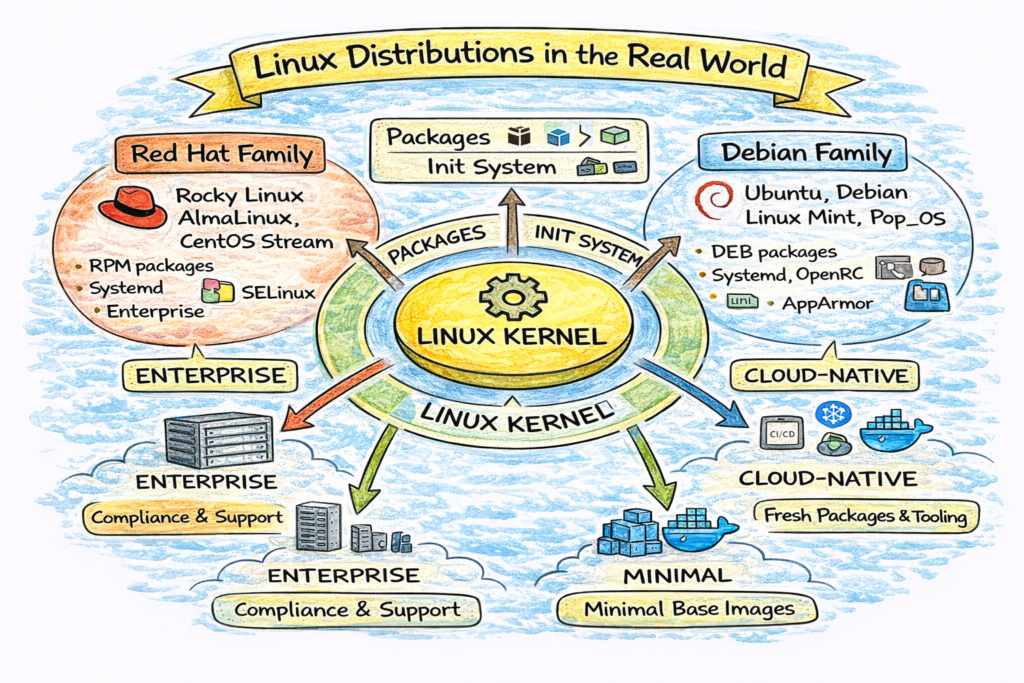
- RHEL/CentOS used in enterprises for stability + compliance
- Ubuntu used in cloud-native stacks for fresh packages + tooling
- Alpine in containers for minimal attack surface
- Debian in security-conscious orgs for predictability
- Amazon Linux in AWS because of deep IAM + kernel integration
If you treat all distros as “just Linux”, you’ll run into outages, dependency hell, and security issues.
2️⃣ Core Concepts (Explained Simply)
✔ Definition
A Linux distribution (“distro”) is:
Linux Kernel + Userland Tools + Package System + Policies + Defaults
Think of it like a car:
- Engine = kernel
- Body & interior = userspace tools
- Fuel type = package system
- Safety rules = security policies
- Maintenance schedule = support lifecycle
✔ What Distros Provide Beyond Kernel
| Component | What It Does |
|---|---|
| Kernel | Manages hardware & syscalls |
| Init System | Boot & service lifecycle mgmt |
| Package Manager | Software installation & updates |
| Userland | Shell, commands, utilities |
| Security Layer | SELinux/AppArmor, PAM, auditd |
| Networking Stack | DHCP, resolvers, firewalls, net-tools |
| Defaults & Policies | Service configs, filesystem, patches |
| Support Lifecycle | Updates, security, compliance, SLA |
✔ Major Families of Distros
Linux distros are family-based:
🟥 Red Hat Family
- RHEL
- CentOS Stream
- Rocky Linux
- AlmaLinux
- Fedora
Uses:
- RPM packaging
yum/dnfpackage managers- SELinux enabled by default
Target: Enterprise + Server
🟦 Debian Family
- Debian
- Ubuntu
- Linux Mint
- Pop!_OS
Uses:
.debpackagesaptpackage manager- AppArmor commonly used
Target: Cloud + Desktop + Ubuntu-based servers
🟩 Minimal / Security / Embedded
- Alpine Linux (musl + busybox)
- BusyBox
- OpenWRT
- Yocto
Used in:
- Containers
- Routers
- IoT
- Appliances
Target: Minimal footprint + Security
Example: Alpine base image is ~5MB vs Ubuntu ~70MB.
✔ Package System Differences Matter
| Family | Package Format | Manager |
|---|---|---|
| Debian | .deb | apt |
| RedHat | .rpm | yum / dnf |
| Alpine | .apk | apk |
This affects automation tools like:
- Ansible
- Chef
- Puppet
- Salt
- Terraform provisioning
- Packer builds
Because playbooks must handle package differences.
✔ Init Systems Matter
Two major ones seen today:
| Init | Used By |
|---|---|
| systemd | Ubuntu, Debian, RHEL, Fedora, Amazon Linux |
| OpenRC | Alpine, Gentoo |
| SysVinit | Legacy systems |
Example difference:
# systemd:
systemctl restart nginx

# Alpine OpenRC:
rc-service nginx restart
CI runners, embedded devices, and containers often use non-systemd init environments.
3️⃣ Commands (With Real Output Examples)
Check Distro Info
$ cat /etc/os-release
NAME="Ubuntu"
VERSION="24.04 LTS (Noble Numbat)"
Check Package System
$ dpkg -l | heador
$ rpm -qa | heador
$ apk info | headCheck Init System
$ ps -p 1 -o comm=
systemd
Check Kernel Version
$ uname -r
6.5.0-14-generic
These four answers:
- Which distro?
- Which packaging ecosystem?
- Which init system?
- Which kernel version?
4️⃣ Real DevOps / SRE Scenarios
Scenario A: Kubernetes Worker Nodes
Many CNI plugins (Calico, Cilium, Weave) require specific kernels or modules.
Example error:
BPF not supported on kernel < 4.19So distro selection impacts:
- eBPF compatibility
- IPVS load balancing
- Cgroup v2 support
Ubuntu > Debian > Amazon Linux often used for K8s nodes.
Scenario B: Alpine in Containers
Developers often ask:
“Why does my Python app break only in Alpine?”
Because Alpine uses musl libc, not glibc:
- Many binary wheels assume glibc
- Some syscalls behave differently
Fix: use python:3.10-slim instead of python:3.10-alpine.
Scenario C: Enterprise Compliance
Banks use RHEL/CentOS because:
- SELinux
- Audit logs
- Vendor support
- Stability over speed
Startups use Ubuntu for:
- Faster packages
- Cloud-first ecosystem
- Easier tooling
5️⃣ Common Mistakes Engineers Make
❌ Treating all distros the same
❌ Using Alpine for everything without understanding musl
❌ Deploying Kubernetes on ancient kernels
❌ Assuming systemd exists in containers
❌ Ignoring SELinux until it breaks workloads
❌ Using EOL distros to save time/money
All of these lead to outages.
6️⃣ Intermediate & Advanced Notes (For Mid-Level Engineers)
Distros differ in:
- Kernel patchsets (Ubuntu has low-latency kernels)
- Filesystem defaults (btrfs, xfs, ext4)
- Security policy (SELinux vs AppArmor)
- Cgroups v1 vs v2 adoption
- eBPF + LSM hooks
- Support lifecycle (5–10 years)
Example:
RHEL uses XFS as default for Kubernetes workloads → better parallel IO.
7️⃣ Practical Takeaways (Checklist)
✔ Understand what makes a distro unique
✔ Know the major distro families
✔ Can identify packaging ecosystems
✔ Know why Alpine is tricky for binaries
✔ Understand why enterprises use RHEL
✔ Know how to inspect distro system details
✔ Understand impact on DevOps/SRE tooling