
Lesson 1: What Linux Actually Is (and Isn’t)
1️⃣ Why This Topic Matters (Production Context)
Most engineers start using Linux via SSH, Docker, or WSL — without understanding what Linux actually is.
This leads to confusion like:
- “Is Ubuntu Linux?”
- “Is Docker Linux?”
- “Is the kernel the same as the OS?”
- “Why do containers even require Linux?”
In production environments (AWS, GCP, Azure, Kubernetes, On-Prem), Linux exists in many forms:
- Kubernetes worker nodes
- Docker container base images
- CI/CD runners
- Bastion hosts
- EC2 VM images
- Embedded devices
- Network appliances
If you do not understand what Linux really is, you will struggle when debugging:
- System instability
- Kernel panics
- Missing dependencies in containers
- Syscalls blocked by security profiles
- Inconsistent behavior across distros
So before learning commands or shell tricks, we must answer:
What is Linux—exactly?
2️⃣ Core Concepts (Explained Simply)
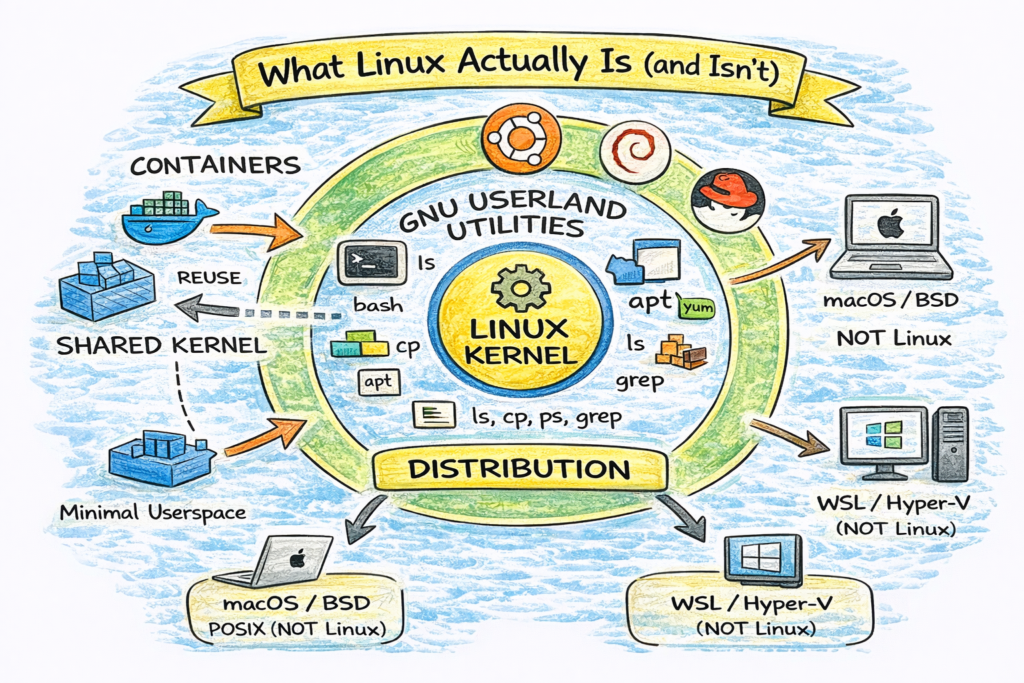
✔ Linux Is Not an Operating System
Linux = Kernel
The Linux kernel is the low-level software that:
- Manages CPU, memory, disk, network
- Schedules processes
- Handles system calls
- Enforces permissions
- Talks to hardware drivers
It does not include:
- Shell (bash, zsh)
- Package manager (apt, yum)
- Desktop UI (GNOME, KDE)
- Core utilities (cp, ls, cat)
✔ GNU/Linux = Operating System
When people say “Linux”, they usually mean:
Linux kernel + GNU user space + utilities
For example, Ubuntu = Linux kernel + GNU + apt + systemd + extras.
✔ Distribution = Packaging
A distribution (Ubuntu, Debian, RHEL) includes:
| Component | Purpose |
|---|---|
| Kernel | Core engine |
| Init system | Boot + services |
| Userland tools | ls, cp, ps, grep |
| Package manager | apt, yum, dnf |
| Config defaults | networking, storage |
| Security policies | SELinux/AppArmor |
| Optional GUI | GNOME, KDE |
So distributions differ in:
- System behavior
- Package availability
- Security defaults
- Filesystem structure
- Long-term support
✔ Containers Use Linux Too
Containers are not VMs; they are processes running on a Linux kernel.
Running:
docker run ubuntu ls /You’re not running “Ubuntu kernel”, you’re running:
- Ubuntu userspace
- On the host Linux kernel
Which is why containers can’t run Linux kernel modules on their own.
✔ So What About Mac & Windows?
| Platform | Relationship to Linux |
|---|---|
| Mac | POSIX compliant UNIX, not Linux |
| Windows WSL | Linux userspace + Microsoft kernel API |
| Windows Server | Can run containers via LCOW / Hyper-V |
| Kubernetes | Requires Linux nodes (Windows is limited) |
So Linux influences everything even when not running directly.
3️⃣ Commands (With Real Output Examples)
These commands help verify what Linux actually is:
Check Kernel
$ uname -r
6.5.0-14-generic
Check Distro
$ cat /etc/os-release
NAME="Ubuntu"
VERSION="24.04 LTS"
Check Init System
$ ps 1
PID TTY  STAT   TIME COMMAND
1   ?    Ss     0:03 /sbin/init
Check System Architecture
$ uname -m
x86_64
Each of these answers a different question.
4️⃣ Real DevOps / SRE Scenarios
Scenario A: Kubernetes Node Debugging
SRE sees OOMKills on nodes:
kubectl describe pod | grep -i oomEngineer checks host kernel behavior:
cat /proc/sys/vm/overcommit_memory
dmesg | grep -i oom
They are debugging kernel memory policy, not application code.
Scenario B: Container Missing Commands
New engineer asks:
“Why doesn’t my Nginx container have ping installed?”
Because containers include only minimal userspace, not full OS.
Fix:
apt update && apt install iputils-pingScenario C: SSH Login Shell Troubles
Bash works differently between:
- interactive login shell
- non-interactive scripts
- container commands
Understanding the OS layers prevents CLI confusion.
5️⃣ Common Mistakes Engineers Make
❌ “Ubuntu is Linux, Arch is Linux — all same.”
→ Kernel is same, userspace differs greatly.
❌ “Docker containers run their own OS.”
→ They share kernel with the host.
❌ “Linux = commands.”
→ Commands come from GNU coreutils, not kernel.
❌ “Installing packages means modifying Linux.”
→ You modify userspace, not kernel.
6️⃣ Intermediate & Advanced Notes
For mid-level engineers:
- Linux kernel = monolithic kernel
- Uses system calls (syscalls) as API
- Kernel exposes
/procand/sysvirtual filesystems - Security layers include:
- SELinux
- AppArmor
- Seccomp
- cgroups
- namespaces
Containers use:
- namespaces → isolation
- cgroups → resource control
- seccomp → syscall filtering
- overlayfs → layered filesystem
This is why containers require Linux host.
7️⃣ Practical Takeaways (Checklist)
By now you should:
✔ Understand Linux is a kernel, not a whole OS
✔ Understand why distros differ
✔ Know what userland utilities are
✔ Know what containers reuse from host OS
✔ Know which commands reveal system info
✔ See Linux in production context (K8s, CI, VMs, Docker)